Level 4 · Reliability & scale
A customer got charged twice. How?
A customer got charged twice. How?
Before you start This lesson uses a few words from earlier lessons:
- Race condition: a bug where the result depends on which of two requests finishes first. (Your app forgot everyone’s messages overnight. Why?)
- Constraint: a rule that the database enforces itself, such as a foreign key. (You changed your name. Half the app still shows the old one)
- ORM: a package, such as Prisma, that lets your code use the database without writing SQL (the database language) by hand. (How one line of text can dump your whole database)
- Idempotency key: a unique label for one operation, so a service can recognize a repeat. (The payment timed out. Did it go through?)
Two charges, 40 milliseconds apart
You sell online courses. Logged-in customers have a saved card, so they buy with one tap: Buy now, $49.
A customer sends you a screenshot of her bank app. It shows two charges of $49, in the same minute. You open your database. There are two orders for her cart, made 40 milliseconds apart.
But you thought of this. Your code checks if the cart is already paid before it charges. You tested it: tap Buy, tap again, and the second tap says “already paid”.
That same week, two more strange things happen:
- A live workshop had one seat left. Two people bought it.
- A user had 10 credits in your app and spent 20.
Nobody attacked your app. Her phone was slow, she tapped twice, and both taps arrived almost together. Your code expects each request to run alone. On a real server, many requests run at the same time, and they can interfere with each other. This lesson shows the tools that databases give you to stop it.
The mental model: the gap between “check” and “act”
Here’s what your two requests did, step by step:
| Time | Request A (first tap) | Request B (second tap) |
|---|---|---|
| 0 ms | Reads the cart: not paid | |
| 40 ms | Reads the cart: not paid | |
| 50 ms | Charges the card, waits for the bank | |
| 90 ms | Charges the card, waits for the bank | |
| 1,200 ms | Marks the cart as paid | |
| 1,300 ms | Marks the cart as paid |
Request B checked at 40 ms, when the cart really was unpaid. Both checks were true when they ran. Both requests charged.
The name for this pattern is check-then-act: read something, decide, then change it. The time between the check and the change is the race window. Here it was more than a second long, because it contained a call to the payment service.
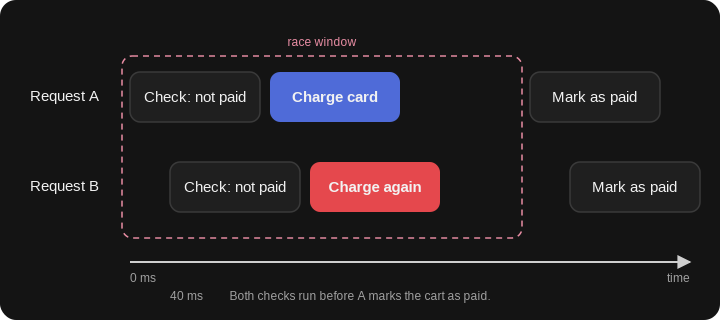
Think of two people who share a flat. Each one opens the fridge, sees no milk, and goes out to buy some. Now there are two bottles. Each one checked correctly. The problem is that checking and buying weren’t one step.
Where the comparison stops working: the two people could leave a note on the fridge. Your app needs a rule that the database enforces. Two requests can’t see each other’s notes until the database saves them. The rest of this lesson is about those tools.
Why you never saw it in testing
When you test, your second tap starts after the first request has finished. There’s no overlap, so there’s no race. Slow connections, double taps, automatic retries by the browser and two open tabs all make overlaps. You never make them yourself.
When an app grows, a rare bug happens every day. Say something goes wrong once in every 10,000 checkouts. An app with 100 checkouts a day sees it about every three months. An app with 10,000 checkouts a day sees it every day.
How it goes wrong
Bug 1: Check-then-act around a slow call
Here’s the checkout code that the AI wrote:
app.post("/api/checkout", requireLogin, async (req, res) => {
  const cart = await db.cart.findFirst({ where: { id: req.body.cartId, userId: req.user.id } });
  if (cart.status === "paid") return res.json({ ok: true });
  await chargeCard(cart); // about one second
  await db.cart.update({ where: { id: cart.id }, data: { status: "paid" } });
  res.json({ ok: true });
});
In plain English:
- Line 2: find this user’s cart.
- Line 3: if it’s already paid, stop.
- Line 4: charge the saved card. This waits for the payment service.
- Line 5: mark the cart as paid.
The check on line 3 and the update on line 5 are a second apart. Any request that arrives in that second passes the check.
Bug 2: Read, change in JavaScript, write back
Here’s the credits feature:
const user = await db.user.findUnique({ where: { id: userId } });
if (user.credits < price) throw new Error("Not enough credits");
await db.user.update({ where: { id: userId }, data: { credits: user.credits - price } });
In plain English: read the user’s credits. If there aren’t enough, stop. If there are, calculate the new balance in JavaScript and save it.
Say two requests spend 10 credits, and the balance is 10. Both read 10, both pass the check, and both write 0. The user bought two things for the price of one. The second write silently overwrote the first request’s change. The name for this is a lost update. The workshop’s “one seat left” sold twice in the same way.
Bug 3: Half-finished work
The purchase really has two steps: take the credits, then make the order.
await db.user.update({ where: { id: userId }, data: { credits: { decrement: price } } });
await db.order.create({ data: { userId, courseId, price } }); // what if this fails?
The second line can fail because of a bug, a crash or a lost connection. Then the first change is already saved. The user lost 10 credits and has no course.
What good looks like
Tool 1: Transactions, for all-or-nothing
A transaction is a group of database changes that succeed or fail together. In SQL, it starts with BEGIN. It ends with COMMIT (save everything) or ROLLBACK (undo everything). With Prisma:
await prisma.$transaction(async (tx) => {
  const user = await tx.user.update({ where: { id: userId }, data: { credits: { decrement: price } } });
  if (user.credits < 0) throw new Error("Not enough credits");
  await tx.order.create({ data: { userId, courseId, price } });
});
In plain English:
- Line 1: start a transaction. Every step inside uses
tx, so it belongs to this transaction. - Line 2: take the credits.
decrementasks the database to subtract. JavaScript doesn’t do the calculation. - Lines 3–4: the balance can go below zero, or the order step can fail. In both cases, Prisma rolls back the whole transaction, as if nothing happened.
This fixes Bug 3. It fixes Bug 2 too. When two of these run at the same time, the second update waits until the first transaction finishes. Then it subtracts from the new balance, goes below zero, and rolls back. Prisma’s own transaction docs use this pattern for a money transfer.
Databases describe what transactions promise with four letters, ACID:
| Letter | Name | In plain words |
|---|---|---|
| A | Atomicity | All the steps happen, or none do. No half-finished purchases. |
| C | Consistency | When a transaction finishes, your data follows every rule the database enforces, such as constraints. If it would break one, it’s rolled back. |
| I | Isolation | Other requests don’t see your changes until you commit. |
| D | Durability | Once committed, the change survives a crash or power cut. |
Isolation is the difficult one. A setting called the isolation level controls how strictly the database keeps transactions apart. PostgreSQL’s default level is Read Committed. With it, a transaction around Bug 2’s original code still loses updates. Both requests can still read 10 before either one writes.
Go deeper: Two transactions, one wrong answer (Level 4) explains isolation levels and what each one prevents.
Tool 2: Let the database check and change in one step
The simplest fix for a race is to remove the gap. Put the check inside the change:
UPDATE users SET credits = credits - 10
WHERE id = 42 AND credits >= 10;
In plain English: take 10 credits from user 42, but only if they have at least 10.
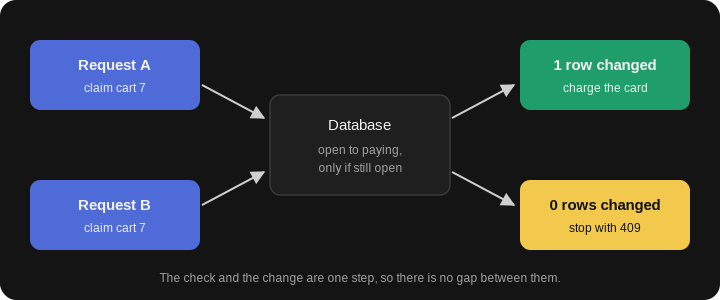
Say two of these arrive together. PostgreSQL makes the second one wait for the first. Then it checks the condition again on the new balance. The first reports UPDATE 1 (one row changed). The second finds 0 credits and reports UPDATE 0, so your code knows that it failed.
In Prisma, updateMany does the same thing and returns the number of rows it changed. Here it fixes Bug 1, because only one request can claim the cart:
const claimed = await db.cart.updateMany({
  where: { id: cartId, userId: req.user.id, status: "open" },
  data: { status: "paying" },
});
if (claimed.count === 0) return res.status(409).json({ error: "Already being paid" });
// only one request ever gets here for this cart
In plain English: change the cart from open to paying, but only if it’s still open. The second request finds no open cart, and it stops before it charges. 409 is the status code for “conflict”.
Tool 3: Row locks, when you must read first
Sometimes the decision is too complex for one UPDATE. You must read a row, run some checks in your code, and then write. For that, lock the row while you decide:
await prisma.$transaction(async (tx) => {
  const [w] = await tx.$queryRaw`SELECT * FROM "Workshop" WHERE id = ${id} FOR UPDATE`;
  if (w.seatsLeft < 1) throw new Error("Sold out");
  // ... other checks
  await tx.workshop.update({ where: { id }, data: { seatsLeft: { decrement: 1 } } });
});
In plain English: inside a transaction, read the workshop with FOR UPDATE. That puts a row lock on it. Until this transaction ends, other transactions that try to lock, change or delete this row must wait. Normal reads aren’t blocked. The second buyer waits, then reads seatsLeft: 0 and gets “Sold out”.
Prisma’s normal query methods don’t offer FOR UPDATE. So this code uses a raw query (SQL that you write yourself). It uses the safe backtick form, which sends values separately from the SQL.
Locks have a cost:
- Waiting. Buyers of the same workshop now go one at a time. Some rows get thousands of requests every second, such as one counter for the whole app. For those rows, the line of waiting requests gets long.
- Keep transactions short. A lock lasts until the transaction ends. Prisma’s docs warn that long transactions hurt performance and can cause deadlocks. They tell you to avoid network requests and slow queries inside them. By default, Prisma also cancels an interactive transaction (one that runs your code between steps) after 5 seconds.
- Deadlocks. Two transactions can each hold a lock that the other one needs. Then they wait for each other forever. The name for this is a deadlock. PostgreSQL finds it and cancels one of them.
Go deeper: Two tasks waiting for each other forever (Level 4) covers deadlocks and how to avoid them.
Tool 4: Constraints, the safety net
Your code can have bugs. But nothing can skip the database’s own rules. Add two kinds wherever money is involved:
- A unique constraint: “no two rows can have the same value in this column”. Put
UNIQUE (cart_id)onorders. Then the database refuses a second order for the same cart, however it got there. - A check constraint: “this condition must always be true”. Put
CHECK (credits >= 0)onusers. Then no bug can ever leave a negative balance.
When a unique constraint stops a duplicate, PostgreSQL returns an error like this. Prisma reports it as error P2002, “Unique constraint failed”:
duplicate key value violates unique constraint "orders_cart_id_key"This is the error that you want. Catch it, and return the order that already exists.
You may already use this pattern: “look up this idempotency key, and if it’s not there, make the order”. That’s check-then-act too. Two requests with the same key can both find nothing. Add a unique constraint on the key. Then the second insert fails, and the database doesn’t save a duplicate.
Tool 5: Idempotency keys for the part outside your database
A transaction only covers your database. The call to the payment service is outside it. If the transaction rolls back after the charge, the charge stays. So:
- Keep network calls out of transactions. Claim the cart (Tool 2), commit, then charge.
- Give the charge an idempotency key for this cart, such as
cart-${cart.id}. A retry or a race can send the same charge twice. Stripe recognizes the key and doesn’t charge again. - Save the result after the charge. Your server can crash between the charge and the save. Then the cart stays
paying. The payment service’s webhook (a message it sends to your server) tells you what really happened.
You can disable the Buy button after the first tap. This helps users, but it’s not a fix. A second tab or a script can still send two requests.
Go deeper: The order was saved, but the email never went out (Level 5) covers how to keep your database and other services in agreement.
Test your own app
You need an app of your own for this part. No app yet? Start with Your first app in an afternoon, with an AI doing the typing. Built it in an AI app builder? Ask its AI to do each step below for you, or to add the missing part first (for example, a login).
Do not test this on real customers. Use staging (the copy of your app for testing), with your payment service in test mode.
- Send the same request many times at once. Open your app as a test user. Open developer tools and go to the Console tab. Run this code (change it to match your checkout request):
const send = () => fetch("/api/checkout", { method: "POST", headers: { "Content-Type": "application/json" }, body: JSON.stringify({ cartId: 7 }) });
const results = await Promise.all(Array.from({ length: 10 }, send));
console.log(results.map((r) => r.status));
In plain English: make 10 identical checkout requests, start them all at the same moment, and print the status code of each one. The code runs on your app’s own page. So the browser sends your test user’s login cookie with each request.
- Count the results. The test dashboard must show one order and one payment. The other nine must get an error like
409, or the same order back. - Do this again for every “limited” action: spending credits, the last item in stock, using a coupon, claiming a username.
Takeaways
Key terms
- Check-then-act: reading something, deciding, then changing it in a separate step
- Race window: the gap between the check and the change
- Lost update: two requests read the same value, and one write silently overwrites the other
- Transaction: a group of database changes that succeed or fail together
- ACID: atomicity, consistency, isolation, durability: what transactions promise
- Row lock (
SELECT ... FOR UPDATE): makes other transactions wait before they change a row that you work on - Unique and check constraints: database rules that block duplicates and impossible values, whatever your code does
Red flags in AI-written code
findUniqueorfindFirst, then anif, thenupdateorcreateon the same row, with no transaction or constraint- A new value calculated in JavaScript (
user.credits - price) and written back - Several related writes (credits, order, stock) with no transaction
- A payment or email call inside a database transaction
- A balance, stock or seat count column with no
CHECKconstraint
Ask your AI
- “Find every place where my app reads a value, checks it, and then writes. Could two requests at the same moment both pass the check?”
- “Rewrite this purchase so taking the credits and creating the order happen in one transaction, and the balance can never go below zero.”
- “Which tables in my app should have unique or check constraints to stop duplicates and negative balances? Write the migration.”
Going deeper (optional, for readers who want more detail)
Optimistic concurrency. Locks are “pessimistic”: they expect a conflict and make others wait. The “optimistic” method adds a version number to each row. You read the row and its version. When you write, you add WHERE version = <the one you read> and increase the version. If someone else changed the row in between, your update changes 0 rows. Then you try again or tell the user.
Prisma’s transaction docs show this pattern for booking seats. It works well when conflicts are rare.
What the second UPDATE sees. PostgreSQL’s default level is Read Committed. At this level, an UPDATE can find that another transaction changes the same row. Then it waits. If that transaction commits, the UPDATE checks its WHERE condition again on the new version of the row. That’s why Tool 2 works without a lock that you add yourself.
Stricter isolation. The SERIALIZABLE isolation level makes the database act as if transactions ran one at a time. When it can’t guarantee that, it cancels one transaction with an error, and your code must try it again. It’s safer, but you must write the retry.
Requests at the same time with the same idempotency key. Stripe’s docs cover a request that conflicts with another request with the same key that still runs. Stripe doesn’t save the result, and you can retry the request. So the key protects you from double charges, even when both requests arrive together.
Every statement is a transaction. PostgreSQL treats a single statement without BEGIN as its own small transaction. That’s why one UPDATE with a condition is safe on its own, but two separate statements are not.
References (9)
- Transactions (tutorial) and Glossary: PostgreSQL documentation. Transactions as all-or-nothing, BEGIN, COMMIT and ROLLBACK, single statements running in their own transaction, and the definitions of ACID.
- Transaction Isolation: PostgreSQL documentation. Read Committed is the default, and how a waiting UPDATE re-checks its WHERE condition on the new row.
- Explicit Locking: PostgreSQL documentation. What
SELECT ... FOR UPDATEblocks, that plain reads aren’t blocked, and automatic deadlock detection. - Constraints: PostgreSQL documentation. Unique and check constraints.
- ERROR 23505: Duplicate key value violates unique constraint: Bytebase. The wording of PostgreSQL’s duplicate key error, with example constraint names in the
<table>_<column>_keyform. - Error reference (Prisma ORM v7): Prisma documentation. Error
P2002, “Unique constraint failed”. - Transactions and batch queries: Prisma documentation. Interactive transactions, the money transfer example, rollback on error, the 5-second default timeout, keeping transactions short, and optimistic concurrency.
- Idempotent requests: Stripe API reference. Idempotency keys and requests that conflict with a concurrent request using the same key.