Level 2 · Builder
You changed your name. Half the app still shows the old one
You changed your name. Half the app still shows the old one
Before you start
- Database: a program made to store data safely and find it quickly. (Your app forgot everyone’s messages overnight. Why?)
- Table, row and column: a table holds one kind of thing, like messages. Each row is one item. Each column is one detail about every item. (Your app forgot everyone’s messages overnight. Why?)
- SQL: a language many databases understand, with commands like
SELECT(find rows) andINSERT(add a row). (Your app forgot everyone’s messages overnight. Why?)
The name that wouldn’t change
You built a recipe-sharing app with AI. People sign up, post recipes and comment on each other’s posts. Everything works well.
One day, a user called sam_cooks changes their display name to Sam Rivera. Their profile page shows the new name. But every recipe they ever posted still says “by sam_cooks”. Their comments say “sam_cooks” too.
You ask the AI to fix it. It writes code that updates the name in the posts. Now the posts say “Sam Rivera”, but the comments still say “sam_cooks”. You fix the comments. A week later, you see the old name in the “top cooks” list on the homepage.
Then a different user deletes their account. Their comments are still there, under a name that leads nowhere. When someone clicks it, the page crashes.
Nothing here is a typing mistake. The code does what it was told. The problem is the shape of the data: how your tables were designed. This lesson shows you how to design them so these bugs can’t happen.
The mental model: store each fact once
Here is the AI’s first version of the posts table:
| id | author_name | title |
|---|---|---|
| 1 | sam_cooks | Five-minute pancakes |
| 2 | mia_bakes | Lemon cake |
| 3 | sam_cooks | Tomato soup |
Look at author_name. The users table stores the fact “user 7’s name is sam_cooks”. The app also copies that fact into every post, every comment and the “top cooks” list. That’s four places with the same fact.
When a fact is in four places, every change has to reach all four. If you miss one, your data gets out of sync: two places that should agree now disagree. Nobody gets an error. The app quietly shows wrong information.
Here’s the rule that prevents it:
Store each fact in exactly one place. Everywhere else, point to it.
Think about the contacts app on your phone. Your group chats don’t store a copy of your friend’s name. They store which contact sent each message. Rename the contact once, and every chat shows the new name.
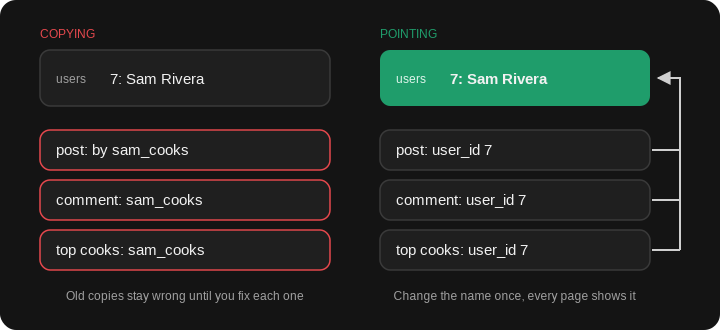
Where this comparison stops working: your phone does this for you. In your app, a database only points instead of copying if you design the tables that way. You decide which tables you need, what goes in each one, and how they point to each other. This work is called data modeling.
Primary keys: a label that never changes
To point at something, it needs a label that never changes and is never shared.
In a table, that label is the primary key: a column whose value is different in every row, and is never empty. In most apps, it’s a column called id that the database fills in itself: 1, 2, 3, and so on.
Why not use something people already know, like an email address or a username? Because those change. Sam changed their name. People change email addresses. If other tables point at a value that changes, every pointer breaks. An id number means nothing to anyone, so there’s never a reason to change it.
Foreign keys: pointing instead of copying
Now each post can point to its author with the author’s id. A column that holds another table’s primary key is called a foreign key. “Foreign” here only means “from another table”.
Here is how you’d create the users table in SQL:
CREATE TABLE users (
  id bigint GENERATED ALWAYS AS IDENTITY PRIMARY KEY,
  display_name text NOT NULL
);
In plain English: make a users table. Its id is a whole number (bigint). The database creates it by itself for each new row (GENERATED ALWAYS AS IDENTITY). The id is the primary key. Each user also has a display_name, which can’t be empty (NOT NULL).
Now the posts table, which points to it:
CREATE TABLE posts (
  id bigint GENERATED ALWAYS AS IDENTITY PRIMARY KEY,
  user_id bigint NOT NULL REFERENCES users (id),
  title text NOT NULL
);
In plain English:
- Lines 1, 2 and 4: make a
poststable with atitleand its ownid, made the same way as inusers. - Line 3 is the important one.
REFERENCES users (id)turnsuser_idinto a foreign key. The database now promises that every post’suser_idmatches a real user’sid.
A constraint is a rule that the database enforces, and a foreign key is one kind. So the database keeps this promise. If your code tries to save a post for user 999, and there’s no user 999, the database refuses. If your code tries to delete a user who still has posts, the database refuses that too, with an error like this:
update or delete on table "users" violates foreign key constraint "posts_user_id_fkey" on table "posts"The error looks frightening, but it’s good news. It means “other rows still point to this user, so I won’t delete it.” The database stopped bad data from getting in.
Getting the name back
The posts table no longer has the author’s name. So how does the page show “by Sam Rivera”? You ask the database to combine the two tables:
SELECT posts.title, users.display_name
FROM posts
JOIN users ON users.id = posts.user_id;
In plain English: for each post, find the user whose id matches the post’s user_id. Give me the post’s title with that user’s name. A request like this to a database is called a query. A query that combines tables is called a join.
Now when Sam changes their name, you change one row in users. Every post, comment and list shows the new name, because they all look it up from the same place.
Three shapes of relationship
Every connection between two tables has one of three shapes. Ask yourself two questions: “Can one A have many B?” and “Can one B have many A?”
One-to-one
One user has one settings record. This is rare. Often you can put those columns in the users table instead.
One-to-many
One user writes many posts, but each post has one author. One post has many comments, but each comment belongs to one post.
The foreign key always goes on the “many” side. Each post stores its one user_id. Each comment stores its one post_id, plus a user_id for the person who wrote it:
| id | post_id | user_id | body |
|---|---|---|---|
| 1 | 1 | 2 | These pancakes are great! |
| 2 | 1 | 7 | Thanks! |
| 3 | 2 | 7 | Can I use oranges instead? |
Many-to-many
Likes are an example. One user can like many posts, and many users can like one post. Neither side can hold a single foreign key, because there are many on both sides.
The answer is a table in the middle, with one row for each like:
CREATE TABLE likes (
  user_id bigint NOT NULL REFERENCES users (id),
  post_id bigint NOT NULL REFERENCES posts (id),
  PRIMARY KEY (user_id, post_id)
);
In plain English: each row in likes says “this user liked this post”. Both columns are foreign keys, so the database checks that the user and the post exist. The last line makes the pair the primary key. Each pair must be unique, so the same user can’t like the same post twice.
Tags work the same way. You need a tags table, and a post_tags table in the middle that connects posts to tags.
How it goes wrong
Look for these patterns in tables that an AI designed for you.
Bug 1: Copied data
Look for columns like author_name, author_email or author_avatar in a posts or comments table. Each is a copy of something in the users table. Over time, each copy will become different from the original. This is the bug from the start of the lesson.
Bug 2: A list stored in one column
posts.tags      = "vegan,quick,dinner"
posts.liked_by  = "[2, 7, 15]"
The AI stores many values in one column. It uses text with commas, or a JSON list (a list in the JSON text format). It works in a demo. Then these problems start:
- The database can’t check that user 15 exists. It also can’t stop the same ID from appearing twice.
- To find “all posts Sam liked”, the app must read every post and search inside the text.
- To remove one like, the app must read the list, edit it and write it back.
- Two people who like a post at the same moment can overwrite each other. This is the race condition you saw with JSON files: the result depends on which request finishes first.
A list in a column almost always means a missing table.
Bug 3: IDs without foreign keys
The comments table has a post_id column, but nobody added REFERENCES posts (id). It looks the same in the table view. But the database doesn’t know it points anywhere.
Delete a post, and its comments stay behind. They point to a post that no longer exists. Rows like these are called orphans. The page that lists “my latest comments” tries to show each post’s title. It finds nothing, and it crashes.
Bug 4: Stored counts
This is a like_count column in posts, and your code adds 1 to it on every like. It’s another copy: the real count is the number of rows in likes. A request can fail halfway. A new “unlike” feature can forget to subtract 1. Then the number is wrong forever. Count the rows instead:
SELECT count(*) FROM likes WHERE post_id = 1;Sometimes a copy is a deliberate choice, to make a slow page fast. That’s fine when you also plan how to keep the copy correct. An accidental copy is the problem.
Go deeper: Fast, but showing yesterday’s data (Level 4) covers deliberate copies and how to keep them correct.
What good looks like
Here is the full design for the recipe app:
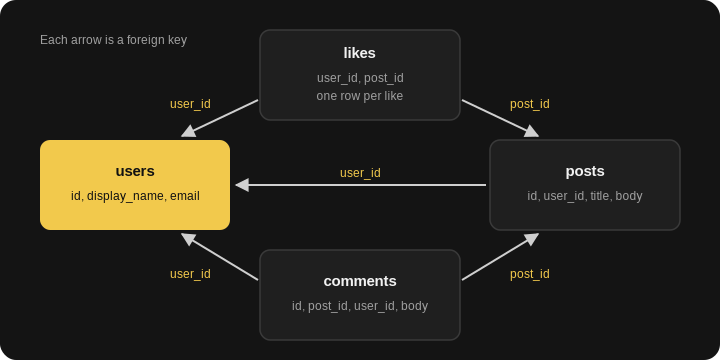
Every fact is in one place. Names are only in users. Every arrow is a real foreign key, and the database checks it.
Decide what happens on delete
When you delete a post, what should happen to its comments and likes? You decide, and the database does it every time. You add the choice to the foreign key:
ON DELETE CASCADE: delete them too. This is good for comments and likes on a deleted post.- Leave it out: the database refuses to delete the post while anything still points to it. This is a safe default when you’re not sure.
For example, look at this column in the comments table: post_id bigint NOT NULL REFERENCES posts (id) ON DELETE CASCADE. It means “when a post is deleted, delete its comments too.”
Be careful with CASCADE on users. If you delete one user, you could delete their posts, every comment on those posts and every like on them. Sometimes that’s right. Decide on purpose.
The same ideas in every tool
You may never type CREATE TABLE yourself. You might use Supabase’s table editor, or a code library such as Prisma or Drizzle. The words are the same everywhere: primary key, foreign key, relation (another word for relationship). Ask your AI to show you where you set each one.
Plan before you build
Before you ask the AI to build a feature that stores data, write the tables down in plain words, like the diagram above. For each table, ask: what is one row? What does it point to? You can change a design later, once real users have data in it. But it is much harder.
Go deeper: You renamed one column and the live app crashed (Level 2) shows how to change tables safely once they hold real data.
Test your own app
You need an app of your own for this part. No app yet? Start with Your first app in an afternoon, with an AI doing the typing. Built it in an AI app builder? Ask its AI to do each step below for you, or to add the missing part first (for example, a login).
- Look at your tables. A schema is the description of all your tables and how they connect. Open your database’s table view (for example, the Table Editor in Supabase). Or ask your AI: “Print my database schema: every table, column, primary key and foreign key.”
- Find the copies. Look for any column with a name, email or picture that is also in another table.
- Find the lists. Look for columns with commas or square brackets, like
"a,b,c"or[1, 2, 3]. - Check every
_idcolumn. Each one should be a real foreign key, not only a number. - Do the rename test. Change your display name. Then visit every page that shows it: posts, comments, lists. Every one should show the new name.
- Do the delete test. With test data, delete a post that has comments. Then open any page that lists comments. It should still work.
Takeaways
Key terms
- Data modeling: deciding which tables you need, what goes in each one, and how they connect
- Primary key: a column that is unique for every row and never changes, usually
id - Foreign key: a column that holds another table’s primary key, checked by the database
- One-to-many: one user, many posts. The foreign key goes on the “many” side.
- Many-to-many: many users like many posts. It needs a table in the middle.
- Join: a query that combines rows from two tables
- Out of sync: two copies of the same fact that now disagree
Red flags in AI-designed tables
author_name,user_emailor similar copied into other tables- A column with a list:
"vegan,quick",[2, 7, 15] - A column that ends in
_idwith no foreign key behind it - A stored count (
like_count,comment_count) with no plan to keep it correct - An email or username used as the primary key
Ask your AI
- “List every column in my database that copies data from another table. How would I store it once instead?”
- “Which columns in my database end in _id but aren’t foreign keys?”
- “Draw my tables and the relationships between them. Mark each one as one-to-many or many-to-many.”
- “For each foreign key, what happens when the row it points to is deleted?”
Going deeper (optional, for readers who want more detail)
Normalization. The rule “store each fact once” has a formal name: normalization. Database textbooks describe it as a series of levels called normal forms (first, second, third and more). The practical version is the one in this lesson. Put no lists in a column and copy no facts. Every column describes the thing the row is about. The opposite, a copy made on purpose for speed, is called denormalization.
ON DELETE options. PostgreSQL offers several. NO ACTION is the default if you write nothing: the delete fails if rows still point to it. RESTRICT is similar, but the database checks it immediately. CASCADE deletes the rows that point to it. SET NULL keeps them but empties their foreign key. That only works if the column allows empty values.
PostgreSQL doesn’t index foreign keys automatically. A foreign key doesn’t create an index on the column that points (like posts.user_id). The PostgreSQL docs recommend that you add one. The reason: to delete a user, or to find all of a user’s posts, the database has to search that column. Fast with 100 users, frozen at 10,000. The missing index explains indexes.
Number IDs or UUIDs. GENERATED ALWAYS AS IDENTITY gives 1, 2, 3. Many apps use UUIDs instead: long random IDs like 3f8a1c9e-72b4-4d1a-9c3e-5b6f8a2d1e7c. You can create them outside the database, but they’re longer and harder to read. Either works as a primary key. Neither one replaces correct permission checks, as Change one number in the URL, see everyone’s invoices explains.
Soft deletes. Some apps never really delete rows. They set a deleted_at date instead and hide those rows. This makes undo possible, but every query must remember to skip deleted rows.
Loading related rows. When a page shows 20 posts with their authors, use one join, not one extra query per post. One page, 500 database queries covers this common slowdown.
Not every database uses tables. Document databases such as MongoDB store nested records instead, and they handle copies differently. SQL or NoSQL? The AI chose for you. Was it right? compares them.
References (6)
- 5.5. Constraints: PostgreSQL docs. Primary keys, foreign keys, the many-to-many table in the middle, the
ON DELETEoptions and their default, and the advice to index foreign key columns yourself. - 5.3. Identity Columns: PostgreSQL docs. How
GENERATED ALWAYS AS IDENTITYcreates anidfor each new row. - 2.6. Joins Between Tables: PostgreSQL docs. How a join combines rows from two tables in one query.
- ri_triggers.c: PostgreSQL source code. The exact wording of the “violates foreign key constraint” error.
- 8.12. UUID Type: PostgreSQL docs. What UUIDs are, and that they can be created outside the database.
- Relational data modeling: Prisma docs. The same ideas in a code library: relations, foreign keys, and one-to-one, one-to-many and many-to-many.