Level 3 · Shipping
The payment timed out. Did it go through?
The payment timed out. Did it go through?
Before you start This lesson uses a few words from earlier lessons:
- Status code: the number in a server’s answer, such as 200 (worked), 429 (too many requests) or 503 (not available for a short time). (The app said “Saved!”. The note was never saved)
- Idempotent: if you do it twice, the effect is the same as if you do it once. A lift button is an example. (The app said “Saved!”. The note was never saved)
- Webhook: a message that a service like Stripe sends to your server when something happens, such as a successful payment. (Free stuff with one fake “payment succeeded” message)
- Background job: work that your app does outside the user’s request, often with automatic retries. (Sign-up takes 10 seconds because of one email)
Two charges for one pair of shoes
A customer clicks Pay $49 in your shop. Your server sends the payment to your payment service and waits.
And waits. The payment service is slow for a moment. After 30 seconds, your code stops waiting and shows: “Payment failed. Please try again.”
The customer clicks Pay again. This time, the payment works in two seconds. The customer sees “Thank you for your order!”
The next day, the customer sends you an email with a screenshot of their bank app. It shows two charges of $49.
What happened? The first payment did not fail. It went through. Only the answer was slow. Your code stopped waiting, guessed the worst result, and asked the customer to pay again.
This lesson is about the most confusing moment in any app that talks to another service. You asked, and you got no answer. Did it work?
The mental model: the phone call that cuts off
Imagine that you phone a pizza shop. You give your order and your address. Right after you say “That’s all”, the line goes silent. The call dropped.
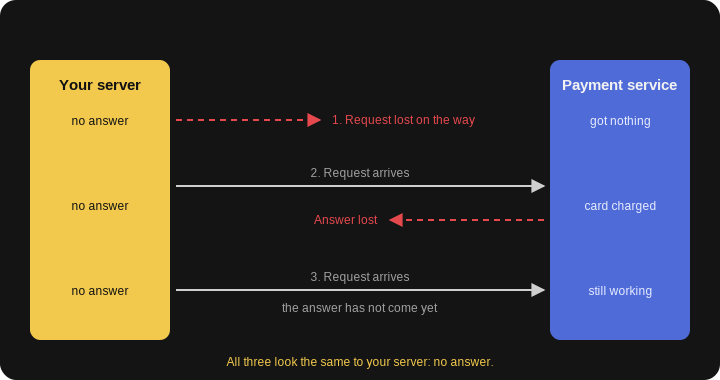
Did the shop get your order? There are three possibilities:
- The order never arrived. The line dropped before they heard it.
- The order arrived, and they are making it. Only their answer (“Thank you, 30 minutes!”) got lost.
- They are still writing it down. The answer has not come yet.
From your side, all three sound exactly the same: silence. You can call again and order again. But in case 2, you then get two pizzas.
Requests between computers work in the same way. Your server sends a request to another service and waits. A timeout is the longest time that you agree to wait. When the time is up, you stop waiting.
Here is the key idea of this lesson:
A timeout tells you that you stopped waiting. It does not tell you what happened.
Where the comparison stops working: on the second call, a pizza shop can recognize your voice and tell you that they already have your order. A computer cannot do this, unless you give it a way to recognize the repeat. That way is an idempotency key. It is the big fix later in this lesson.
Why you need timeouts anyway
Timeouts cause this confusion. So why not wait forever?
Because each second of waiting has a cost. While your server waits, the user looks at a spinner. Your serverless function continues to run until the platform stops it, and you can pay for that time. If many requests wait at the same time, your app becomes slow for everyone.
Many tools wait for a surprisingly long time by default. The fetch function in Node.js can wait for minutes before it stops. The official OpenAI and Anthropic libraries for JavaScript wait 10 minutes per attempt by default. Then they retry a timed-out request two more times. That is sensible for long AI answers, but much too long for a payment button.
So set a timeout that fits the job. Then handle the uncertain result correctly.
Retries: trying again
When a request fails or times out, the natural next step is to send it again. This is a retry. Many failures are short: a small network problem, a service that restarts, or a service with too much work for a short time. A retry a moment later often works.
But a retry is safe only if one of these is true:
- The request is idempotent, like reading data (GET) or deleting one specific record. If you do it twice, nothing changes.
- You gave the request a way to show that it is a repeat. Idempotency keys do this.
How it goes wrong
Bug 1: No timeout at all
const res = await fetch("https://api.example.com/rates");This line waits as long as fetch allows: minutes. If that service stops answering, your function runs until the platform stops it. After a long wait, the user gets a 504 error. Meanwhile, users click again, and every click starts another request that waits.
Bug 2: Treating a timeout as a failure
try {
  await chargeCustomer(order);
} catch (err) {
  return res.status(500).json({ error: "Payment failed. Please try again." });
}
In plain English: if any problem happens during the charge, tell the user that the payment failed. This includes a timeout. Then the user pays again.
This is exactly the bug from the story. “I got no answer” became “it failed”. For reading data, that causes no harm. For anything that creates, sends or charges, it causes doubles.
Bug 3: The retry loop that never stops
while (true) {
  try {
    return await callAiModel(prompt);
  } catch {
    // try again immediately
  }
}
In plain English: call the AI model. If the call fails for any reason, call it again at once, forever.
Imagine that the AI service has too much work and returns errors. Your app immediately sends more requests, and so does every other app with this code. The service gets more requests exactly when it can handle fewer, so it stays down longer. Also, some errors never go away, like an invalid API key. With those errors, the loop never ends.
Bug 4: Retrying the wrong errors
Not every error is temporary. A 400 Bad Request means that your request is wrong. A 401 means that your key is wrong. A 404 means that the item does not exist. If you send the same request again, you get the same answer every time. Retries for these errors waste time and hide the real problem from your logs.
What good looks like
Fix 1: Always set a timeout
const res = await fetch("https://api.example.com/rates", {
  signal: AbortSignal.timeout(5000), // give up after 5 seconds
});
AbortSignal.timeout(5000) makes a signal that cancels the request after 5,000 milliseconds (5 seconds). Then fetch throws an error named TimeoutError. Your code can catch and handle this error.
Choose the number for the job. A quick lookup can get 5 seconds. A long AI answer can get 60 seconds. If possible, stream the AI answer (send it piece by piece), so the user sees progress. Most service libraries also have a timeout setting. Tell your AI to set it for every service that you call.
Fix 2: Retry the right errors, with longer waits
async function withRetries(fn, attempts = 3) {
  for (let i = 1; ; i++) {
    try { return await fn(); } catch (err) {
      if (!isTemporary(err) || i === attempts) throw err; // give up
      await sleep(2 ** i * 500 * (0.5 + Math.random())); // about 1s, 2s, 4s...
    }
  }
}
In plain English:
- Lines 2–3: try the call, up to 3 times. If it works, return the result.
- Line 4: if the error is not temporary, or this was the last attempt, stop and pass the error on.
isTemporaryis a small function. It returns true only for a timeout, “too many requests” (429), or a server error (500, 502, 503, 504). Permanent errors fail fast. - Line 5: if not, wait before the next try.
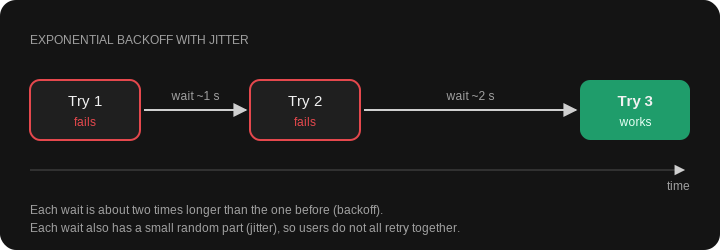
sleepis a small function that waits that many milliseconds. Each wait is about two times the previous wait.
These two ideas have names:
- Exponential backoff: wait longer after each failure (1 second, then 2, then 4). This gives a service with problems time to recover.
- Jitter: add a little randomness to each wait. Imagine that a thousand users all failed at the same moment. They must not all come back at the same moment. The random part spreads them out.
Some services tell you exactly how long to wait. They put the time in a Retry-After header on a 429 or 503 reply. If the header is there, use it.
Also, check the library before you add your own retries. The official OpenAI, Anthropic and Stripe libraries already retry some errors with backoff. Two layers of retries multiply. For example, 3 retries in your code around 3 retries in the library can give up to 16 attempts.
Go deeper: One slow service took your whole app down (Level 5) shows how to stop calls to a service that continues to fail.
Fix 3: Idempotency keys for anything that charges or creates
Now the real fix for the double charge. An idempotency key is a unique label that you attach to one operation. It tells the service: “If you saw this label before, this is a repeat, not a new request.”
Stripe’s documentation describes how it works:
- You send the key in a header named
Idempotency-Key. Stripe suggests a random value such as a UUID (a long random ID). You can also use a value from your own records, like the ID of a shopping cart. - Stripe saves the result of the first request with that key. Then it returns that same saved result to any retry with the same key. There is no second charge.
- Stripe keeps keys for at least 24 hours.
- If you use a key again with different details, Stripe returns an error. It does not guess.
With Stripe’s Node.js library, the key is one extra option:
const payment = await stripe.paymentIntents.create(
  { amount: 4900, currency: "usd", customer: order.stripeCustomerId },
  { idempotencyKey: `order-${order.id}-payment` }
);
In plain English:
- Line 2: the payment details: $49.00 (Stripe counts in cents), in US dollars, for this customer.
- Line 3: the idempotency key, made from the ID of your own order. Every attempt to pay for this order uses the same key.
Now run the story again. The first request times out. Your code retries with the same key. Stripe recognizes the key and returns the result of the first payment. There is one charge.
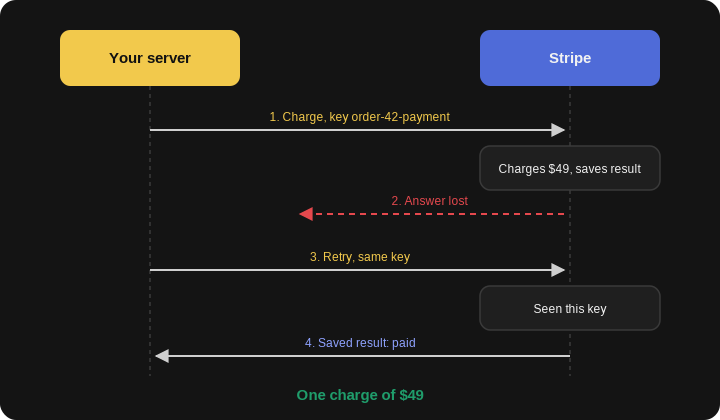
The most important rule: one key per operation, not per attempt. If you make a new random key on every retry, each retry looks like a new payment. Then the key protects nothing. Your app can retry later, from a background job or after a restart. In that case, save the key with the order, so that every attempt uses the same key.
Fix 4: When you don’t know, check and do not guess
Sometimes all the retries fail, and you still have no answer. Do not tell the user “failed”. Do not start a new payment with a new key. Do these things:
- Show an honest message: “We’re confirming your payment. This can take a minute.”
- Mark the order as
pending. - Find out what really happened. Stripe sends a webhook when the payment succeeds. You can also look up the payment through Stripe’s API. Then update the order.
Stripe gives the same advice. If you still do not know the result after the 24-hour period, stop the retries. Check what happened before you try again.
Fix 5: Protect your own API too
Your own users have the same problem with your server. They double-click. Or their phone loses signal, and the browser sends the form again. Your “Place order” route can also accept an idempotency key:
app.post("/api/orders", requireLogin, async (req, res) => {
  const key = req.headers["idempotency-key"];
  if (!key) return res.status(400).json({ error: "Missing Idempotency-Key" });
  const existing = await db.order.findUnique({ where: { userId_key: { userId: req.user.id, key } } });
  if (existing) return res.json(existing); // a repeat: return the first result
  const order = await db.order.create({ data: { userId: req.user.id, key, ...cleanOrderData(req.body) } });
  res.status(201).json(order);
});
In plain English:
- Lines 2–3: read the key from the request header. Refuse requests without a key.
- Lines 4–5: look for an order that this user already made with this key. If there is one, this request is a repeat, so send back the same order.
- Lines 6–7: if not, create the order and save the key with it.
The page makes the key once, when the checkout form opens, with crypto.randomUUID(). It sends the same key with every submit of that form. In your database, make the pair of user and key unique. Then the database refuses a second row with the same pair. So two copies that arrive at the same moment cannot both create an order.
You can also disable the button after the first click. This helps the user, but only the server check protects you.
Go deeper: A customer got charged twice. How? (Level 4) covers what happens when two copies of a request run at exactly the same time.
Test your own app
You need an app of your own for this part. No app yet? Start with Your first app in an afternoon, with an AI doing the typing. Built it in an AI app builder? Ask its AI to do each step below for you, or to add the missing part first (for example, a login).
Use the test mode of your payment service for all of these tests.
- Search for missing timeouts. Ask your AI: “List every call to an outside service in my code, and the timeout each one uses. Mark the ones that use the default.”
- Double-click the pay button. In test mode, click Pay two times quickly. Or submit the form and then press refresh. Then check the dashboard of the payment service. Is there one payment or two?
- Lose the network during a request. In Chrome, open developer tools and click the Network tab. Find the throttling menu, which changes the network speed (it usually says “No throttling”). Click Pay, then choose Offline immediately. Then switch back. What does your app tell the user? Does it tell them to pay again?
- Read your retry settings. For each service library that you use, find its default timeout and number of retries in its docs. Write them down.
Takeaways
Key terms
- Timeout: the longest time that you will wait for an answer. It tells you that you stopped waiting, not what happened.
- Retry: sending a failed request again
- Exponential backoff: waiting longer after each failed attempt
- Jitter: randomness added to the wait, so that clients do not all retry together
- Idempotency key: a unique label for one operation, so the receiver can recognize repeats
Red flags in AI-written code
fetchor a service library with no timeout set- A timeout or network error that the user sees as “Payment failed, try again”
- A retry loop with no maximum number of attempts or no wait between attempts
- Retries on
400,401,403or404errors - A payment, order or email request with no idempotency key
- A new random idempotency key made inside the retry loop
Ask your AI
- “Find every place where my app charges money, creates an order or sends a message. Does each one use an idempotency key that stays the same across retries?”
- “What does my checkout show the user if the payment request times out? Change it so a timeout is treated as ‘unknown’, not ‘failed’.”
- “Check my retry code: does it only retry temporary errors, use exponential backoff with jitter, and stop after a few attempts? Does the library underneath already retry?”
Going deeper (optional, for readers who want more detail)
Why retries can make outages worse. An outage is a time when a service is down. An AWS article by Marc Brooker calls retries “selfish”. Each retry asks the server for more of its capacity. When many layers of a system each retry, the numbers multiply. Imagine that your browser retries 3 times, your API retries 3 times, and your database library retries 3 times. During an outage, one click can then become dozens of database requests.
A common practice is to retry at one layer only, usually the layer closest to the failure.
Retry budgets. Some systems limit retries to a share of normal traffic, for example “retries can be at most 10% of requests”. When the service is healthy, almost no requests need a retry, so the app never uses the budget. When the service fails badly, the budget runs out. Then the app stops adding more requests.
Nested timeouts. Imagine that your page waits 10 seconds for your API, and your API waits 30 seconds for a payment service. The page stops waiting long before your server does. The server then finishes the payment for a user who already saw an error. Inner timeouts must be shorter than outer ones.
Stripe’s saved errors. After the work starts, Stripe saves the result of the first request with a key. This includes 500 server errors. A retry with the same key returns the same saved 500. Stripe treats a 500 as “result unknown”. Check what happened before you try again with a new key.
Some requests fail before the work starts, for example because of invalid parameters (wrong values in the request) or rate limiting. Stripe does not save those results, so you can retry them.
A standard header. Stripe uses the Idempotency-Key header. The IETF is the group that writes internet standards. An IETF draft (still a draft at the time of writing) describes this header as a general standard for HTTP APIs. Many payment and messaging APIs accept a header with this name. But read the docs of each service, because some use a different name or keep keys for a different time.
References (8)
- Idempotent requests: Stripe API reference. The
Idempotency-Keyheader, keys up to 255 characters, keys kept for at least 24 hours, saved results including500errors, and errors when parameters change. - Advanced error handling: Stripe documentation. Network errors with unknown outcomes, automatic retries in Stripe’s libraries, and checking what happened instead of retrying after 24 hours.
- AbortSignal: timeout() static method: MDN. Cancelling a request after a set time, and the
TimeoutErrorit produces. - Dispatcher: undici documentation (the library behind
fetchin Node.js). Default waits of 300 seconds for headers and body. - openai-node README: OpenAI. Two automatic retries by default and a 10-minute default timeout.
- TypeScript SDK: Anthropic documentation. Two automatic retries by default (timeouts included), which errors are retried, and the 10-minute default timeout.
- The Idempotency-Key HTTP Header Field: IETF Internet-Draft. The proposed general standard for the
Idempotency-Keyheader, still a draft. - Timeouts, retries, and backoff with jitter: Marc Brooker, AWS. Why retries are “selfish”, how retries multiply across layers, exponential backoff and jitter.