Level 4 · Reliability & scale
Two transactions, one wrong answer
- Isolation levels
- Dirty reads
- Non-repeatable reads
- Phantom reads
- Lost updates
- Write skew
- Serializable
- Serialization failures
Two transactions, one wrong answer
Before you start This lesson uses a few words from earlier lessons:
- Transaction: a group of database changes that succeed or fail together. It ends with
COMMIT(save) orROLLBACK(undo). (A customer got charged twice. How?)- Lost update: two requests read the same value, and one write silently overwrites the other. (A customer got charged twice. How?)
- Row lock (
SELECT ... FOR UPDATE): makes other transactions wait before they change a row that you work on. (A customer got charged twice. How?)- Retry with backoff: trying a failed operation again, and waiting a little longer each time, with some randomness. (The payment timed out. Did it go through?)
21 people in a class with 20 spots
You run a booking app for a yoga studio. Each class has 20 spots. You read about double charges, so you were careful: the booking code runs inside a transaction. It counts the bookings for the class. It adds a new one only if there are fewer than 20.
On Monday, the 6 pm class shows 21 bookings. Twenty-one people arrive with mats.
The logs show the last two bookings 15 milliseconds apart. Here’s what the database did:
| Time | Transaction A (Mia) | Transaction B (Leo) |
|---|---|---|
| 0 ms | Counts bookings: 19 | |
| 15 ms | Counts bookings: 19 | |
| 20 ms | 19 < 20, inserts Mia’s booking | |
| 25 ms | Commits | |
| 30 ms | 19 < 20, inserts Leo’s booking | |
| 35 ms | Commits |
Each transaction was correct on its own. Together, they gave a wrong answer.
The transaction did its job (all or nothing), but it did not keep the two apart. Leo’s count ran while Mia’s booking was still unsaved, so it saw 19. The I in ACID, isolation, controls how strictly the database keeps transactions apart. There are several levels to choose from, and your database chose one for you.
The mental model: as if there were a queue
The perfect result is easy to describe: the result is the same as if the transactions ran one at a time, in some order. If Mia went first and Leo second, Leo would count 20 and get the answer “full”. The name for one-after-another is serial execution.
Databases don’t really run transactions one at a time, because that’s far too slow. The isolation level decides how much of that overlap a transaction can notice. It also decides which strange results can happen.
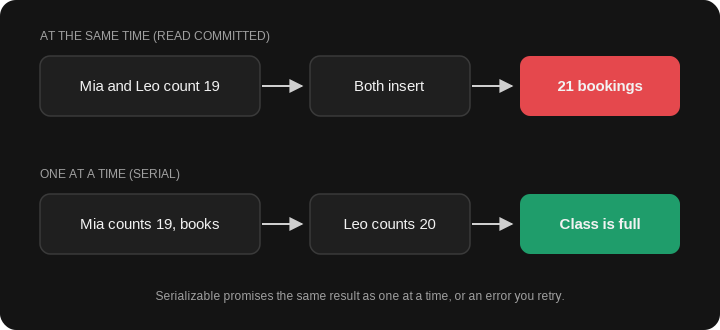
Think of a shared calendar on a kitchen wall. The strictest rule is “one person at the calendar at a time”: no double bookings, but people wait. A looser rule is “take a photo, plan from the photo, then write your booking”. It’s faster. But two people can plan from the same photo, and both take the last free slot.
Where the comparison stops working: databases have a third option. Everyone works at the same time, and the database watches for dangerous overlaps. If the result couldn’t happen in a queue, the database cancels one transaction. That transaction must start again.
Five ways overlapping transactions go wrong
The name for these problems is anomalies. Here they are in plain words:
| Anomaly | What happens | Example |
|---|---|---|
| Dirty read | You read another transaction’s change before it commits. It may be rolled back, so you saw something that never existed. | A balance shows $500 from a transfer that then fails |
| Non-repeatable read | You read the same row twice in one transaction and get different values, because someone committed a change in between. | A report reads a price twice and gets $80, then $60 |
| Phantom read | You run the same search twice and new rows have appeared (or disappeared). | Count bookings: 19. Count again: 20 |
| Lost update | Two transactions read a value, both change it, and one write overwrites the other. | Stock 5, two sales, stock ends at 4 |
| Write skew | Two transactions read the same data, each changes something different, and together they break a rule. | The 21-bookings class |
Write skew is the hardest to see. Mia and Leo never changed the same row. The rule they broke, “at most 20”, covers many rows, so no single row shows the conflict. Another classic example: two doctors are on call, and at least one must stay on call. At the same moment, each one checks “is someone else on call?”. Each one sees yes and stops being on call.
The standard levels
The SQL standard (the official description of SQL) defines four levels by the first three anomalies:
| Level | Dirty read | Non-repeatable read | Phantom read |
|---|---|---|---|
| Read Uncommitted | Allowed (never in PostgreSQL) | Possible | Possible |
| Read Committed | No | Possible | Possible |
| Repeatable Read | No | No | Allowed (never in PostgreSQL) |
| Serializable | No | No | No |
Notice two things. First, PostgreSQL never allows dirty reads. If you ask for Read Uncommitted, it gives you Read Committed. Second, Serializable means more than “no phantoms”. It promises the queue result, so it stops every anomaly, including write skew.
What PostgreSQL really does
PostgreSQL’s isolation uses snapshots. A snapshot is a frozen view of the database at one moment. It contains every change committed before that moment, and nothing after. The levels differ in when the database takes the snapshot and what it checks.
Read Committed: the default
Read Committed is PostgreSQL’s default. Each statement gets a new snapshot when it starts. So in one transaction, two statements can see different data, if someone committed in between. That’s why non-repeatable and phantom reads can happen.
In the yoga story, Leo’s count got a snapshot at 15 ms. Mia hadn’t committed yet, so her booking wasn’t in it. (A single UPDATE with a condition is still safe here. It waits for the other change and checks again, as the double-charge lesson showed.)
Repeatable Read: one snapshot for the whole transaction
At Repeatable Read, the database takes one snapshot at the transaction’s first statement and keeps it until the end. Every read sees the same data, so non-repeatable and phantom reads can’t happen.
It also catches lost updates. Your transaction can try to update or delete a row that another transaction changed and committed after your snapshot. Then PostgreSQL cancels your transaction with:
ERROR: could not serialize access due to concurrent updateBut it doesn’t catch write skew. Mia and Leo still both count 19 from their snapshots and insert different rows. They didn’t both change the same row, so the database finds nothing.
Serializable: the queue result, or an error
Serializable works like Repeatable Read. It also watches which data each transaction read and wrote. A group of transactions can give a result that no one-at-a-time order would give. Then PostgreSQL cancels one of them:
ERROR: could not serialize access due to read/write dependencies among transactionsThe other one commits. In the yoga story, the database saves Mia’s booking and cancels Leo’s transaction. When Leo’s transaction runs again, it counts 20 and says “full”.
This tracking doesn’t make transactions wait. Instead, some transactions get cancelled, and the docs warn that some of these were fine.
Here’s the full picture for PostgreSQL:
| Level | Dirty | Non-repeatable | Phantom | Lost update | Write skew |
|---|---|---|---|---|---|
| Read Committed (default) | No | Possible | Possible | Possible* | Possible |
| Repeatable Read | No | No | No | Error, retry | Possible |
| Serializable | No | No | No | Error, retry | Error, retry |
* When your code reads a value, calculates in JavaScript and writes it back. A single UPDATE that does the calculation itself is safe.
How it goes wrong
Bug 1: “It’s in a transaction, so it’s safe”
The code below uses Prisma, an ORM (a package that talks to the database for you).
await prisma.$transaction(async (tx) => {
  const taken = await tx.booking.count({ where: { classId } });
  if (taken >= 20) throw new Error("Class is full");
  await tx.booking.create({ data: { classId, userId: req.user.id } });
});
In plain English: inside a transaction, count this class’s bookings. If there are 20, stop. If not, make a booking.
This is the yoga bug. It runs at Read Committed, because Prisma uses your database’s default level unless you set one. Two of these can still both count 19. It passes every test where you click one button at a time.
Bug 2: Serializable on, errors forgotten
You set the app to Serializable. The 21-bookings bug is gone. But when a popular class opens, some users get a 500 error page (the status code for a server error). Serialization errors are normal at this level. They mean “I cancelled this to keep your data correct, please run it again”. Code that doesn’t retry them turns correct data into failed requests.
Bug 3: Retrying the wrong thing
A side effect is an action outside your database, such as an email or a card charge.
- Retrying only the last statement. The insert used a count that is now out of date. The PostgreSQL docs say to retry the complete transaction, including the logic that decided what to write. That’s why PostgreSQL can’t retry for you: it can’t run your JavaScript again.
- Side effects inside the transaction. If it sends an email or charges a card, each retry does it again. A rollback only undoes changes in your database.
Bug 4: Serializable in one place only
Serializable checks for conflicts only between transactions that are also Serializable. Say the booking page uses it, but an admin “add attendee” route runs at Read Committed. Together, the two can still overbook the class.
What good looks like
Option 1: Lock the thing the rule is about
The rule is “at most 20 bookings per class”. So make every booking for a class go through the class’s own row:
await prisma.$transaction(async (tx) => {
  await tx.$queryRaw`SELECT id FROM "Class" WHERE id = ${classId} FOR UPDATE`;
  const taken = await tx.booking.count({ where: { classId } });
  if (taken >= 20) throw new Error("Class is full");
  await tx.booking.create({ data: { classId, userId: req.user.id } });
});
Only line 2 is new. It locks the class’s row, so Leo’s transaction waits there until Mia’s commits. Read Committed gives each statement a new snapshot. So Leo’s count on line 3 sees 20, and the app tells him the class is full.
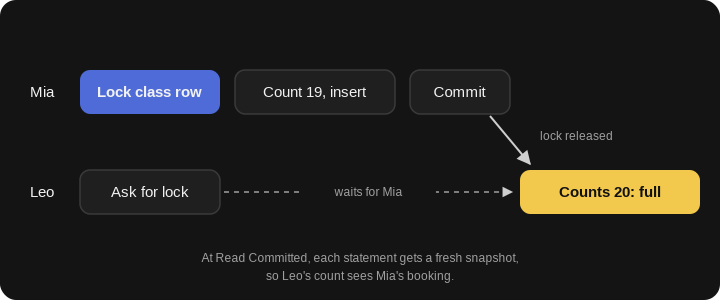
A lock on the booking rows doesn’t help, because the conflict is about a row that doesn’t exist yet. The lock on the parent row (the class) changes the problem. “A rule across many rows” becomes “one row that everyone waits for”.
Option 2: Serializable, with a retry loop
Sometimes the rule is too complex to point at one row. Then ask the database to find conflicts for you, and retry:
for (let attempt = 1; attempt <= 5; attempt++) {
  try {
    return await prisma.$transaction((tx) => bookSpot(tx, classId, userId), { isolationLevel: "Serializable" });
  } catch (err) {
    if (err.code !== "P2034" || attempt === 5) throw err;
    await new Promise((r) => setTimeout(r, Math.random() * 50 * attempt)); // short random wait, then run it all again
  }
}
In plain English:
- Lines 1–3: run the whole booking as a Serializable transaction. (
bookSpotholds the count and insert from Bug 1.) If it commits, return. - Line 5: Prisma reports write conflicts like this one, and deadlocks, with the code
P2034. Pass on any other error, or a fifth failure. In PostgreSQL itself, every error has a five-character code, its SQLSTATE. Serialization failures always have40001. - Line 6: wait a few random milliseconds, so the competing transactions don’t collide again. Then start again from the count.
Keep the email and the charge after the loop, when the booking is committed.
Option 3: Make it one statement or a constraint
Often the best fix needs no special level. Store a booked count on the class. Claim a spot with one UPDATE that has a condition (WHERE booked < capacity). Add a CHECK constraint too, as in the double-charge lesson.
Lock or Serializable?
SELECT ... FOR UPDATE |
Serializable + retry | |
|---|---|---|
| Best when | The rule belongs to one row you can name (a class, an account, a cart) | The rule spans many rows or tables, and it’s hard to say what to lock |
| When many requests want the same data | Transactions wait in line | Some fail and run again |
| Main risk | Forgetting the lock in one code path; deadlocks | Missing retry handling; retrying side effects |
| Other code | Must take the same lock | Must also run as Serializable |
What changes when the app grows
Both tools cost more when more transactions use the same data at the same time.
- Locks put requests in a line. Say each booking holds the class lock for 5 ms. If 100 people book at the same instant, the last one waits about half a second. That’s fine for one class, but not for one counter that every request uses.
- Serializable turns crowding on the same data into retries. Each retry is another full transaction. So many conflicts at once add load when the database is busiest. Limit the attempts and add random waits. The PostgreSQL docs also advise to declare a transaction
READ ONLYwhen it only reads. - Long transactions hurt both. The database holds locks longer, and there’s more time for conflicts. Never wait for a network call or a user inside a transaction.
Go deeper: Two tasks waiting for each other forever (Level 4) covers deadlocks, which both tools can cause.
Test your own app
You need an app of your own for this part. No app yet? Start with Your first app in an afternoon, with an AI doing the typing. Built it in an AI app builder? Ask its AI to do each step below for you, or to add the missing part first (for example, a login).
Do not test this on production (the live app). Use your staging (test) database.
- Check your level. In your SQL editor, run
SHOW default_transaction_isolation;. On a standard PostgreSQL setup, it saysread committed. - Make the overlap by hand. Open two terminal windows. Connect both to staging with
psql, PostgreSQL’s command-line tool. Run the lines below one at a time, and change between the windows:
BEGIN ISOLATION LEVEL READ COMMITTED;
SELECT count(*) FROM bookings WHERE class_id = 7;   -- run in A, then in B
INSERT INTO bookings (class_id, user_id) VALUES (7, 101);  -- A uses 101, B uses 102
COMMIT;  -- in A, then in B
Both commits succeed. Now do it again with SERIALIZABLE on the first line. One of the two windows gets could not serialize access.
- Send parallel requests. Run the 10-requests-at-once test from the double-charge lesson against your booking, stock or credits route. Then count the rows.
Takeaways
Key terms
- Isolation level: how much transactions that run at the same time can see of each other, and which anomalies can happen
- Snapshot: a frozen view of committed data at one moment
- Dirty / non-repeatable / phantom read: seeing uncommitted data / a changed row / new or missing rows in one transaction
- Write skew: two transactions read the same data, write different rows, and together break a rule
- Read Committed: PostgreSQL’s default; a new snapshot for each statement
- Repeatable Read: one snapshot per transaction; catches lost updates, not write skew
- Serializable: the result of running one at a time, or a serialization failure (SQLSTATE
40001) that you must retry
Red flags in AI-written code
- Count or check, then insert, inside a transaction, with no lock and no stricter level
- “It’s in a transaction” as the reason a race can’t happen
isolationLevel: Serializablewith no retry around it- A retry that repeats only the last query, or that repeats emails or charges
- Serializable in one route while other routes change the same data at Read Committed
Ask your AI
- “Find every transaction in my app that reads data, checks a rule, and then writes. Which isolation level does each run at, and could two of them at once break the rule?”
- “For this booking flow, compare SELECT … FOR UPDATE on the parent row with Serializable plus retries. Which fits better, and why?”
- “Where does my app handle serialization failures (SQLSTATE 40001 or Prisma P2034)? Retry the whole transaction, at most 5 times, with a short random wait, and no side effects inside.”
Going deeper (optional, for readers who want more detail)
Why the lock trick needs Read Committed. In Option 1, Leo’s count sees Mia’s booking because of Read Committed. It takes a new snapshot for each statement, after the lock wait. At Repeatable Read, the snapshot comes from the transaction’s first statement. That’s the locking SELECT itself, before the wait. So Leo’s count uses the old snapshot and still sees 19.
If you use locks with a stricter level, think carefully about when the database takes the snapshot.
How Serializable works in PostgreSQL. Its name is Serializable Snapshot Isolation (SSI). It records what each transaction read with predicate locks. Despite the name, these never make anyone wait, and they can’t cause deadlocks. They exist only to find dangerous patterns of reads and writes. The tracking is approximate, so some cancellations are false alarms.
Which errors to retry. The PostgreSQL docs say that you can always retry serialization failures (40001). Deadlocks (40P01) are often worth a retry too. Unique violations (23505) sometimes are, for example when two transactions chose the same new key. But they can also be a real, permanent error, so retry them carefully.
A retry doesn’t always succeed. When many transactions compete, it can take several attempts.
Read-only transactions. At Repeatable Read, transactions that only read never get serialization failures. At Serializable, you can declare a transaction SERIALIZABLE READ ONLY DEFERRABLE. It waits at the start until it can run with no risk of cancellation. This is useful for long reports.
Other databases are different. MySQL’s InnoDB engine (the part that stores the data) uses Repeatable Read by default, not Read Committed. Its Repeatable Read also works differently from PostgreSQL’s. The same level name doesn’t mean the same behavior everywhere. If your app moves to another database, test again the code paths that run at the same time.
Read Committed’s second check has limits. After a wait, the WHERE check looks only at the updated row. The PostgreSQL docs say this makes Read Committed wrong for commands with complex search conditions, but right for simple ones.
References (6)
- Transaction Isolation: PostgreSQL documentation. Anomaly definitions, the isolation level table, Read Committed as default, no dirty reads, snapshot timing, both error messages, SSI, READ ONLY advice.
- Serialization Failure Handling: PostgreSQL documentation. SQLSTATE 40001, 40P01 and 23505, retrying the complete transaction, no automatic retry, multiple retries.
- Explicit Locking: PostgreSQL documentation. What
SELECT ... FOR UPDATEblocks and its behavior at stricter levels. - Serializable Snapshot Isolation (SSI): PostgreSQL wiki. Write skew and how Serializable detects it where Repeatable Read doesn’t.
- Transactions and batch queries: Prisma documentation. The
isolationLeveloption, database default levels, and retrying P2034 errors. - Transaction Isolation Levels (InnoDB): MySQL documentation. Repeatable Read as InnoDB’s default.