Level 4 · Reliability & scale
Your app tried to load 50,000 rows at once
- Pagination
- LIMIT and OFFSET
- Cursor (keyset) pagination
- Stable sort and tiebreakers
- Total counts
- Page size limits
Your app tried to load 50,000 rows at once
Before you start This lesson uses a few words from earlier lessons:
- Query: a request to the database, written in SQL, such as “find this user’s orders”. (You changed your name. Half the app still shows the old one)
- Index: a sorted list of a column’s values that lets the database find rows without reading the whole table. (Fast with 100 users, frozen at 10,000. The missing index)
- Memory: fast, short-term storage that your server uses while it works. It has a fixed size. (Your app restarted and all the likes vanished)
- Parameterized query: a query with placeholders like
$1. The values go to the database separately. (How one line of text can dump your whole database)
The page that worked for a year
You built an online shop with AI. The admin area is the part of the app that only you and your staff can open. It has an Orders page: a table of every order, newest first. In your first month, it had 40 orders. It loaded instantly.
A year later, the shop does well. There are 50,000 orders. One morning you open the Orders page and wait. The page stays blank for 20 seconds. On your phone, the browser tab crashes.
Your hosting company runs your server code as a function: a small program that it starts for each request. Its dashboard says the function ran out of memory, and the platform restarted it. At the same moment, customers say that checkout was slow.
Nothing changed in your code. The code always said “get all the orders”. With 40 orders, “all” was small. With 50,000, “all” is a problem.
This lesson shows how to send data one page at a time, and how to keep every page fast.
The mental model: a bookmark, not a page number
Pagination means you show a long list in smaller pieces. Each piece is a page. The number of rows in it is the page size.
There are two ways to ask for “the next piece”:
- By position: “Skip the first 40,000 orders, then give me 20”. This is like counting 40,000 lines down a printed list before you read.
- By bookmark: “Give me the 20 orders right after this order”. This is like opening a book at a bookmark. You don’t count the pages before it.
The first way is offset pagination. The second is cursor pagination, also called keyset pagination. The bookmark is the cursor.
Both give the same first page. The difference appears on page 2,000. It also appears when new orders arrive while someone reads the list.
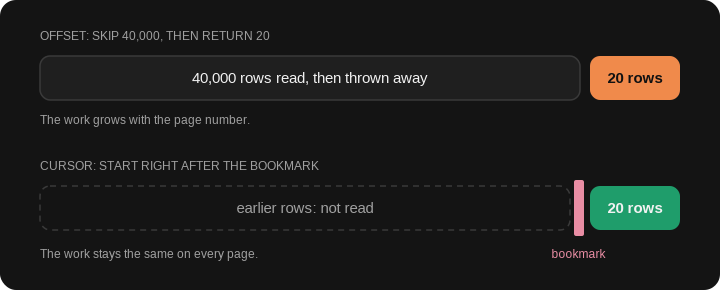
Where the comparison stops working: a database cursor points at a row, not at a page. For example, it points at “the order created at 10:42:07 with ID 51234”. If someone deletes that row, the cursor still works. The database looks for the rows that come after that point in the sort order.
Why “load everything” breaks
Here’s what happens when one request asks for all 50,000 orders. Your server sends data as JSON, a text format for data. Say each order in JSON is about 1 KB. That size is made up but realistic for an order with a customer name, an address and a few items.
| Step | What it costs |
|---|---|
| The database reads and sorts 50,000 rows | Database time, while other queries wait |
| Your server holds all of them in memory, then builds the JSON | About 50 MB of JSON, plus the objects it was built from |
| The response travels over the network | 50 MB is a big download, especially on a phone |
| The browser turns it into 50,000 table rows on the page | The page freezes while it builds them |
Each row adds to the cost of each step. So this bug is invisible at 40 orders, but it breaks the app at 50,000. Serverless functions (functions that the platform starts and stops for you) also have a fixed memory size. Some platforms also limit the size of a response. On Vercel, for example, a normal function response can be at most 4.5 MB. So a list that is big enough can’t work at all, however long you wait.
An endpoint is one web address of your API, such as /api/orders. The fix is a rule: a list endpoint never returns an unlimited number of rows.
How it goes wrong
Bug 1: No limit at all
app.get("/api/orders", requireAdmin, async (req, res) => {
  const result = await db.query("SELECT * FROM orders ORDER BY created_at DESC");
  res.json(result.rows);
});
In plain English: when an admin opens the Orders page, ask the database for every order, newest first. Then send all of them back. db.query sends SQL to the database. result.rows holds the rows that it returned.
AI writes this often, because it’s correct with test data. In Prisma (an ORM, a package that talks to the database for you), it’s prisma.order.findMany() with no take.
Bug 2: Offset pagination that gets slower every page
The usual first fix uses two SQL words:
LIMIT 20: return at most 20 rows.OFFSET 40: first skip 40 rows.
SELECT id, customer, total, created_at
FROM orders
ORDER BY created_at DESC, id DESC
LIMIT 20 OFFSET 40;  -- page 3
In plain English: sort the orders newest first, skip 40, and return the next 20. So page n uses OFFSET (n - 1) × 20.
Each response now has only 20 rows. But the docs of PostgreSQL, the database in these examples, give a warning. The rows that OFFSET skips “still have to be computed inside the server”.
The database can’t jump to row 40,001. It walks through the first 40,000 rows in sorted order and throws them away. (That’s with an index that matches the sort. Without one, it must first read and sort the whole table.)
| Page | Rows the database works through | Rows returned |
|---|---|---|
| 1 | 20 | 20 |
| 100 | 2,000 | 20 |
| 2,001 | 40,020 | 20 |
The cost grows with the page number. Users rarely click to page 2,001, but bots (programs that visit pages automatically) do. A background job does too: code that runs on its own, without a user who waits. If it walks the whole table page by page, each page reads again everything before it.
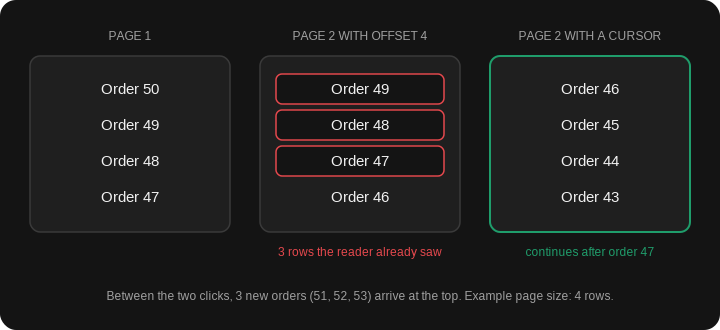
Offset has a second problem: drift. A reader is on page 1 when 3 new orders arrive. They click “Next”. Everything moved down 3 places, so page 2 starts with 3 rows they already saw. When someone deletes rows, the opposite happens: the reader misses some rows.
Bug 3: Sorting by a value that isn’t unique
Look at the ORDER BY created_at DESC, id DESC above. Many AI-written queries sort by created_at only. But two orders can have the same created_at. This happens especially when you import many orders at once.
When two rows have the same sort value, the database can return them in either order. The order can change between two queries. The PostgreSQL docs say this about different LIMIT and OFFSET values without an ORDER BY that gives a unique order: they “will give inconsistent results”. A row can appear on two pages, or on none.
The fix is a tiebreaker: a second sort column that is unique. This is almost always the primary key id, the column that is different for every row. A sort by created_at, id is a stable sort: the same rows always come back in the same order.
Bug 4: The browser chooses the page size
const limit = Number(req.query.limit); // ?limit=1000000 works tooThe page sends ?limit=20. But anyone can change the web address or call your API directly with ?limit=1000000. Now you have Bug 1 again. As with every input, the server decides what’s allowed.
What good looks like
Fix 1: Cursor (keyset) pagination
The idea: don’t “skip 40,000”. Remember the last row that the reader saw. Then ask for the rows that come after it in the sort order.
SELECT id, customer, total, created_at
FROM orders
WHERE (created_at, id) < ($1, $2)
ORDER BY created_at DESC, id DESC
LIMIT 21;
In plain English:
- Line 3:
$1and$2are thecreated_atandidof the last order on the previous page. Keep only the rows that come before it in time.(created_at, id) < ($1, $2)compares the pairs from left to right, like words in a dictionary. It comparescreated_atfirst, andidonly when thecreated_atvalues are equal. - Line 4: sort newest first, with
idas the tiebreaker. It must match line 3, column for column. - Line 5: ask for 21 rows, but show only 20. If 21 rows come back, you know there’s a next page. You show 20 and drop the extra one.
The first page is the same query without the WHERE line.
Fix 2: The index that makes it fast
Keyset pagination is fast only with an index that matches the sort:
CREATE INDEX orders_created_at_id_idx ON orders (created_at, id);With this index, the database jumps straight to the bookmark in the sorted list. Then it reads the next 21 entries. The PostgreSQL docs explain this case: an index matches the ORDER BY of a LIMIT n query. Then the database can read the first n rows “without scanning the remainder at all”. The database can also read the index backwards, so it works for DESC too.
Now page 2,001 costs about the same as page 1: about 21 rows of work, not 40,020. New orders at the top don’t move anything, because the bookmark is a row, not a position.
If the list has a filter, put the filter column first. For example, a user’s own orders, newest first, need an index on (user_id, created_at, id). On a big production table, make it with CREATE INDEX CONCURRENTLY, as you saw in the indexes lesson.
Fix 3: The route, with a maximum page size
A route is the code that answers one endpoint.
app.get("/api/orders", requireAdmin, async (req, res) => {
  const limit = Math.min(Math.max(Number(req.query.limit) || 20, 1), 100);
  const after = req.query.cursor ? decodeCursor(req.query.cursor) : null;
  const rows = await getOrdersPage(after, limit + 1); // runs the SQL above
  const page = rows.slice(0, limit);
  const nextCursor = rows.length > limit ? encodeCursor(page.at(-1)) : null;
  res.json({ orders: page, nextCursor });
});
In plain English:
- Line 2: read the page size from the request. If it’s missing or not a number, use 20. Never use less than 1 and never more than 100, whatever the request says.
- Line 3: if the browser sent a cursor, turn it back into a
created_atand anid. No cursor means “first page”. - Line 4: run the keyset query, and ask for one extra row.
- Lines 5–6: keep the first
limitrows. If the extra row came back, make a cursor from the last row on this page. If not, there’s no next page. - Line 7: send the page and the cursor. To get the next page, the page sends
?cursor=...back.
encodeCursor turns the last row’s created_at and id into one short piece of text. For example, it can use JSON encoded with base64. Base64 is a way to write any data as letters and digits that are safe in a web address.
The page sends the cursor back unchanged and never builds its own. The server checks the cursor like any other input. If it doesn’t decode to a valid date and ID, reply with 400 Bad Request, the status code for a wrong request. Users can sometimes choose a sort, such as “by total”. Then the cursor holds that sort’s values plus the id. Each sort that you offer needs its own index.
Fix 4: Think twice about total counts
“Page 1 of 2,500” looks friendly. But it needs a total, and a total has a cost. In PostgreSQL, COUNT(*) must look at every matching row.
Other changes can happen at the same moment. So the database checks row by row which rows this query can see. The PostgreSQL wiki says it “must walk through all rows” to do that. On 50 million rows, that’s slow, and it runs on every page load.
Options, from cheapest to most exact:
- No total. Show “Load more” while
nextCursorisn’t empty. - A count with a maximum. Count up to 1,001 rows. If you reach 1,001, show “1,000+”. The cost stays low however big the table gets.
- A cached count that you count again every few minutes. (A cache is a saved copy of a result that you reuse.) Or an estimate: PostgreSQL keeps an approximate row count for each table. That’s good for “about 2.3 million”.
Usually nobody needs the exact number.
Page numbers or “Load more”?
| Page numbers (offset) | “Load more” or infinite scroll (keyset) | |
|---|---|---|
| Good for | Small or medium tables, search results, admin tables where people jump around | Feeds, timelines, chat history, exports, anything large or growing |
| Cost of deep pages | Grows with the page number | Stays the same |
| Needs a total count | Usually | No |
| New rows while reading | Duplicates or gaps | Stable |
| Jump to page 37 or share a link to it | Yes | No |
Offset is fine when the table stays small. It’s also fine when you limit how deep users can go. For example, offer only the first 100 pages, then ask the user to narrow the search. This also stops bots that ask for page 99,999.
What changes when the app grows
- Background jobs and exports must walk a big table by keyset, in batches of a few hundred or thousand rows. A job that loads “all rows” runs out of memory, like a page does.
- Every list endpoint gets a default and a maximum page size. This includes admin endpoints, where this bug often hides. It also includes lists inside lists: an order with 10,000 line items needs its own limit.
Go deeper: One page, 500 database queries (Level 4) covers another way a list page gets slow: one extra query per row.
Test your own app
You need an app of your own for this part. No app yet? Start with Your first app in an afternoon, with an AI doing the typing. Built it in an AI app builder? Ask its AI to do each step below for you, or to add the missing part first (for example, a login).
- Try a huge limit. Use your staging app, the copy of your app for testing. Add
?limit=1000000(or the name your app uses) to a list request. You must get at most your maximum. - Time a deep page. If you use offset, fill a staging table with a million fake rows (the indexes lesson shows how). Then run
EXPLAIN ANALYZEon page 1 and on a page near the end. This command runs the query and shows the time for each step. Compare the times. - Check the sort. Look at every paginated query. Is the last
ORDER BYcolumn unique? If not, addid. - Look for drift. Open page 1 of a list. Make a new item in another tab, then click “Next”. Do you see a row again?
Takeaways
Key terms
- Pagination: returning a long list in pages, not all at once
- Page size: rows per page. The server sets a default and a maximum.
- Offset pagination: “skip N rows, return the next M”. Deep pages are slow and rows drift.
- Cursor (keyset) pagination: “return rows after this one”. The last row’s sort values are the bookmark.
- Tiebreaker: a unique column like
idthat you add to the sort, so the order is always the same - Total count: the number of matching rows. Exact counts on big tables cost a lot.
Red flags in AI-written code
SELECT * FROM tableorfindMany()with noLIMITortakeon a table that growslimit,takeorpageSizeread from the request with no maximumORDER BY created_atwith no unique tiebreakerOFFSETused to walk through a big table in a background job or export- A
COUNT(*)on a large table on every page load - Keyset pagination with no index that matches the
ORDER BY
Ask your AI
- “Find every list endpoint in my app. For each, what is the default page size, the maximum, and how is it enforced on the server?”
- “Convert this OFFSET pagination to keyset pagination with a stable sort and a unique tiebreaker. Show me the index it needs.”
- “Which of my pages show a total count? How expensive is each count on a table with 10 million rows?”
Going deeper (optional, for readers who want more detail)
Mixed sort directions. The row comparison (created_at, id) < ($1, $2) works only when all columns sort in the same direction. For ORDER BY total DESC, id ASC, write the full condition: total < $1 OR (total = $1 AND id > $2). Then make an index that matches, such as (total DESC, id ASC).
NULLs in sort columns. A sort column can be empty (NULL). Then comparisons with it give “unknown”, and rows with NULL can fall out of the pagination. Make sort columns NOT NULL, or handle NULLs in your query.
Timestamp precision. PostgreSQL timestamps keep microseconds. JavaScript’s Date keeps only milliseconds. Your database library can turn created_at into a Date, and you can build the cursor from that. Then the bookmark is a little wrong, and rows made in the same millisecond can be skipped. Put the exact value in the cursor (for example, also select created_at::text). Or paginate on a column without this problem.
Going backwards. For a “Previous” button with keyset pagination, reverse the comparison and the sort (> and ASC). Take the rows, then reverse their order before you show them.
Prisma’s options. In Prisma, skip and take are offset pagination. Prisma also has a cursor option. You usually use it with skip: 1, to leave out the cursor row itself. Prisma’s docs say that offset costs more as the offset grows. They suggest cursor pagination for large or growing data.
Why the database can’t jump to row 40,001. A B-tree index (the usual kind of index) is sorted by value. It doesn’t number its entries by position. It can find “the entry for this created_at and id” in a few steps. But it can’t know which entry is number 40,001 without counting.
References (8)
- LIMIT and OFFSET: PostgreSQL documentation. Skipped OFFSET rows are still computed; ORDER BY needed for consistent pages.
- Indexes and ORDER BY: PostgreSQL documentation. An index matching ORDER BY returns the first n rows of a LIMIT without scanning the rest; backward scans for DESC.
- Row and Array Comparisons: PostgreSQL documentation. Row comparisons like
(a, b) < (c, d)compare left to right. - Slow Counting: PostgreSQL wiki. Why COUNT(*) has to look at every row; estimates as an alternative.
- Date/Time Types: PostgreSQL documentation. Timestamps have 1 microsecond resolution.
- Paging Through Results: Markus Winand, Use The Index, Luke. The keyset (“seek”) method, deterministic sort with a unique tiebreaker, and PostgreSQL’s index support for row values.
- Vercel Functions Limits: Vercel documentation. The 4.5 MB response body limit and function memory limits.
- Pagination: Prisma documentation. Offset vs cursor pagination in Prisma.