Level 4 · Reliability & scale
Two tasks waiting for each other forever
Two tasks waiting for each other forever
Before you start This lesson uses a few words from earlier lessons:
- Transaction: a group of database changes that succeed or fail together. (A customer got charged twice. How?)
- Race condition: a bug where the result depends on which of two requests finishes first. (A customer got charged twice. How?)
- The await gap: while one request waits at an
await, other requests run and can change shared data. (How one server handles thousands of users at once)- Instance: one running copy of your app; platforms often run several, each with its own memory. (How one server handles thousands of users at once)
Two friends, one frozen app
You built an app where friends split bills. Each user has a wallet with a balance, and users can send each other money.
You learned about race conditions, so you protected each wallet: only one request can change a wallet at a time. A transfer takes the sender’s wallet first, then the receiver’s wallet. It moves the money and then lets both wallets go. You tested it many times. It worked every time.
One evening, after dinner, Maya sends Leo $20. At the same second, Leo sends Maya $5.
Both requests start. Neither one finishes. Both phones show a loading spinner. A minute later, Maya tries to pay someone else, and that request stops too. Every request that touches Maya’s or Leo’s wallet stops, until you restart the server.
Nothing crashed. The logs show no error. Two tasks wait for each other, and they will wait forever.
This is a deadlock. This lesson explains the locks that cause it, how your database handles it, and the simple rule that prevents it.
Mental model: keys and parking spaces
A lock and a mutex: one key
Some code must never run twice at the same time for the same data. For example: read a balance, add to it, save it. If two requests do this at the same time, one update is lost. The part of the code that must run alone is called a critical section.
A lock protects a critical section. The most common kind is a mutex, short for mutual exclusion. Think of a café with one bathroom key on a big wooden block. You take the key, use the room and bring the key back. Anyone else who needs the room waits at the counter until you return the key.
Node.js runs your JavaScript on one main thread (one line of work that does one thing at a time). You still need locks, because of the await gap. A popular library (ready-made code you install) for this is async-mutex:
const walletLock = new Mutex(); // from the async-mutex library

async function addFunds(walletId, amount) {
  return walletLock.runExclusive(async () => {
    const balance = await getBalance(walletId);
    await saveBalance(walletId, balance + amount);
  });
}
runExclusive waits until the mutex is free, takes it and runs your function. At the end, it releases the mutex, even if your function throws an error. While one call is inside, every other call waits its turn. The read and the save of two calls can no longer mix.
Where the comparison stops working: the café key is a real object that everyone can see. This mutex lives in the memory of one process (one running program). A second instance of your app has its own walletLock and never waits for yours. In-memory locks protect you inside one process only. Across instances, the lock must live in a shared place, usually the database.
A semaphore: at most N at once
Sometimes “one at a time” is too strict. You want “at most 5 at a time”. For this, you use a semaphore: a counter of free slots.
Think of a parking lot with 5 spaces. A car goes in if a space is free. If not, it waits at the gate. When a car leaves, the next car goes in.
A real use: your app calls a paid AI API. Your AI provider limits how many requests you can send, and each call costs money. Imagine that 1,000 users press “Summarize” at the same time. Then 1,000 calls start. The provider may reject many of them with 429 Too Many Requests, and the rest arrive as one big bill.
const aiSlots = new Semaphore(5); // async-mutex: at most 5 AI calls at once

app.post("/api/summarize", async (req, res) => {
  const summary = await aiSlots.runExclusive(() => callAiApi(req.body.text));
  res.json({ summary });
});
Every call goes through the semaphore. Five calls run. The others wait in a queue (a waiting line) in memory until a slot is free.
Now the trade-off, in numbers. Each AI call takes 10 seconds, and you allow 5 at once. So you finish 0.5 calls per second, which is 30 per minute. The 100th person in line waits about 200 seconds. A semaphore protects your money and your provider limit, but it changes a burst of requests into a queue. For big bursts, move the work into a background job and tell the user that the result will come later.
Go deeper: Sign-up takes 10 seconds because of one email (Level 3) covers queues and limits on how many jobs run at once.
A deadlock: a circle of waiting
A deadlock happens when two or more tasks each hold something that the others need. Each task waits for the others to let go. None of them can move, ever.
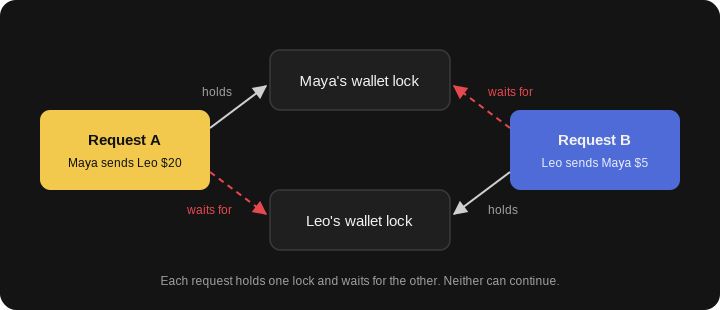
Computer scientists describe four conditions that must all be true for a deadlock. People often call them the Coffman conditions, after a 1971 paper:
| Condition | In plain words | Wallet example |
|---|---|---|
| Mutual exclusion | Only one task can hold a lock at a time | One request per wallet |
| Hold and wait | A task keeps one lock while it waits for another | Holds Maya’s wallet, waits for Leo’s |
| No preemption | Nobody can take a lock away; the holder must release it | Your code never takes a lock away from another task |
| Circular wait | The waiting forms a circle | Maya→Leo waits for Leo→Maya, which waits for Maya→Leo |
The useful part: if you break any one of the four conditions, a deadlock is impossible. Each fix later in this lesson breaks one condition.
How it goes wrong
Deadlock 1: Locks taken in opposite order
Here is the transfer from the story:
async function transfer(fromId, toId, amount) {
  const releaseFrom = await locks[fromId].acquire(); // one Mutex per wallet
  const releaseTo = await locks[toId].acquire();
  try {
    // ...move the money
  } finally { releaseTo(); releaseFrom(); }
}
acquire() waits for the mutex and returns a function that releases it. The code takes the sender’s lock, then the receiver’s lock, and does the work. It releases both locks in finally, so it releases them even after an error. It looks careful. Now look at two calls at the same time:
| Time | Maya sends Leo $20 | Leo sends Maya $5 |
|---|---|---|
| 1 | Locks Maya | Locks Leo |
| 2 | Waits for Leo… | Waits for Maya… |
| 3 | …forever | …forever |
All four conditions are true. The finally block does not help, because neither function ever gets to it. The code never releases the locks. So every later request that needs Maya’s or Leo’s wallet waits in line behind them. In memory, nothing detects this. The requests wait until the browser or your platform stops them with a timeout (a time limit for a wait).
Deadlock 2: The same thing, inside the database
You move the logic into a PostgreSQL (Postgres) transaction, which is a good idea. When a transaction runs UPDATE on a row, Postgres locks that row until the transaction ends. A second transaction that wants to update the same row must wait.
So two transfers in opposite order make the same circle:
BEGIN; UPDATE wallets SET balance = balance - 20 WHERE id = 1; -- A locks Maya (1)
BEGIN; UPDATE wallets SET balance = balance - 5 WHERE id = 2;  -- B locks Leo (2)
UPDATE wallets SET balance = balance + 20 WHERE id = 2;        -- A waits for B
UPDATE wallets SET balance = balance + 5 WHERE id = 1;         -- B waits for A
Transaction A (Maya sends Leo $20) and transaction B (Leo sends Maya $5) run on two different connections to the database. Each line runs in the order shown. After line 2, A holds Maya’s row and B holds Leo’s row. Lines 3 and 4 each wait for a row that the other transaction holds.
The difference: Postgres detects deadlocks. A transaction can wait for a lock for a set time (the deadlock_timeout setting, 1 second by default). After that time, Postgres checks for a circle. If it finds one, it aborts one of the transactions, and the other one finishes. The aborted transaction gets an error like this:
ERROR:  deadlock detected
DETAIL:  Process 9788 waits for ShareLock on transaction 1035; blocked by process 91.
Its error code is 40P01. The Postgres docs say that the choice of aborted transaction is “difficult to predict and should not be relied upon”. So, in your app, one of the two transfers fails at random, about a second later. Your code probably does not handle this error. If it happens a few times a day, nobody can explain it.
Other ways locks hurt
- Holding a lock during a slow call. Your code locks a row and calls an AI API that takes 20 seconds. Then it commits (saves the transaction). The row stays locked the whole time. Every request that needs the row waits, and collisions become more likely.
- The forgotten release. Code calls
acquire()but has nofinally. An error happens before the release, and every other task waits forever.runExclusiveprevents this. - In-memory locks with many instances. The mutex works on your laptop. Then it fails in production, where 3 instances each have their own mutex. You get no deadlock, but no protection either.
What good looks like
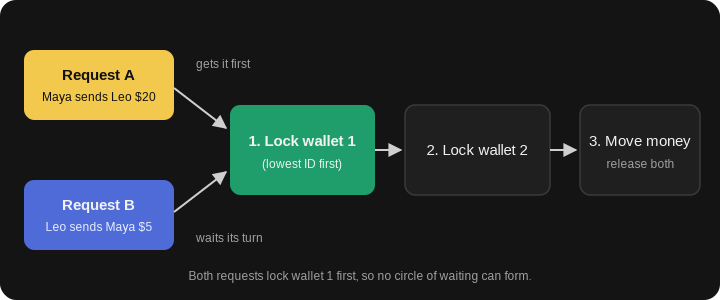
1. Always take locks in the same order
This breaks circular wait. The Postgres docs call it “the best” defence. Pick one global order, for example lowest wallet ID first, and use it everywhere:
await db.transaction(async (tx) => {
  const [firstId, secondId] = [fromId, toId].sort((a, b) => a - b);
  await tx.query("SELECT id FROM wallets WHERE id = $1 FOR UPDATE", [firstId]);
  await tx.query("SELECT id FROM wallets WHERE id = $1 FOR UPDATE", [secondId]);
  // ...now update both balances, in any order
});
db.transaction stands for the transaction helper of your database library. SELECT ... FOR UPDATE locks a row but does not change it yet. The code sorts the two IDs and locks the smaller one first, in both directions of transfer.
Now Maya→Leo and Leo→Maya both start with a lock on wallet 1. The request that gets it first also gets wallet 2. The other request waits a moment and then runs. No circle can form.
2. Don’t wait forever: use timeouts
A timeout does not stop the circle from forming. But it stops the circle from lasting forever. A task that waits too long stops and lets go of what it holds.
- In JavaScript,
async-mutexhaswithTimeout(new Mutex(), 5000). If the lock is not free after 5 seconds, the wait fails with anE_TIMEOUTerror. It does not wait forever. - In Postgres,
lock_timeoutaborts any statement that waits for a lock longer than the limit. It is off by default (0). You can set it for one transaction withSET LOCAL lock_timeout = '5s';.
A timeout changes a silent wait into an error that you can log and retry.
3. Retry the whole transaction on a deadlock
Good ordering prevents most deadlocks, but not always all of them. For example, a query that you did not write can still cause one. The Postgres docs say that a retry of deadlock failures may be advisable. They also say that a retry must run the complete transaction again, not only the failed statement:
for (let attempt = 1; attempt <= 3; attempt++) {
  try {
    return await transferInTransaction(fromId, toId, amount);
  } catch (err) {
    if (err.code !== "40P01" || attempt === 3) throw err; // not a deadlock, or out of tries
  }
}
With the pg library, Postgres error codes appear on err.code. The loop retries only deadlocks, at most 3 times. The loop passes on any other error at once.
Go deeper: The payment timed out. Did it go through? (Level 3) explains safe retries and longer waits between attempts.
4. Hold locks for a short time
Do slow work (AI calls, payments, emails) before you take a lock or after you release it. A transaction must contain only database work. Short locks give shorter queues and fewer collisions.
5. Prefer no lock at all
Often the best lock is no lock. An atomic update is one statement that the database runs as a single step. For example: UPDATE wallets SET balance = balance - 20 WHERE id = 1 AND balance >= 20. This needs no mutex in your code. Use locks when one change really depends on several rows. Use semaphores to limit expensive calls to other services.
Test it yourself
Make a database deadlock (on a test database only). You need two connections that each keep a transaction open. For example, use psql (the PostgreSQL command-line tool) in two terminal windows. Connect both to a test database. Create a table with two rows:
CREATE TABLE wallets (id int PRIMARY KEY, balance int);
INSERT INTO wallets VALUES (1, 100), (2, 100);
Then type these commands. Change windows in this order:
- Window A:
BEGIN; UPDATE wallets SET balance = balance - 20 WHERE id = 1; - Window B:
BEGIN; UPDATE wallets SET balance = balance - 5 WHERE id = 2; - Window A:
UPDATE wallets SET balance = balance + 20 WHERE id = 2;(it waits) - Window B:
UPDATE wallets SET balance = balance + 5 WHERE id = 1;
After about a second, one window shows ERROR: deadlock detected, and the other window continues. Run ROLLBACK; in both windows. Now do the steps again, but update id 1 first in both windows. You get no deadlock. The second window waits until the first window commits.
Check your own code. Search your project for FOR UPDATE, Mutex, Semaphore and acquire(. For each one, ask two questions. In what order does the code take locks? Does the code do anything slow while it holds a lock?
Watch your semaphore. Each time a call starts, log how many calls run and how many wait. Then send 20 requests at once. The number of calls that run must never go above your limit.
Takeaways
Key terms
- Lock: something that makes other tasks wait while one task works on shared data
- Mutex: a lock that lets exactly one task in at a time
- Semaphore: a lock that lets at most N tasks in at a time
- Critical section: the code a lock protects
- Deadlock: tasks that wait for each other in a circle, forever
- Lock ordering: you always take locks in the same agreed order, so no circle can form
Red flags
- Code that locks two things in an order that depends on the request (sender first, then receiver)
acquire()withoutfinally, or a lock with no timeout- A payment, AI or email call inside a transaction or a locked section
- An in-memory mutex or semaphore that must protect all instances
deadlock detectederrors in your logs that nobody retries
Ask your AI
- “Find every place where my code takes more than one lock or locks more than one row in a transaction. Is the order always the same?”
- “Does any transaction or locked section call an external API? Move those calls outside.”
- “Add a retry for Postgres error 40P01 that runs the whole transaction again, at most 3 times.”
- “Do my mutexes and semaphores still work with several instances? If not, what shared lock should I use?”
Going deeper (optional, for readers who want more detail)
A semaphore in a few lines. You don’t need a library. The difficult part: give a free slot directly to the next waiter. Do not release the slot and let the waiter take it later. If you do, a new request can take the slot first. Then, for a short time, you run one more task than your limit.
let running = 0;
const waiting = [];
async function withLimit(task, max = 5) {
  if (running < max) running++;
  else await new Promise((resolve) => waiting.push(resolve));
  try { return await task(); }
  finally { const next = waiting.shift(); next ? next() : running--; }
}
When a task ends, it does one of two things. It wakes the next waiter, who takes its slot, so running stays the same. Or, if nobody waits, it frees the slot.
Postgres advisory locks. Postgres can also hold locks whose meaning your app decides. These are called advisory locks, because Postgres doesn’t enforce them: your code must use them the same way everywhere. SELECT pg_advisory_xact_lock(42); takes an exclusive lock on the number 42 and keeps it until the transaction ends.
pg_try_advisory_xact_lock(42) does the same, but if the lock is taken, it returns false at once and does not wait. A common use: make sure that only one instance runs a scheduled job at a time. The lock lives in the database, so it works across all your instances.
NOWAIT and SKIP LOCKED. If you add NOWAIT to SELECT ... FOR UPDATE, the statement fails at once when the row is locked. It does not wait.
SKIP LOCKED skips locked rows. Postgres says that this gives an inconsistent view of the data. But it is useful for queue tables (tables that hold jobs to do). There, several workers (programs that do the jobs) each take a different pending job.
Livelock. This problem is similar to a deadlock. Tasks keep reacting to each other, for example all retry at exactly the same moment. No task is blocked, but no task makes progress. A small random wait before each retry usually stops it.
Locks in other shared stores. Locks across instances can also live in a store like Redis (a fast shared data store that keeps data in memory). Always give such a lock an expiry time, so a crashed instance can’t hold it forever.
References (9)
- Explicit Locking: Deadlocks and Advisory Locks: PostgreSQL. Row-level locks, automatic deadlock detection, unpredictable victim, consistent lock order as the best defence.
- Lock Management: deadlock_timeout: PostgreSQL. The 1-second default wait before a deadlock check.
- Client Connection Defaults: lock_timeout: PostgreSQL.
lock_timeoutbehaviour and its default of 0 (disabled). - Serialization Failure Handling: PostgreSQL. Retrying deadlock failures (
40P01) “may also be advisable”, and a retry must re-run the complete transaction. - Advisory Lock Functions: PostgreSQL.
pg_advisory_xact_lockandpg_try_advisory_xact_lock. - SELECT: The Locking Clause: PostgreSQL.
FOR UPDATE,NOWAIT, andSKIP LOCKEDwith its warning about an inconsistent view of the data. - L73: Deadlock detected: pganalyze. Example of the full
deadlock detectedlog message with itsDETAILline. - async-mutex README: DirtyHairy (GitHub).
Mutex,Semaphore,runExclusive,withTimeoutandE_TIMEOUT. - Deadlock (computer science): Wikipedia. The four Coffman conditions from the 1971 paper.