Level 2 · Builder
Never store a password. Here's what to store instead
Never store a password. Here’s what to store instead
Before you start Words from earlier lessons:
- Backend: the part of your app that runs on your server, where secrets are safe. (A player scored 999,999 points by editing the page. How?)
- Database: the place where your app keeps its data, in tables. (Your app forgot everyone’s messages overnight. Why?)
- Headers:
Name: valuelines of extra details on requests and responses. (Every website is a conversation. Here’s how it goes)- Secret: a value that lets someone act as you. (Your app’s secrets don’t belong in your code. Here’s where they go)
- Reading JavaScript:
const,===,asyncandawait, and thereqandresof a server. (The AI wrote your code. Can you read it?)
The table you never want to see
You built a sign-up page with AI. It works. You open your database and look at the users table:
| id | password | |
|---|---|---|
| 1 | mia@example.com | sunshine2024 |
| 2 | leo@example.com | Leo!Football9 |
| 3 | sam@example.com | sunshine2024 |
Every password is in plain text, exactly as the user typed it. Anyone who can see this table can log in as any of your users.
“But nobody else can see my database,” you think. But databases do leak. Someone shares a backup file by mistake, or a laptop gets stolen. Plan for the day it happens.
And here is the worse part. People reuse passwords. Leo probably uses Leo!Football9 for his email too. Attackers take leaked email and password pairs from one site and try them on other sites: email, shops, banks. This attack is called credential stuffing. A leak from your small app can open your users’ accounts everywhere.
This lesson shows how to store passwords so that a leak does not show them. Then it shows how your app remembers who is logged in.
Keep a fingerprint, not the password
You do not need to store the password. You only need to check it. The tool for that is a hash.
A hash function takes any text and turns it into a jumble of characters with a fixed length. This jumble is called a hash. A hash function has two important properties:
- The same input always gives the same hash.
- It works in only one direction. You cannot turn a hash back into the password.
So at sign-up, your server hashes the password and stores only the hash. At login, it hashes what the user typed. Then it checks if the two hashes match. The server never stores the real password.
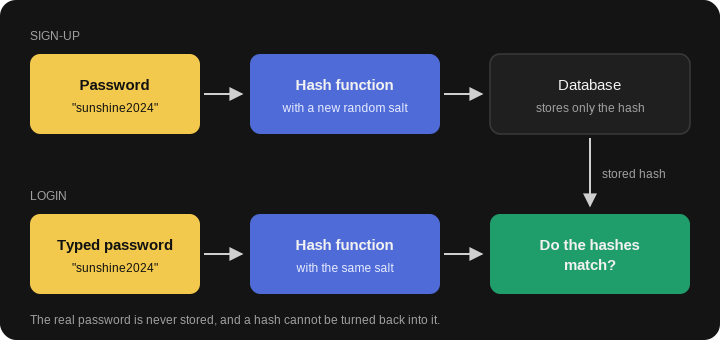
Think of a fingerprint. Your fingerprint can prove that it is you. But nobody can make a copy of you from a fingerprint.
Where the comparison stops working: an attacker with your table of hashes can hash a list of common passwords and look for matches. For this reason, password hashing needs two more tricks.
Trick 1: Be slow on purpose
Most hash functions, like SHA-256, are made to be fast. They do jobs like a check that a file downloaded correctly. For passwords, fast is bad: an attacker can try huge numbers of guesses per second.
Password hashing functions are made only for passwords, and they are slow on purpose. One hash takes a fraction of a second. Your users do not notice that when they log in. But an attacker who tries billions of guesses notices it very much.
Trick 2: Add a salt
Look at the table again. Mia and Sam both use sunshine2024. If you hash both passwords in the same way, their hashes are the same. So if an attacker cracks one, they crack both.
A salt is a random value. The server creates a new salt for each user and mixes it in before it hashes the password. Same password plus different salt gives a completely different hash. So attackers must attack each user separately. Good password hashing libraries (packages of ready-made code) create the salt for you and store it inside the hash text.
Which one to use
OWASP is a non-profit community that publishes widely used security guides. Its advice on passwords, in plain words:
- Use a slow password hashing function. Argon2id is OWASP’s first choice for new apps. Many older apps use bcrypt, which OWASP accepts for older systems.
- Let a well-known library choose the settings, which control how slow the hash is. The Node
argon2package’s defaults are stronger than OWASP’s minimum. - Never use a fast hash like SHA-256 or MD5 for passwords.
- Never encrypt passwords. To encrypt data means to scramble it so that someone with the right key can unscramble it. If the key leaks with the database, every password is readable.
Staying logged in: sessions
You log in one time, then you click around for an hour. How does the server know that every click is still you? HTTP does not remember anything between requests. So after a successful login, the server creates a session:
- It makes a long random code, the session ID, like
9f3a7c...(much longer in real life). - It saves a record: “session
9f3a7c...belongs to user 17, expires in 7 days.” - It gives the session ID to the browser.
- The browser sends the session ID back with every request. The server looks it up and knows that it is user 17.
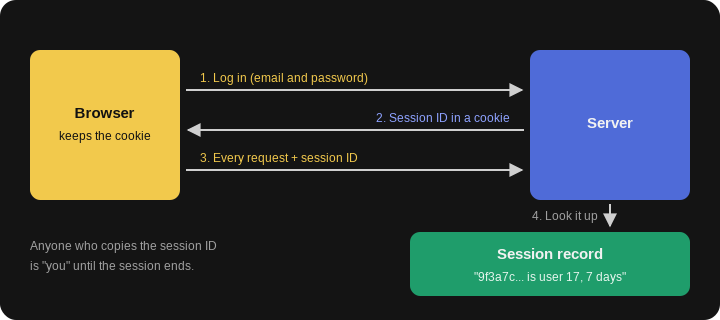
It is like a wristband at a concert. You show your ticket one time at the entrance. After that, the staff check the wristband.
Where the comparison stops working: a wristband is hard to copy, but a session ID is only text. Anyone who gets a copy is “you” until the session ends. So the session ID must be long and random, and the browser must protect it.
Cookies and their three flags
How does the browser send the session ID back every time? With a cookie. A cookie is a small piece of data that a server asks the browser to keep. The browser automatically attaches it to every request to that website. Two headers do this work. The server’s response says:
Set-Cookie: session_id=9f3a7c...; HttpOnly; Secure; SameSite=Lax; Max-Age=604800And every later request from the browser carries:
Cookie: session_id=9f3a7c...Max-Age=604800 means “keep this for 604,800 seconds”, which is 7 days. The other three words are flags, and they protect your users:
| Flag | What it does | What it protects against |
|---|---|---|
| HttpOnly | JavaScript on the page can’t read the cookie | An attacker runs their own script on your page and steals the session ID |
| Secure | The browser sends the cookie only over HTTPS, the encrypted version of HTTP | Someone on the same café Wi-Fi reads it from an unencrypted request |
| SameSite | Controls if the browser sends the cookie when another website starts the request | Another website makes your browser send a request to your app, with your cookie attached |
For a login cookie, SameSite=Lax is a good default. It still sends the cookie when someone follows a normal link to your site from another site.
Go deeper: A comment that runs code in every visitor’s browser (Level 2) shows how attackers run scripts on your page. What the padlock icon really protects, and what it doesn’t (Level 2) explains HTTPS.
Tokens and JWTs
With sessions, the server must look up a record on every request. Some systems use a token instead: a piece of data that proves who you are. The browser sends it back with each request.
The most common kind is a JWT (JSON Web Token, often said as “jot”). It has three parts, with dots between them:
eyJhbGciOiJIUzI1NiIsInR5cCI6IkpXVCJ9.eyJ1c2VySWQiOjE3fQ.<signature>- A header (not an HTTP header): the method that was used to sign it.
- A payload: the data. The middle part above decodes to
{"userId":17}. - A signature: made with a secret key that only your server knows.
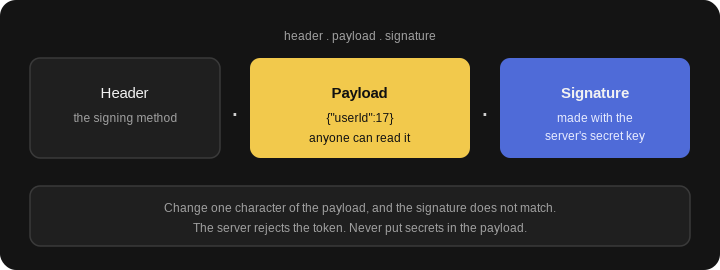
When a JWT comes back, the server checks the signature. If anyone changed even one character of the payload, the signature does not match, and the server rejects the token. So the server can trust userId: 17 without a lookup.
Beginners often miss these three facts:
- Anyone can read a JWT. It is encoded (written in a format that anyone can turn back), not encrypted. Paste one into any JWT decoder, and the payload appears. Never put secrets in it.
- A JWT is hard to cancel. The server stores nothing, so a stolen JWT works until it expires.
- The signing key is a secret. If it leaks, attackers can sign their own tokens, for any user.
For a typical web app, a session in an HttpOnly cookie is the simpler and safer choice. JWTs are more common in mobile apps and in services that talk to each other.
How it goes wrong
The code in the rest of this lesson is JavaScript that runs on your server. It uses Express, a popular package for building servers in Node. In Express code, req is the request that came in, and res is the response that your server sends back. db is your app’s code for talking to the database.
Bug 1: A fast hash, or no hash
const passwordHash = crypto.createHash("sha256").update(password).digest("hex");
await db.user.create({ data: { email, passwordHash } });
In plain English: the code hashes the password with SHA-256 and saves a new user row. The curly brackets on line 2 make objects. { email, passwordHash } is a short way to write { email: email, passwordHash: passwordHash }. Each property gets its name and its value from the variable with the same name. data holds the values for the new row.
The code looks secure. But SHA-256 is fast and there is no salt. So Mia and Sam get the same hash, and attackers can crack common passwords quickly.
Bug 2: The token in localStorage
const data = await response.json();
localStorage.setItem("token", data.token);
In plain English: this code runs in the browser, after the login request comes back. response is the server’s answer. response.json() reads the JSON in it and turns it into an object, and data.token is the token inside.
Then the code saves the token in localStorage, a storage area in the browser. Any JavaScript on your page can read localStorage. If an attacker gets one script onto your page, it can send away every user’s token. OWASP’s advice is to keep session IDs in HttpOnly cookies.
Bug 3: Smaller leaks
- The code reads a JWT with
jwt.decode(). In the popularjsonwebtokenlibrary,decodedoes not check the signature, so it believes any token. Usejwt.verify(). - Log out only deletes the cookie. The session still works on the server.
- “No such email” and “wrong password” get different messages. This tells attackers which emails have accounts.
- A JWT signing key like
"secret"is in the code. The key belongs in an environment variable, and it must be long and random. - There is no limit on login attempts. Attackers can try thousands of passwords.
Go deeper: Bots signed up 10,000 times overnight. Now what? (Level 2) shows how to limit attempts.
What good looks like
First choice: don’t build it yourself
Login has more parts than this lesson shows: password resets, “log in with Google”, two-step codes and more. Each part has its own traps. Ready-made login services and libraries, like Clerk, Supabase Auth, Firebase Auth and Auth.js, do this work for you. Ask your AI to use one. Then your job is to check its settings.
If you write it yourself: the right pieces
Hash with Argon2id. At sign-up, use the argon2 package:
const passwordHash = await argon2.hash(password);
await db.user.create({ data: { email, passwordHash } });
In plain English: line 2 uses the same short form as Bug 1. argon2.hash makes a random salt and hashes the password slowly with Argon2id. It gives back one piece of text that holds the salt, the settings and the hash. The code saves only that text, never the password.
At login, check what the user typed:
const user = await db.user.findUnique({ where: { email } });
const hashToCheck = user ? user.passwordHash : fakeHash;
const passwordOk = await argon2.verify(hashToCheck, password);
if (!user || !passwordOk) {
  return res.status(401).json({ error: "Wrong email or password" });
}
In plain English:
- Line 1: find the user with this email.
{ where: { email } }is the same short form: “where the email is this email”. If there is no such user,useris empty. - Line 2:
A ? B : Cis a short “if”. It means: if A, use B, or else use C. So the code takes the user’s stored hash, orfakeHashwhen there is no user. - Line 3:
argon2.verifyhashes what the user typed with the salt from the stored hash. It givestrueif the two hashes match. - Lines 4–6:
!means “not” and||means “or”. If there is no user, or the password is wrong, the server sends the same answer.401is the status code for a failed login.
What is fakeHash? It is a real Argon2id hash of some random text. Your server makes it one time, when it starts.
Why do you need it? Without fakeHash, the server skips the slow check when the email has no account. Then “no such user” answers come back faster. An attacker can time the answers to find out which emails have accounts. With fakeHash, the server always does one slow check, so both answers take about the same time.
Set the session cookie with all three flags:
res.cookie("session_id", sessionId, {
  httpOnly: true,
  secure: true,
  sameSite: "lax",
  maxAge: 7 * 24 * 60 * 60 * 1000, // 7 days, in milliseconds
});
This is how Express sends the Set-Cookie header that you saw earlier. sessionId must come from a secure random generator, for example crypto.randomBytes in Node. Never make it from a counter or the user’s ID.
On log out, delete the session record on the server. Then clear the cookie.
Test your own app
You need an app with a login that you built. No app yet? Start with Your first app in an afternoon, with an AI doing the typing. You also need Chrome on a laptop or desktop. Built it in an AI app builder? Ask its AI to do each step below for you if you get stuck.
- Add a login first, if your app has none. The class wall has no login yet. Ask your AI: “Add a simple sign-up and login to my class wall, with an email and a password. Only people who are logged in can post. Store only a slow hash of each password, made with Argon2id or bcrypt. Keep the login in a session cookie with the HttpOnly, Secure and SameSite flags.” Then test it: sign up, log out and log in again. Open your app in its own tab, for example with its preview link, so that developer tools show only your app.
- Look at your users table. Ask your AI: “Where does my app keep its users? Give me simple steps to see the rows of that table.” Follow the steps, and find the password column. It must hold long text that starts with something like
$argon2id$or$2b$(bcrypt). If you can read a password, stop and fix that first. - Look at your cookies. Open developer tools (F12 on Windows, Cmd+Option+I on Mac). Click the Application tab, then Cookies on the left. Pick your site and find your login cookie. Check that HttpOnly, Secure and SameSite are set.
- Try to read the cookie with JavaScript. In the Console tab, type
document.cookieand press Enter. Your session cookie must not appear. - Check localStorage. In the Application tab, open Local Storage. Look for a token there.
- Test the error message. Log out. Try an email that has no account. Then try a real email with a wrong password. The two messages must be the same.
- Test log out. Copy your session cookie’s name and value from the Application tab. Log out. In the cookie list, double-click the empty row and add a cookie with the same name and value. Reload the page. If you are logged in again, the server did not end the old session.
With a login service, the service keeps the passwords, so you can skip step 2. The other steps still apply.
Takeaways
Key terms
- Hash: a one-way fingerprint of a value.
- Salt: a random value mixed into each password before hashing.
- Password hashing function: a hash that is slow on purpose, like Argon2id or bcrypt.
- Credential stuffing: trying leaked email and password pairs on other sites.
- Session: the server’s record that a browser belongs to a logged-in user.
- Cookie: data that the browser keeps for a site and sends back with every request.
- HttpOnly, Secure, SameSite: cookie flags that block scripts, plain HTTP and other sites.
- JWT: a signed token with readable data inside.
Red flags in AI-written code
- Readable passwords, or passwords hashed with
sha256ormd5, or “encrypted” passwords. - Tokens or session IDs in
localStorage, or cookies withouthttpOnly,secureorsameSite. jwt.decode()where the code needsjwt.verify().- A log out that only deletes the cookie.
Ask your AI
- “How does my app store passwords? Show me the code, and the algorithm it uses.”
- “List every cookie my app sets, with its HttpOnly, Secure and SameSite settings.”
- “Could I replace my hand-written login code with a proven login service or library? What would change?”
Going deeper (optional, for readers who want more detail)
OWASP’s full list. The Password Storage Cheat Sheet ranks the choices like this, with these minimum settings:
- Argon2id, the first choice: 19 MiB of memory, 2 iterations (rounds) and 1 degree of parallelism.
- scrypt, when Argon2id is not available: N=2^17, r=8, p=1.
- bcrypt, only for older systems: a work factor of 10 or more. bcrypt uses at most 72 bytes of a password.
- PBKDF2-HMAC-SHA256, when you must meet the FIPS-140 government standard: 600,000 iterations.
As a general rule, one hash must take less than one second. The Node argon2 package uses Argon2id by default, with 64 MiB of memory, 3 iterations and 4 threads.
Pepper. Some apps also mix in a pepper. A pepper is one secret value for all passwords, stored outside the database (for example, in a secret manager). If only the database leaks, the hashes are useless without the pepper. OWASP calls it extra defense, not a replacement for correct hashing.
Session rules from OWASP.
- Session IDs need at least 64 bits of randomness (32 random bytes give 256).
- Create a new session ID after login. Then an ID that an attacker planted before login becomes useless.
- End sessions after a period of inactivity and after a maximum total time. Enforce both on the server.
The three SameSite values. Strict sends the cookie only when the request comes from your own site. Lax also sends it when a user follows a normal link from another site. None always sends it, and it requires Secure. Some browsers treat a cookie without a SameSite setting as Lax. Not every browser does this, so always set it yourself.
Secure and localhost. Browsers make an exception for localhost (your own computer). So Secure cookies still work while you test on your laptop.
The “none” algorithm. Some old JWT libraries accepted tokens with "alg":"none", which means “no signature”. OWASP says that current libraries fixed this. But make sure that your JWT library rejects it.
Password rules. OWASP’s Authentication Cheat Sheet gives these rules:
- Passwords shorter than 8 characters are weak when two-step login is on. Without two-step login, passwords shorter than 15 characters are weak.
- Allow at least 64 characters, so that people can use long passphrases.
- Allow every character, and do not force rules like “must include a symbol”.
References (12)
- Password Storage Cheat Sheet: OWASP. Hash passwords instead of encrypting them, the order Argon2id, scrypt, bcrypt, the minimum settings for each, bcrypt’s 72-byte limit, salts that libraries manage for you, peppers, and the “less than one second” rule.
- Session Management Cheat Sheet: OWASP. At least 64 bits of randomness in session IDs, a new ID after login, server-side timeouts and log out, the HttpOnly, Secure and SameSite flags, and keeping session IDs out of localStorage.
- Authentication Cheat Sheet: OWASP. Credential stuffing, the same error message for unknown emails and wrong passwords, and the password length and character rules.
- JSON Web Token Cheat Sheet: OWASP. The three parts of a JWT, a payload anyone can read, why JWTs are hard to cancel, and the old
"alg":"none"problem. - Set-Cookie: MDN Web Docs. What
HttpOnly,Secure,SameSiteandMax-Agedo,SameSite=NoneneedingSecure, the localhost exception, and browsers that default toLax. - node-argon2 and its Options page: node-argon2 on GitHub.
argon2.hashandargon2.verify(hash, password), Argon2id by default with 64 MiB of memory, 3 iterations and 4 threads, and a random salt that is stored in the hash. - jsonwebtoken: Auth0 on GitHub.
jwt.decode()does not check whether the signature is valid, andjwt.verify()does. - Object initializer and Response: json() method: MDN Web Docs. The short form
{ a, b }for{ a: a, b: b }, andresponse.json()reading a JSON response into an object. - Express and res.cookie(): Express docs. Express is a web framework for Node, and
res.cookie()takes thehttpOnly,secure,sameSiteandmaxAgeoptions, withmaxAgein milliseconds.