Level 2 · Builder
Bots signed up 10,000 times overnight. Now what?
Bots signed up 10,000 times overnight. Now what?
Before you start This lesson uses a few words from earlier lessons:
- Endpoint: one address on your server, like
/api/login. Each endpoint does one job. (The hidden conversation behind every button you tap)- Status code: the number at the start of every response. Examples are 200 (OK) and 404 (Not Found). (The app said “Saved!”. The note was never saved)
- IP address: the number that identifies a computer on the internet, like
203.0.113.7. (How does your browser find one computer out of billions?)- Reverse proxy: a service like Cloudflare that receives requests before your server does. It passes them on to your server. (One company went down, and a big chunk of the internet went with it)
The morning after launch
You built an app with AI that writes product descriptions. A user types a few words about what they sell. Then your server asks a paid AI API (an AI service that your code calls over the internet) to write the description. New users get 20 free descriptions. You launch in the evening and go to sleep happy.
In the morning, you open your dashboard. You had 10,000 new sign-ups overnight. The email addresses look like xk2f9@example.com, xk2fa@example.com, xk2fb@example.com. Your email service has stopped sending, because you used up your monthly allowance on confirmation emails. And your AI provider’s bill is far higher than anything you planned.
Nobody hacked you. Nobody guessed a password. Someone wrote a small program that filled in your sign-up form again and again. Then the program used every free account to get free AI text. Your server said “yes” every time, because nothing in your code told it when to say “no”.
This lesson teaches your server to say “slow down”.
Bots don’t get tired
A bot is a program that uses a website automatically, without a person clicking. Some bots are useful: search engines use bots to read web pages. Other bots are made to abuse apps.
A person can fill in your sign-up form maybe a few times a minute. A bot can send thousands of requests a minute, all day, for almost no cost. It does not use your page at all. It sends requests directly to your endpoints, the same way your frontend (the part of your app that runs in the browser) does.
So ask this question for every endpoint: “What happens if someone calls this 10,000 times?”
The endpoints bots love
| Endpoint | What a bot does | What it costs you |
|---|---|---|
| Sign-up | Creates thousands of fake accounts | Abuse of your free offer, emails sent, a database full of junk |
| Login | Tries thousands of passwords for one account | Accounts broken into |
| Password reset, SMS codes | Sends messages again and again | Each email or text message can cost money |
| Anything that calls a paid AI API | Uses your app as free AI | Real money for every single request |
The last row is the most dangerous for apps built with AI. Most AI APIs charge for every request, based on how much text goes in and comes out. Suppose that your endpoint passes any request to the AI without limits. Then anyone who finds the endpoint spends your money.
The mental model: a counter for each visitor
The fix is called rate limiting. Your server counts how many requests each visitor makes in a period of time, and it refuses the extra ones.
Think of a shop with a sign: “Limit 2 per customer.” The shop counts what each customer buys. When someone tries to buy a third, the cashier says no. Tomorrow, the count starts again.
A rate limit has three parts:
- Who you count. Usually this is an IP address, or a logged-in user’s ID.
- How many requests are allowed. For example, 5.
- The time window. For example, 15 minutes. When the window ends, the count resets.
So “5 login attempts per IP address per 15 minutes” is a complete rate limit.
When someone goes over the limit, your server replies with status code 429 Too Many Requests. It can also send a Retry-After header (a short Name: value label on the response). This header says how long to wait (usually a number of seconds) before the next try.
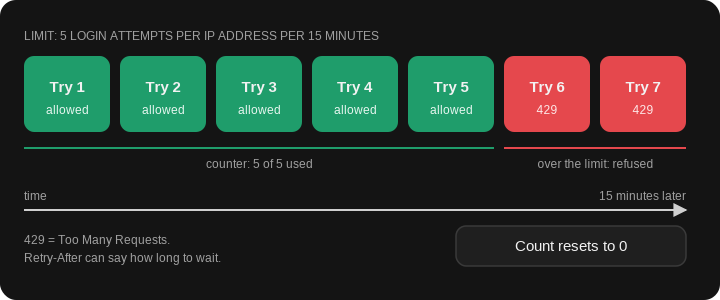
Where the shop comparison stops working: a cashier can see the customer’s face. Your server cannot. It only sees an IP address, or an account. A determined attacker can use many IP addresses and create many accounts. That is why rate limiting is one layer of protection, not the complete protection.
IP address or user?
There are two common ways to decide “who” you count:
- By IP address. This works for everyone, including people who are not logged in. Use it for sign-up, login and password reset. The weakness: many real people can share one IP address. A whole school, office or mobile phone network can appear as one address. A strict IP limit can block all of them at once.
- By user ID. This only works for logged-in users, but it is much fairer and more precise. Use it for features like “generate a description”. The user ID comes from the session (the server’s record of who is logged in), so the user cannot fake it.
Most apps use both: IP limits on sign-up and login, and user limits on the expensive features.
How it goes wrong
Bug 1: The AI endpoint with no limits
The user’s prompt is the text that the user writes for the AI model. You ask your AI: “Add an endpoint that sends the user’s prompt to the AI model and returns the answer. Only logged-in users can use it.”
app.post("/api/generate", requireLogin, async (req, res) => {
  const text = await callAiModel(req.body.prompt);
  res.json({ text });
});
In plain English:
- Line 1: When a logged-in user sends a request to
/api/generate… - Line 2: …take the prompt from the request, send it to the paid AI model, and wait for the answer…
- Line 3: …and send the answer back.
It does exactly what you asked. But look at what is missing:
- No limit on how often. One account can call it 50,000 times.
- No limit on size. The prompt can be as long as the attacker wants. Longer prompts cost more.
- The login check does not help much. Sign-up is free, so “logged-in user” means “anyone with a script that signs up”.
Bug 2: The limit only exists on the page
Sometimes the AI “adds a limit” in the browser. It disables the button for a few seconds after each click, or it counts clicks in the browser. That stops a polite human. It does nothing against a bot, because a bot never clicks your button. It sends requests directly to /api/generate.
Any limit that lives in the browser is only a suggestion. Only limits on the server are rules.
Go deeper: Can strangers read your whole database? Check in 5 minutes (Level 2) explains why every check that matters must happen on the server.
Bug 3: The counter that nobody shares
This bug is harder to see. The AI adds a popular rate-limiting package (ready-made code that you add to your app). The limit works perfectly on your laptop. In production (the live app that real users use), bots still get through.
By default, many rate limiters keep their counter in the server’s memory: the short-term storage that disappears when the program stops. That is fine for one server. But hosting platforms often run your code as many copies at once. Serverless functions (code that the platform starts only when a request arrives) start new copies whenever traffic grows. Each copy has its own memory and its own counter. A limit of 10 per minute across 20 copies can become 200 per minute.
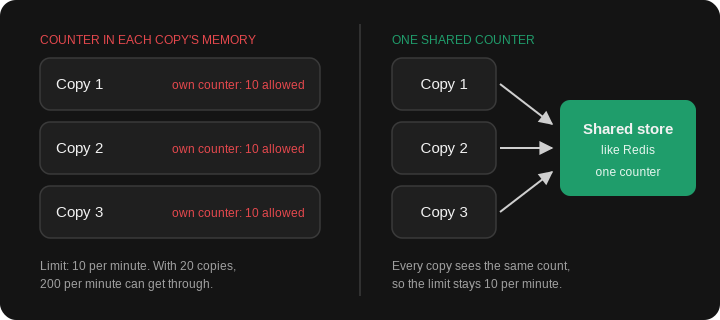
A second version of this bug happens behind a reverse proxy. Your app may sit behind Cloudflare, or behind your hosting platform’s own proxy. Every request reaches your server from the proxy. If your code reads the IP address the wrong way, every visitor looks like the same IP address. Then either everyone gets blocked together, or the limit counts the proxy instead of the real visitors.
What good looks like
Fix 1: Limit login and sign-up by IP address
Here is a limit on the login endpoint. It uses express-rate-limit, a package for Express. Express is the popular Node.js package for building servers, and the code in these lessons uses it:
const loginLimiter = rateLimit({
  windowMs: 15 * 60 * 1000, // a 15-minute window
  limit: 5,                 // 5 attempts per IP address per window
});

app.post("/api/login", loginLimiter, handleLogin);
In plain English:
- Lines 1–4: Create a limiter with the package’s
rateLimitfunction. It allows 5 requests per IP address every 15 minutes.windowMsis the window in milliseconds, so15 * 60 * 1000is 15 minutes. - Line 6: Run the limiter before the login code. If an IP address has already used its 5 attempts, the limiter replies with 429. The login code never runs.
Use the same idea, with different numbers, for sign-up and password reset.
Ask your AI about two settings:
- A shared store. Your app may run on more than one server, or as serverless functions. Then the counter must live in a shared place that every copy can see. Usually this is Redis, a very fast database that keeps data in memory. People often use it for counters. Many hosted Redis services work with serverless apps.
- The real IP address behind a proxy. In Express, a setting called
trust proxytells your app to read the visitor’s IP address from the header that your proxy adds. Set it to match your exact setup. Do not trust that header from everywhere. If you do, attackers can send a fake IP address in that header.
Fix 2: Limit expensive features per user
For the AI endpoint, count per user, and keep the count in your database:
app.post("/api/generate", requireLogin, async (req, res) => {
  const prompt = String(req.body.prompt ?? "");
  if (prompt.length > 2000) return res.status(400).json({ error: "Your text is too long." });
  const usedToday = await countGenerationsToday(req.user.id);
  if (usedToday >= 20) return res.status(429).json({ error: "Daily limit reached." });
  await recordGeneration(req.user.id);
  res.json({ text: await callAiModel(prompt) });
});
In plain English:
- Lines 2–3: Turn the prompt into text and refuse anything over 2,000 characters. Big inputs cost more, so size is part of the limit.
- Line 4: Ask the database how many times this user has generated text today.
req.user.idcomes from the session, so you can trust it. - Line 5: If the user has reached 20, reply with 429 and a clear message. The AI is never called.
- Line 6: Record this use before you call the AI. Then a user cannot send extra requests while the first one waits for an answer.
- Line 7: Call the AI and send back the answer.
Also limit the size of the answer. Most AI APIs have a setting for the maximum length of the reply. Ask your AI to set it.
Fix 3: Make fake accounts harder and less useful
Rate limits slow bots down. These steps make each fake account worth less:
- Add a bot check to sign-up. A CAPTCHA is a test that tries to tell humans and bots apart, like “click all the traffic lights”. Newer bot checks, such as Cloudflare Turnstile, often run in the background without a puzzle. When the check passes, it gives the browser a token: a short code that proves the check happened. The browser sends the token with the form. Your server must verify that token with the provider. Cloudflare’s docs say plainly that the widget (the check on the page) alone does not protect your forms.
- Confirm the email address before you give free credits. A fake address cannot click a confirmation link.
- Give new accounts smaller limits until the account has existed for some time or the user has paid.
Fix 4: Use more than one layer
You can enforce limits in three places. Each place catches different things.
| Where | Example | Good at | Not good at |
|---|---|---|---|
| The edge (in front of your server) | Cloudflare rate limiting rules, your hosting platform’s firewall | Stopping floods from one IP address before they reach your code or your bill | Knowing who the logged-in user is or what plan they pay for |
| Your server | The code in this lesson | Per-user limits, daily quotas, different limits per plan | Very large floods, which still reach your server |
| The provider | Budget limits and alerts in your AI provider’s dashboard | Limiting the damage if everything else fails | Telling a real user from an attacker |
The edge and your server do the daily work. The provider budget is the final protection. Cloudflare includes one rate limiting rule even on its free plan, which is a good fit for your login endpoint. On the free plan, this rule counts requests per IP address over 10 seconds. So it stops fast floods, not slow guessing.
Go deeper: You woke up to a $10,000 cloud bill. What happened? (Level 3) covers spending limits, budget alerts and AI API costs in detail.
Be kind to real users
When a real person reaches a limit, show a clear message on the page. For example: “You’ve used your 20 descriptions for today. They reset at midnight.” Do not show a blank screen or “Error 429”. Your frontend can check the status code and show the message from your server.
Test your own app
You need an app of your own for this part. No app yet? Start with Your first app in an afternoon, with an AI doing the typing. Built it in an AI app builder? Ask its AI to do each step below for you, or to add the missing part first (for example, a login).
Test only apps that you own. If you send floods of requests to other people’s apps, you can break their terms of use or the law.
- Open your app and log in.
- Open developer tools (F12 on Windows, Cmd+Option+I on Mac).
- Click the Console tab.
- Paste this code. Change the address to one of your own endpoints. Then press Enter.
for (let i = 1; i <= 30; i++) {
  const res = await fetch("/api/login", {
    method: "POST",
    headers: { "Content-Type": "application/json" },
    body: JSON.stringify({ email: "test@example.com", password: "wrong" }),
  });
  console.log(i, res.status);
}
This code sends 30 login attempts with a wrong password, one after another. It prints each status code.
- Read the results. You should see a few failed logins (often 401), then 429 for the rest. If all 30 say 401, nothing limits login attempts.
- Run the same test against your AI endpoint, with a short prompt and a smaller number, like 25. Does it stop at your daily limit?
- Deploy your app (put it online). Then run the test again on your live app. Limits that work on your laptop can fail in production because of Bug 3.
- Open your AI provider’s dashboard. Check whether a budget limit or spending alert is set.
Takeaways
Key terms
- Bot: a program that uses a website automatically
- Rate limiting: counting requests per visitor in a time window and refusing the extra ones
- 429 Too Many Requests: the status code for “you went over the limit”
- Retry-After: a header that says how long to wait before the next try
- CAPTCHA / bot check: a test that tries to tell humans from bots. The server must verify its result.
Red flags in AI-written code
- An endpoint that calls a paid API with no per-user limit and no size limit
- A “limit” that only disables a button or counts clicks in the browser
- A rate limiter that stores its counter in memory, in an app that runs on serverless functions or several servers
- Every request in your logs comes from the same IP address (you count your proxy)
- A bot check widget on the page, but no code on the server that verifies its token
Ask your AI
- “List every endpoint in my app that costs money or sends emails or messages. Which ones have a rate limit on the server?”
- “Add a per-user daily limit to my AI endpoint, stored in the database, and cap the size of the prompt and the AI’s answer.”
- “My app runs on [your hosting platform]. Does my rate limiter share its counter across all copies of the server, and does it read the real visitor IP address behind the proxy?”
Going deeper (optional, for readers who want more detail)
Rate limiting algorithms. An algorithm is a step-by-step method. The simplest one is a fixed window: count requests from 10:00 to 10:15, then reset. Its weakness: a bot can send a full batch at 10:14 and another at 10:15. A sliding window looks at the last 15 minutes from right now, which smooths this out. A token bucket gives each visitor a bucket of tokens that refills at a steady speed. Each request uses a token. This allows short bursts but keeps the average rate under control.
Rate limit headers. Besides Retry-After, many APIs send headers that tell clients how much of their limit is left. Older APIs use X-RateLimit-* headers. The IETF (the group that writes internet standards) is working on standard RateLimit headers. express-rate-limit can send them with its standardHeaders option.
IPv6. IPv6 is the newer, longer form of IP address. One person can easily control a huge block of IPv6 addresses. So a limit on each single IPv6 address does little. For this reason, express-rate-limit groups IPv6 addresses into blocks with its ipv6Subnet option.
Account lockout. Locking an account after a few failed logins sounds safe. But it lets an attacker lock real users out on purpose. These steps are usually better than a hard lockout: slow down attempts, add a bot check after a few failures, and alert the user.
Industry names for this risk. The OWASP API Security Top 10 (2023) calls it “Unrestricted Resource Consumption”. It lists paid third-party services like email, SMS and phone calls as an example. It recommends rate limits, maximum sizes for inputs and uploads, and spending limits with every provider. The OWASP Top 10 for LLM Applications (2025) covers apps built on large language models, the AI models behind chat tools. It calls the AI version “Unbounded Consumption”. It names one form of it Denial of Wallet: sending large amounts of requests to increase the victim’s bill.
References (8)
- RFC 6585: Additional HTTP Status Codes: IETF. Defines 429 Too Many Requests and the optional
Retry-Afterheader. - express-rate-limit: express-rate-limit on GitHub. The
windowMs,limit,standardHeadersandipv6Subnetoptions, the default 429 status, and using a shared store across several servers. - Stores: express-rate-limit docs. The default memory store doesn’t share counts between processes or servers; Redis-backed stores do.
- Express behind proxies: Express docs. The
trust proxysetting, and why trusting every proxy lets clients send a fake IP address. - Rate limiting rules: Cloudflare docs. The Free plan includes one rate limiting rule, counted per IP address over 10 seconds.
- Validate the token: Cloudflare Turnstile docs. Server-side token validation is required; the widget alone doesn’t protect your forms.
- API4:2023 Unrestricted Resource Consumption: OWASP API Security Top 10. Paid services like email and SMS as targets, and the advice on rate limits, size limits and spending limits.
- LLM10:2025 Unbounded Consumption: OWASP Top 10 for LLM Applications. AI cost abuse and “Denial of Wallet”.