Level 1 · Foundations
A player scored 999,999 points by editing the page. How?
A player scored 999,999 points by editing the page. How?
Before you start This lesson uses words from earlier lessons.
- Server: a computer that waits for requests. It answers them. (From You pressed Enter. What happened in the next second?)
- Request and response: your browser asks for something. The server answers. (From Every website is a conversation. Here’s how it goes)
- JavaScript: the code that makes a web page do things. For example, it reacts when you click a button. (From Take a web page apart and see what’s inside)
- Developer tools: hidden panels in your browser. They show what your browser does. (From the same lesson.)
999,999 points
You build a quiz game for your class with an AI. It has 10 questions about space. At the end, each player sees their score. The best scores go on a leaderboard: a list of the top players that everyone can see.
You share the link in your class group chat. Everyone plays.
The next morning, you check the leaderboard. At the top:
Sam: 999,999 points
The quiz has 10 questions. How is that possible?
Sam didn’t break into anything. Sam didn’t guess a password. Sam used tools that come with every browser. And your app believed what Sam’s browser told it.
This lesson explains why. It’s one of the most important ideas in building apps: your app runs in two places, and you only control one of them.
Two places your code runs
In earlier lessons, you saw that a website has two sides. There’s your browser, and there’s the server.
Your app has code on both sides.
Code that runs in the browser. The server sends HTML, CSS and JavaScript to the browser of the player. The browser runs it. This part draws the quiz, shows the questions and reacts when the player taps an answer. This part of your app is called the frontend.
Code that runs on the server. This code never leaves your server. It answers requests. It also saves things that must last, like the scores on the leaderboard. This part of your app is called the backend.
| Frontend | Backend | |
|---|---|---|
| Where it runs | In the browser of each user | On your server |
| What it does | Shows the page and reacts to taps and clicks | Answers requests and saves data |
| Who controls the computer | The user | You |
The last row is the important one. Remember it for the rest of this lesson.
In short: the frontend is the part of your app that runs in the browser of the user. The backend is the part that runs on your server.
Everything you send can be read
Here’s a fact that surprises many beginners: the code of the frontend is not secret.
To run your JavaScript, the browser needs a copy of it. So your server sends the whole file to every visitor. When the file is on their computer, they can read every line.
Say the AI wrote the quiz like this:
const correctAnswers = ["Mars", "Jupiter", "8", "The Sun"];
const SECRET_PRIZE_CODE = "SPACE-CHAMP";
In plain English:
-
Line 1: a list of the correct answers to the quiz. The page uses it to check each answer.
constgives a name to a value, and the square brackets[ ]hold a list. -
Line 2: a secret code. The page shows it to players who get every answer right.
This code is in the frontend, so every player gets a copy. Anyone can open developer tools and find the file. Then they can read the answers and the “secret” code. No hacking needed.
The same is true for anything else in the frontend:
-
Text that the page hides, but that is still in the HTML
-
Notes that the AI left inside the code
-
Secret keys: long passwords that let your app use other services, like an AI service. These services often charge you each time someone uses your key. If your key is in the frontend, anyone can copy it and use it, and you pay.
Go deeper: Your API key leaked, and strangers are spending your money (Level 2) shows how secret keys leak and how to keep them safe.
In short: the browser needs a copy of the frontend to run it, so every visitor can read it. Never put answers, passwords or secret keys in the frontend.
Everything in the browser can be changed
Users can do more than read. They can also change what runs in their browser.
Developer tools let anyone do these things:
-
Change the text, pictures and buttons on the page
-
Turn a greyed-out button back on
-
Pause your JavaScript while it runs and change its numbers
-
Run their own JavaScript on your page
This is not hacking. These are normal browser features. Developers use them to test their own pages. Anyone can open them.
Now back to Sam. The AI built the game so that the browser counts the score:
let score = 0;
if (playerAnswer === correctAnswers[0]) {
  score = score + 1;
}
In plain English:
-
Line 1: start with a score of 0.
letgives a name to a value that can change later. -
Lines 2–4: if the answer of the player matches the first correct answer, add 1 to the score.
===means “is exactly the same as”.correctAnswers[0]is the first item in the list, because JavaScript counts list items from 0.
At the end of the game, the browser sends a request to the server. The request says: “Save this score: 7.” Then the server saves the number on the leaderboard.
But Sam’s browser counted the score. Sam paused the game with developer tools and changed score to 999999. The browser sent “Save this score: 999999.” The server had no way to know that the number was fake, so it saved it.
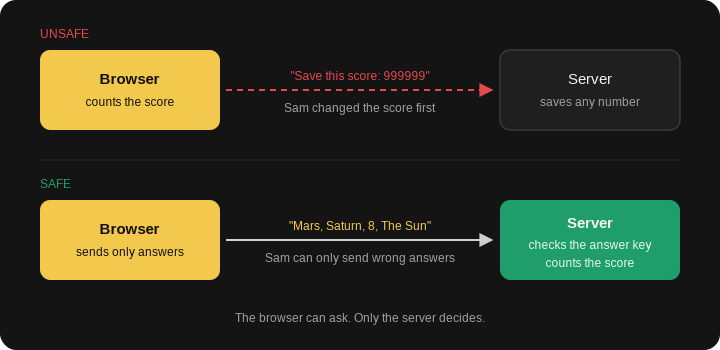
Sam didn’t even need to play. A user can skip your page completely. They can send their own request to your server, with any message they like.
Go deeper: The hidden conversation behind every button you tap (Level 1) shows what these requests look like.
In short: users can change anything that runs in their browser, and they can send any request they want. Your frontend can’t stop them.
The trust boundary
So what can you do?
Think about a test at school. Your answer sheet is in your hands. You can write anything on it, and even change an answer at the last second. But your mark doesn’t come from your sheet alone. The teacher checks it against the answer key in the staff room. You never see the key, and you can’t change it.
Your app works the same way:
-
The frontend is the answer sheet. The user holds it and can write anything.
-
The backend is the staff room. Only you can get in.
The line between the two is called the trust boundary. On the side of the server, you are in control. On the side of the browser, the user is in control. Anything that crosses the line from the browser to the server might have changed on the way.
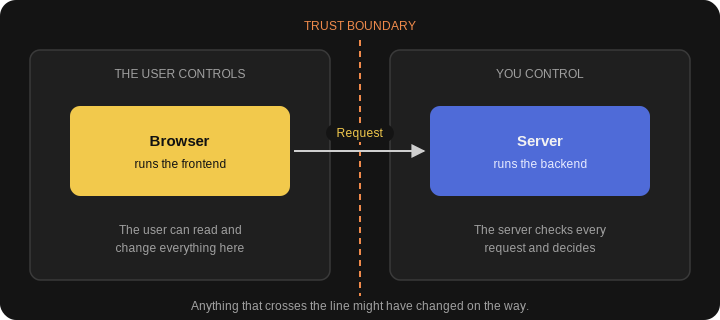
So the rule is:
The browser can ask. Only the server decides.
Where this comparison stops working: in a real school, the answer key never leaves the staff room. In an app, you can send the answer key to the browser by mistake, like the list of correct answers above. Also, a teacher knows which student handed in which sheet. Your server must find that out itself. And it can’t believe what the browser says about it.
In short: the trust boundary is the line between the browser (the user controls it) and the server (you control it). The server must check everything that comes from the browser.
How it goes wrong
AI tools often put important decisions in the frontend. The app still works when you test it, because you don’t try to cheat your own app. Look for these three patterns.
1. The browser decides something that matters. The browser counts the score, calculates a price or decides if an answer is right. Then it tells the server the result. The server believes it.
2. A secret is in the frontend. A secret key, a password or a list of answers is inside code that runs in the browser. It looks hidden because it’s not on the screen. It isn’t hidden.
3. A hidden button is the only protection. Say the AI adds a “Delete all scores” button for the admin. The admin is the person in charge of the app (you). The AI hides the button for everyone else. But a hidden button only changes what the page shows. The request to delete the scores still works for anyone who sends it.
Go deeper: Change one number in the URL, see everyone’s invoices (Level 2) shows how this mistake lets users change the data of others.
In short: look for three things. The browser decides things, secrets are in frontend code, and hidden buttons are the only protection.
What good looks like
Move every important decision to the backend.
For the quiz game:
-
The browser sends only the answers of the player: “Mars, Saturn, 8, The Sun.”
-
The backend checks them against the answer key. The answer key lives only on the server.
-
The backend counts the score and saves it.
Sam can still change things in their browser. But the worst that Sam can do is send wrong answers. The server counts the score, and Sam can’t reach it.
For secrets: keep secret keys on the backend. Sometimes the frontend needs something from another service. Then it asks your backend, and your backend uses the key.
For buttons: you can hide the admin button, so other players aren’t confused. But the backend must also check who is asking before it deletes anything.
Checks in the browser are still useful. Say your sign-up form shows “Please type your name” when the name box is empty. That’s helpful, because the user sees the message instantly. Keep it. But the server must check again, because anyone can skip the check in the browser.
Go deeper: Can strangers read your whole database? Check in 5 minutes (Level 2) covers checks on the server in detail.
In short: the frontend shows things and collects what the user types. The backend checks it and makes every decision that matters.
Try it yourself
You need a laptop or desktop computer with Chrome. In this experiment, you run your own JavaScript on a page, the same way Sam did.
Experiment: Be Sam for a minute
- Open
https://example.com. This page exists only for examples, so nothing you do there can harm anyone. - Press Ctrl+Shift+J on Windows, or Cmd+Option+J on Mac. Developer tools open on a tab called Console. Here you can type JavaScript, and the page runs it.
- Type
let score = 7and press Enter. The Console may show the wordundefined. That is normal. You made a score, like the one in the quiz game. - Type
score = 999999and press Enter. Then typescoreand press Enter. The Console shows 999999. - Type
document.title = "Sam wins"and press Enter.document.titleis the name of the page. Look at the name of the tab at the top of the window. It changed. - Reload the page. The tab has its old name again, and your
scoreis gone.
Type each line yourself. Chrome can block pasted text in the Console the first time, to protect people from scams. Never paste code from a stranger into the Console.
What happened? You ran your own code and changed numbers inside your own browser. The server and every other visitor didn’t notice. A player can do the same to the frontend of your game. That’s why the server must count the score.
Takeaways
Key terms
| Term | Meaning |
|---|---|
| Frontend | The part of your app that runs in the browser of the user (HTML, CSS and JavaScript) |
| Backend | The part of your app that runs on your server |
| Trust boundary | The line between the browser, which the user controls, and the server, which you control |
| Secret key | A long password that lets your app use another service |
Red flags in AI-written code
-
The browser calculates a score, a price or “is this answer right?”. Then it sends the result to the server.
-
Answers, passwords or secret keys are in code that runs in the browser.
-
The page hides a button from some users, but nothing on the server checks who is asking.
-
Someone says “It’s safe, nobody can see that part”.
Ask your AI
-
“Which parts of my app run in the browser, and which run on the server?”
-
“Is there any secret key, password or answer in my frontend code?”
-
“List every decision my app makes in the browser. Which ones should the server make instead?”
Going deeper (optional, for readers who want more detail)
The line is about where code runs, not which folder it’s in. Next.js is a tool for building web apps. Tools like it let you write frontend and backend code in the same project, sometimes in the same file. Some code even runs on the server first and then again in the browser. To know which side a piece of code is on, ask “where does this run?”. Don’t ask “which folder is it in?”. If you’re not sure, ask your AI.
Some settings go to the browser on purpose. In Next.js, some setting names start with NEXT_PUBLIC_. Next.js copies these settings into the JavaScript that goes to the browser. Settings without that start stay on the server. Never put a secret in a NEXT_PUBLIC_ setting. Other tools have similar name starts. Your app’s secrets don’t belong in your code. Here’s where they go covers this.
Squashed code is still readable. Before people use your app online, its frontend code is usually squashed into fewer, shorter files. This makes it load faster. It also makes it harder for people to read, but not secret. Developer tools can lay it out again, and secrets inside it are still plain text.
The name of the mistake. Security lists call this mistake “Client-Side Enforcement of Server-Side Security” (CWE-602). It means the server depends on the browser to protect the server.
References (8)
- Get started with viewing and changing the DOM: Chrome for Developers. Editing a page’s content in the Elements panel.
- JavaScript debugging reference: Chrome for Developers. Pausing code, editing variable values while paused, and making squashed (minified) files readable.
- How to use environment variables in Next.js: Next.js. Variables starting with
NEXT_PUBLIC_are put into the JavaScript sent to the browser; others stay on the server. - CWE-602: Client-Side Enforcement of Server-Side Security: MITRE. The name of the mistake where a server relies on the browser to protect it.
- Input Validation Cheat Sheet: OWASP. Checks in the browser can be bypassed, so the server must check again.
- Run JavaScript in the Console: Chrome for Developers. Ctrl+Shift+J (Windows) or Cmd+Option+J (Mac) opens the Console, where you can run statements that change how the page looks or runs.
- What are self-XSS attacks?: Chrome for Developers. Chrome blocks pasting into the Console for new users and shows a warning, to protect them from scams.
- Example Domains: IANA.
example.comis kept for use in examples and documentation.