Level 1 · Foundations
The AI wrote your code. Can you read it?
- Variables
- Strings
- Arrays
- Objects
- Functions
- ===
- Arrow functions
- async/await
- Template literals
- req and res
The AI wrote your code. Can you read it?
Before you start This lesson uses words from earlier lessons.
- Endpoint: one address on your server that does one job, like
POST /api/messages. (The hidden conversation behind every button you tap)- JSON: a text format for data, like
{ "author": "Mia" }. (The hidden conversation behind every button you tap)- Status code: a number in the response that says how it went, like
200(OK) or404(not found). (Every website is a conversation. Here’s how it goes)- Console: the developer tools tab where you can type JavaScript. (A player scored 999,999 points by editing the page. How?)
- Class wall: the small app that you built with an AI, where classmates post messages. (Your first app in an afternoon, with an AI doing the typing)
The AI says “Done!”. Is it?
A first version of your class wall often forgets every message after a reload. So you ask your AI to save the messages on the server. It changes a few files and says “Done!”.
Does it save empty messages too? You can’t tell if you can’t read the code. Here’s one part that it wrote. This part runs on the server:
app.post("/api/messages", async (req, res) => {
  const text = req.body.text;
  if (!text) {
    return res.status(400).json({ error: "The message is empty" });
  }
  await db.saveMessage(req.body.author, text);
  res.json({ ok: true });
});
It’s normal if this looks like a mess of symbols. By the end of this lesson, you can read every symbol in it.
Your AI does the typing. But you can read a recipe and notice “no salt?” without being a chef. Reading code lets you spot mistakes and ask better questions.
This code is JavaScript, the language that makes web pages do things. A program called Node.js lets JavaScript run on servers too.
In short: you don’t need to write code, but you need to read it. A few symbols appear again and again.
Names for values: const and let
Code works with values: pieces of data like a name or a score. A name for a value is called a variable.
const author = "Mia";
let lives = 3;
lives = 2;
In plain English:
- Line 1: make a variable
authorthat holds"Mia".constmeans it always holds this value. - Line 2: make a variable
livesthat holds3.letmeans the value can change. - Line 3: change
livesto2.
The ; ends one instruction, like a full stop.
In short: a variable is a name for a value. A
constcan’t get a new value. Aletcan.
Strings, numbers and template literals
Text in code is called a string. It goes in quotes: "Mia" or 'Mia'. Numbers have no quotes: 3, 120. And true and false are yes-or-no values.
Watch the quotes. 5 is a number, but "5" is a string. To JavaScript, they are different values.
Code often builds text from values:
const note = `${author} posted a message`; // "Mia posted a message"These quotes are backticks `. A string in backticks is called a template literal. Inside it, ${...} means “put this value here”. With normal quotes, ${author} stays as those exact characters.
Everything after // is a comment: a note for humans that the computer skips. In this lesson, comments show what a line gives back.
In short: text in quotes is a string. In a template literal (backticks),
${...}puts a value into the text.
Lists: arrays and [0]
A list in code is called an array. It goes in square brackets:
const players = ["Leo", "Mia", "Sam"];
players[0];      // "Leo"
players[2];      // "Sam"
players.length;  // 3
To get one item, put its position in square brackets. This position is called the index. Counting starts at 0, not 1. So [0] is the first item.
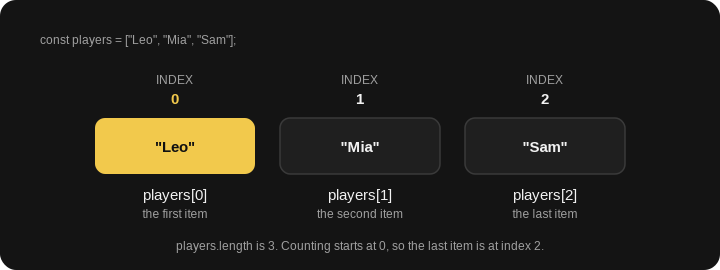
.length is the number of items, so the last item is at length - 1. An index with no item, like players[3], gives undefined: JavaScript’s word for “nothing here”. AI code often uses [0] to take the first result from a list.
In short: an array is a list in
[ ].[0]is the first item, because counting starts at 0.
Objects and the dot
To keep details about one thing together, code uses an object:
const player = { name: "Mia", score: 120 };
player.score;  // 120
An object goes in curly brackets { }. Each detail has a name and a value, like score: 120. Each detail is called a property. JSON looks the same because it was copied from JavaScript objects.
Read the dot as “‘s”: player.score is “player’s score”. Dots can make a chain. req.body.text means: in req, find body, then in body, find text.
In short: an object groups details in
{ }. The dot reads one detail:player.scoreis “player’s score”.
= and === are different
| Symbol | Meaning | Example |
|---|---|---|
= |
“Put this value in” | lives = 2 |
=== |
“Are these exactly the same?” | lives === 2 |
One = is called assignment: it puts a value into a variable. Three === is called strict equality: it compares two values and answers true or false.
It’s strict: the values must also be the same kind.
5 === 5;          // true
"5" === 5;        // false: a string and a number
"Mia" === "mia";  // false: capital letters matter
You may also see ==. It changes the values into the same kind first, so "5" == 5 is true. That can hide mistakes, so === is the safer choice.
In short:
=puts a value in.===asks “exactly the same?”
Decisions: if and !
if (lives === 0) {
  gameOver = true;
}
In plain English: if lives is exactly 0, run the lines inside the curly brackets. If not, skip them. The question in the round brackets is called the condition.
The ! sign means “not”. It turns true into false, and false into true. Some other values also count as “no”: 0, an empty string "", undefined and null (another word for “nothing”). Almost all other values count as “yes”. So if (!text) asks: “Is the text empty or missing?”
Two signs, !!, mean “not not”. They turn any value into a plain true or false. So !!user is true when there’s a user.
In short:
ifruns lines only when its condition is true.!textmeans “no text”.!!turns a value intotrueorfalse.
Functions, arrows and callbacks
A function is a set of steps with a name. To use it is to call it, with round brackets:
const double = (n) => n * 2;
double(21); // 42
In plain English: double takes one input, n, and gives back n times 2. Line 2 calls it with 21. In code, * means “times”.
The arrow => makes this an arrow function. Read it as “gives”. If the function has more steps, they go in curly brackets { }. Then the word return gives back the answer and stops the function. You’ll also see the older form, function double(n) { return n * 2; }. It does the same job.
Code can also hand a function to other code, which calls it later. This is called a callback. Think of a repair shop: “Call me when my phone is fixed.” You don’t wait at the counter. In Take a web page apart and see what’s inside, addEventListener("click", () => { ... }) hands over a callback. The browser calls it on each click.
In short: a function is named steps, called with
( ).=>makes an arrow function. A callback is a function that other code calls later.
Waiting for slow work: async and await
Some work is slow, like saving to a database: the program that keeps your app’s data. The lesson after this one, Your app forgot everyone’s messages overnight. Why?, explains databases. JavaScript doesn’t stop and wait by itself. The code must say when it needs the answer first.
async function countMessages() {
  const messages = await db.getMessages();
  return messages.length;
}
In plain English:
- Line 1:
asyncmarks a function that waits for slow work. - Line 2: ask the database for the messages.
awaitmeans “wait here until they arrive”. - Line 3: give back how many messages there are.
db.getMessages is a made-up name. await only works inside a function marked async.
In short:
awaitmeans “wait for this slow work, then continue”. It works inside anasyncfunction.
Express: app, req and res
Most server code in this course uses Express, a package for building web servers with Node.js. A package is code that other people wrote, which your app can use.
app.get("/api/messages", (req, res) => {
  res.json(["Hi!", "Who has the homework?"]);
});
app is your server. Read line 1 as: “When a GET request arrives at /api/messages, call this function.” The function is a callback, and it’s called the handler. Express gives it two values:
| Code | Meaning |
|---|---|
req |
The request: everything the browser sent |
req.body.text |
The text property of the data the browser sent |
req.params.id |
For an address like /api/messages/:id, the part in place of :id, like 42 |
res |
The response: the answer that you send back |
res.json({ ok: true }) |
Send this object back as JSON |
res.status(400).json(...) |
Set the status code to 400, then send JSON |
400 means “Bad Request”: the request was wrong. If the code sets no status code, the answer has 200 (OK). The names req and res are a habit that the Express documentation uses, so you’ll see them almost everywhere.
An endpoint together with its handler is called a route.
In short:
app.getandapp.postconnect an endpoint to a handler. Together, they make a route.reqis what came in.resis what you send back.
Now read the whole route
Here’s the code from the start again:
app.post("/api/messages", async (req, res) => {
  const text = req.body.text;
  if (!text) {
    return res.status(400).json({ error: "The message is empty" });
  }
  await db.saveMessage(req.body.author, text);
  res.json({ ok: true });
});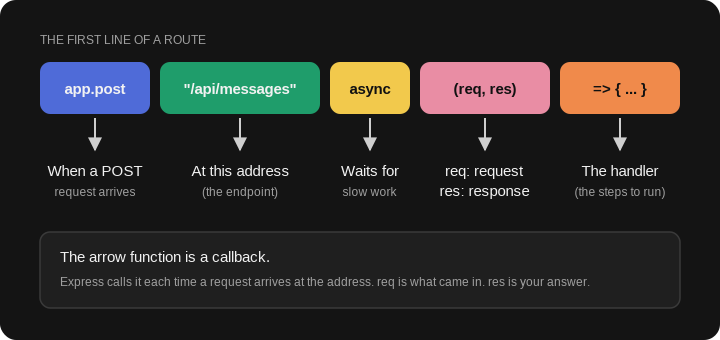
- Line 1: when a
POSTrequest arrives at/api/messages, call this handler. It’sasync, because it waits for the database. - Line 2: put the text that the browser sent into a variable
text. - Lines 3–4: if there’s no text, answer with status code 400 and an error in JSON.
returnstops the handler here. - Line 6: save the message with its author and text, and wait until the database is done.
- Line 7: answer
{ "ok": true }, with status code200.
In short: a route reads
req, does its work withawait, and answers withres.
How it goes wrong: four tiny mistakes
Each of these mistakes is one or two characters.
One = instead of three. if (role = "admin") doesn’t compare. It puts "admin" into role. A string that isn’t empty counts as “yes”, so everyone gets in. It should be ===.
Counting from 1. Code that wants the first result but uses [1] skips one. [1] is the second item.
A missing await. In const messages = db.getMessages(); the code doesn’t wait. messages holds a promise: a note that says “the answer comes later”. It’s like a receipt at a food counter. You can’t eat the receipt, so the next lines break or show nothing.
A missing return.
if (!text) {
  res.status(400).json({ error: "The message is empty" });
}
await db.saveMessage(req.body.author, text);
Without return, the handler continues after the error answer. It saves the empty message and tries to answer a second time. Node.js stops that with the error Cannot set headers after they are sent to the client. Headers are the extra labels on a response.
In short: watch for
=in anif,[1]for the first item, slow work withoutawait, and an error answer withoutreturn.
What good looks like: how to read code you don’t understand
- Read the names first. Names like
text,authorandsaveMessagetell the story before you look at symbols. - Find the start and the end. What starts it, like
app.post? What does it send back? Look at everyres.. - Follow each
if. What happens when it’s true? And when it isn’t? - Check for
awaitbefore slow work, like database calls. - Mark every line you don’t understand. These are your questions.
- Ask your AI to explain it line by line, in plain English. Then ask “what if” questions: “What if the text is empty?”
Your AI can be wrong too. If its answer doesn’t match what the app does, trust the test.
Go deeper: The AI wrote 500 lines. How do you know they’re safe? (Level 3) shows how to review bigger pieces of code.
In short: read the names, find the start and the end, follow each
if, and ask about every line you don’t understand.
Try it yourself
Open the Console in Chrome: Ctrl+Shift+J on Windows, or Cmd+Option+J on Mac. Type each line and press Enter. It only runs in your own tab. When you make a variable, the Console shows undefined. That’s normal.
const pets = ["cat", "dog", "fish"];
pets[0]
pets[3]
"5" === 5
`I have ${pets.length} pets`
pets = []
You should see cat, then undefined, then false, then the text I have 3 pets. The last line gives a red TypeError: Assignment to constant variable, because a const can’t get a new value.
Now try "5" == 5, !!"" and !!"hi". Can you explain each answer? If the Console says a name “has already been declared”, reload the page.
Takeaways
Key terms
- Variable: a name for a value.
constcan’t get a new value,letcan. - String: text in quotes. A template literal uses backticks and
${...}. - Array: a list in
[ ]. The first item is at index0. - Object: details in
{ }, read with a dot, likeplayer.score. - Strict equality (
===): “exactly the same, and the same kind?” - Function: named steps. An arrow function uses
=>. - Callback: a function that other code calls later.
asyncandawait: wait for slow work to finish.reqandres: the request that came in, and the response you send back.
Red flags in AI-written code
- One
=inside anif. [1]where the code wants the first item.- A database call without
await. - An error answer, like
res.status(400), with noreturn.
Ask your AI
- “Explain this code line by line, in plain English. I’m a beginner: [paste the code]”
- “In this route, what happens when the request has no text? Which lines run?”
- “Does this code have an
=inside anif, a missingawaitor a missingreturn?”
Going deeper (optional, for readers who want more detail)
More symbols that you’ll meet soon.
const { text } = req.body;is called destructuring. It means the same asconst text = req.body.text;. It’s a short way to take properties out of an object.{ ...req.body }is called spread syntax. It copies every property ofreq.bodyinto a new object. Can strangers read your whole database? Check in 5 minutes shows why that can be dangerous.players.find((p) => p.name === "Mia")gives the first item for which the callback answerstrue. If no item matches, it givesundefined.
Why req.body can be undefined. Express doesn’t read the request’s body by default. The app must turn that on, usually with the line app.use(express.json());. If your AI’s code reads req.body and gets undefined, check for that line.
const and objects. A const object can still get new property values, like player.score = 130. Only the whole variable can’t be replaced.
What happens when slow work fails. A database can be down. Then the await line fails with an error. Code catches errors like this with try { ... } catch (err) { ... }. Your error page showed your database details to everyone explains how to handle them well.
async functions always give back a promise. Even if the function returns a plain number, the caller gets a promise for that number. That’s why the caller needs await too.
References (12)
- const: MDN Web Docs. A
constcan’t be reassigned, it gives aTypeErrorif code tries, and the properties of aconstobject can still change. - Template literals (Template strings): MDN Web Docs. Template literals use backticks, and
${expression}puts a value into the string. - Array: MDN Web Docs. Arrays are zero-indexed: the first item is at index 0 and the last at
length - 1. - Strict equality (===): MDN Web Docs.
===treats values of different types as different, so"3" === 3isfalse, while==converts types first. - Logical NOT (!): MDN Web Docs. What
!does, the values that count as false, and!!to turn any value into a boolean. - Arrow function expressions: MDN Web Docs. The short
=>form of a function, and when it needs curly brackets andreturn. - Callback function: MDN Web Docs. A callback is a function passed into another function, which then calls it.
- await: MDN Web Docs.
awaitpauses anasyncfunction until a promise settles, and works only insideasyncfunctions or at the top level of a module. - Basic routing: Express. Routes have the shape
app.METHOD(PATH, HANDLER), and the handler runs when a request matches the route. - Request: Express 5.x API Reference.
reqis the request by convention,req.bodyisundefineduntil the app usesexpress.json(), and whatreq.paramsholds. - Response: Express 5.x API Reference.
resis the response by convention,res.status()sets the status code and can be chained, andres.json()sends JSON. - Errors: ERR_HTTP_HEADERS_SENT: Node.js documentation. The error when code adds headers after they were already sent. The message text is defined in Node’s source file
lib/internal/errors.js.