Level 2 · Builder
"Blocked by CORS policy": why the browser said no
“Blocked by CORS policy”: why the browser said no
Before you start This lesson uses a few words from earlier lessons:
- Frontend and backend: the frontend runs in the user’s browser. The backend runs on your server. (A player scored 999,999 points by editing the page. How?)
- Port: a number that says which program on a computer gets a connection. An example is the
3000inlocalhost:3000. (It works on my laptop. Why can’t my friend open it?)- Headers: short
Name: valuelabels on requests and responses, likeContent-Type. (The app said “Saved!”. The note was never saved)- Cookie: a small piece of data that the browser stores. The browser sends it back to the same website with every request, often to keep you logged in. (Never store a password. Here’s what to store instead)
The red line in the console
You are building a notes app with AI. The frontend runs on your laptop at http://localhost:5173. The backend runs at http://localhost:3000. The backend has an API: a set of addresses that your frontend calls to get and save data. You test the API on its own, and it works. You open the API’s address in your browser, and you see the notes as JSON (a plain text format for data).
Then you load the frontend. The list is empty. You open the browser console, the panel in the browser’s developer tools that shows errors. You find this:
Access to fetch at 'http://localhost:3000/api/notes' from origin
'http://localhost:5173' has been blocked by CORS policy: No
'Access-Control-Allow-Origin' header is present on the requested resource.
It is normal if most of this means nothing to you yet. By the end of this lesson, you will be able to read every part of it.
You paste the error into your AI tool. It says: “Install the cors package and add app.use(cors()).” You do. The error is gone. The notes appear.
Is the problem solved? Maybe. Or maybe you removed a safety rule from your app without knowing what it did. This lesson explains the rule and why browsers have it. It also shows how to fix the error without creating a security weakness.
What an origin is
The error talks about an origin. An origin is the “home address” of a page or an API. It has three parts:
- Scheme:
httporhttps - Host: the domain name, like
app.example.com, orlocalhost - Port: the number, like
5173. If there is no number,httpsmeans 443 andhttpmeans 80.
Two addresses have the same origin only if all three parts match. The rest of the address (the path, like /api/notes) does not matter.
This table compares addresses to https://app.example.com:
| Address | Same origin? | Why |
|---|---|---|
https://app.example.com/settings |
Yes | Only the path is different |
http://app.example.com |
No | Different scheme |
https://api.example.com |
No | Different host |
https://app.example.com:8443 |
No | Different port |
Now look at the error again. Your page comes from http://localhost:5173. Your API is at http://localhost:3000. The scheme and the host are the same, but the port is different. So the browser sees two different origins. To the browser, they are as different as two websites of two different people.
The rule: the same-origin policy
Browsers follow a rule called the same-origin policy. JavaScript on a page may freely read responses from its own origin. It may not read responses from other origins, unless the other origin says that it is OK.
Why do browsers block something so useful? Here is an example.
You are logged in to your bank in one tab. In another tab, you open a funny video on a website that you do not know. The browser automatically sends cookies to the website that they belong to. Imagine that the video page’s JavaScript asks the browser for https://bank.example/api/balance. The request could carry your bank cookie. Without the same-origin policy, that page could read your balance, your transactions and your address, and send them anywhere.
The same-origin policy stops this. The video page can try to ask, but it cannot read the bank’s answer.
CORS: the server’s permission slip
Sometimes you want another origin to read your responses. Your own frontend on port 5173 needs your own API on port 3000. A public weather API wants every website to use it.
CORS (Cross-Origin Resource Sharing) is the way that a server gives that permission. The server adds a header to its response:
Access-Control-Allow-Origin: http://localhost:5173This means: “JavaScript from http://localhost:5173 may read this response.”
When the response arrives, the browser checks the header. If the header allows the page’s origin, the browser gives the response to your JavaScript. If not, the browser throws the response away and prints the red error that you saw.
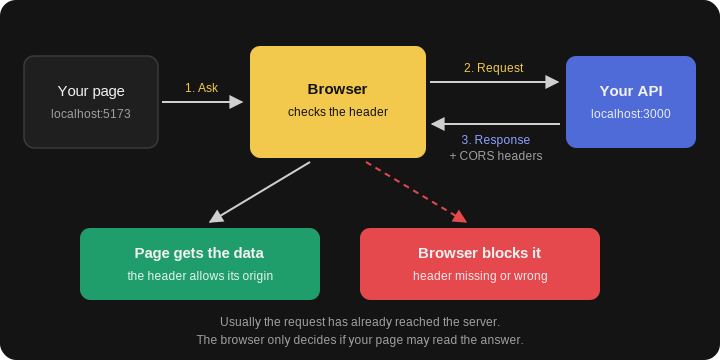
Think of a permission slip for a school trip. The student (your page) wants to go somewhere new (another origin). The teacher (the browser) lets the student go only if the parent (the server) signed the slip. No signature means no trip. In this lesson, “permission slip” means the Access-Control-Allow-Origin header.
Where this comparison stops working: on a school trip, the student stays home if there is no slip. With CORS, the request usually has already reached the server before the browser checks the slip. The browser only refuses to show the answer. Remember this, because it matters later.
The browser is the one checking
This is the most important idea in the lesson: the browser enforces CORS, not your server.
Your server only sends headers. The browser reads them and decides. Programs that are not browsers ignore CORS completely. That includes:
- curl, a program that you run in the terminal (the text window where you type commands). It sends a web request and prints the answer.
- API testing apps like Postman.
- Your own backend code when it calls another API.
That is why your API “worked” when you tested it directly, and failed only inside your web page. Nothing was wrong with the API. It was missing a permission slip that only browsers ask for.
It also means that CORS protects your users’ browsers, not your server. Anyone can call your API with curl, whatever your CORS settings say.
Preflight: asking before sending
Each request has a method: a word like GET, POST or DELETE that says what kind of request it is. For some requests, the browser does not send the request immediately. First it sends a small “may I?” request. This is called a preflight request.
The browser sends a preflight when a request could change data on the server. It also sends one when a request looks different from what an old-fashioned HTML form could send. For example:
- The method is
PUT,PATCHorDELETE. - The request sends JSON (
Content-Type: application/json). Almost every AI-written app does this. - The request has an
Authorizationheader (often used to send a login token) or another header that you added yourself.
The preflight uses a method called OPTIONS, which means “what will you accept?” Here is a preflight before the app saves a note:
OPTIONS /api/notes
Origin: http://localhost:5173
Access-Control-Request-Method: POST
Access-Control-Request-Headers: content-type
And here is a server reply that says yes:
204 No Content
Access-Control-Allow-Origin: http://localhost:5173
Access-Control-Allow-Methods: GET, POST, PUT, DELETE
Access-Control-Allow-Headers: content-type
In plain English, the browser says: “A page from port 5173 wants to send a POST with a content-type header. Is that OK?” The server answers: “Yes: that origin, those methods, that header.” Only then does the browser send the real POST.
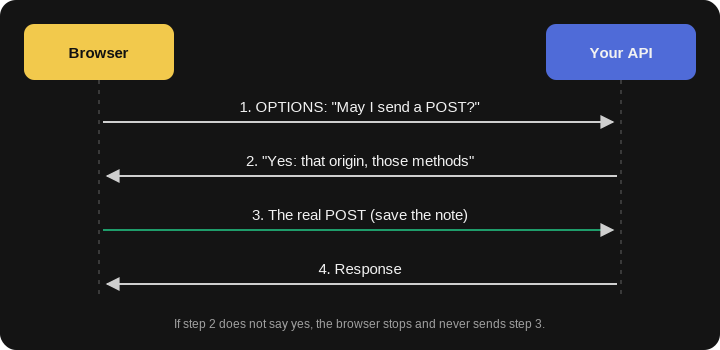
If the server does not answer the preflight correctly, the browser stops. The real request is never sent. The Network tab in developer tools lists every request that the page sends. There, you see the OPTIONS request. The console shows an error that mentions “preflight”.
How it goes wrong
Bug 1: “Allow everything”
Back to your AI’s first fix:
import cors from "cors";

app.use(cors());
app.use(...) runs a piece of code for every request, before your routes. (A route is the code that handles one address, like /api/notes.) Code like this is called middleware. By default, the cors package adds Access-Control-Allow-Origin: * to every response. The star means “any origin may read this.”
For a public API with no login, like a list of countries, this is fine. Any website can already see the same data.
For an app with logins, it causes the next problem. Your app sends a login cookie. A request that carries cookies is a request with credentials. To send the cookie to another origin, the frontend must ask for it with credentials: "include".
And the CORS rules say: a server cannot use * for requests with credentials. The server must name the exact origin. So the browser blocks the response again. The new error says that the Access-Control-Allow-Origin header must not be the wildcard * when the request includes credentials.
This rule exists on purpose. “Every website may read this user’s private data” is almost never what anyone wants.
Bug 2: Copying back whatever origin asks
So you paste the new error into your AI tool. A common answer is this:
app.use(cors({ origin: true, credentials: true }));In plain English:
origin: truetells the package to take the origin from each request and copy it back intoAccess-Control-Allow-Origin. Whoever asks gets a “yes”.credentials: trueaddsAccess-Control-Allow-Credentials: true, which allows requests with cookies.
The error disappears again. But now you have built the bank story from earlier, and your app is the bank. Every origin is allowed, with cookies. Suppose that your login cookie is sent between sites. Then a page on any website that your user visits can make requests as that user. It can also read the answers: the user’s notes, email address and settings.
When is the cookie sent between sites? Browsers limit this with a cookie setting called SameSite, which you saw in the login lesson. But a frontend and a backend on two different domains (website names), such as myapp.vercel.app and myapi.onrender.com, only work with SameSite=None. The AI often adds that setting in the same “fix”. That combination removes the protection completely.
The security testing company PortSwigger describes the result plainly. When a server copies back any origin with credentials, “absolutely any domain can access resources from the vulnerable domain”.
Bug 3: Trying to fix it in the frontend
Sometimes the AI changes the frontend instead:
fetch("http://localhost:3000/api/notes", { mode: "no-cors" });Chrome’s error message even suggests this. But no-cors does not turn CORS off. It sends the request and gives your code an empty, locked answer, called an opaque response. You cannot read anything in it. Your notes list stays empty, and now no error tells you why.
Browser extensions (add-ons that you install in your browser) that “disable CORS” have the same problem. They change only your browser. Every real user still gets the error.
Bug 4: Treating CORS like a lock
“Only my frontend’s origin is allowed, so only my frontend can use my API.” This is false. CORS only limits what JavaScript inside a browser can read. Anyone can call your API with curl, a script or an app.
Also, remember where the permission slip comparison stopped working. Many requests reach your server and run, even when the browser later blocks the response. CORS stops the reading, but not always the action.
Your API still needs to check who is asking and what they may do, on every route.
Go deeper: Change one number in the URL, see everyone’s invoices (Level 2) covers those checks.
Bug 5: A CORS error that is not about CORS
Your server crashes or takes too long. Then your hosting platform (the service that runs your app online) sends its own error page instead. Or the request goes to a wrong address and gets a 404 from code that never runs your CORS middleware. Error responses like these often do not include your CORS headers. The browser sees a response without a permission slip and reports a CORS error.
The console says “CORS”. The real problem is a crash or a wrong address. Before you change any CORS settings, do these steps:
- Click the failed request in the Network tab.
- Look at its status code, the number that says how the request went (like 200 or 404).
- Check your server’s logs, the messages that your server writes while it runs.
What good looks like
Fix 1: Avoid cross-origin requests when you can
The simplest CORS setup is none at all. If the page and the API share one origin, the browser never asks for a permission slip.
- In production (the live version of your app that real users use): frameworks like Next.js serve pages and API routes from the same domain. A framework is a set of ready-made tools for building apps. If you host your frontend and backend together, CORS often goes away completely.
- On your laptop: many tools can forward API requests for you. Here is an example for a project that uses Vite, a tool that runs your frontend on your laptop while you work on it:
// vite.config.js
export default {
  server: {
    proxy: { "/api": "http://localhost:3000" },
  },
};
In plain English: the page asks for anything that starts with /api. The Vite development server (the program that serves your frontend on your laptop) passes that request on to your API at port 3000. Then it brings back the answer. The page only talks to its own origin, localhost:5173, so there is no CORS check. The forwarding happens between two programs on your laptop, not inside the browser.
Fix 2: Allow a short, exact list
If the frontend and the API must be on different origins, name the origins that you trust:
import cors from "cors";

// e.g. "https://app.example.com,https://www.example.com"
const allowedOrigins = process.env.ALLOWED_ORIGINS.split(",");

app.use(cors({ origin: allowedOrigins, credentials: true }));
In plain English:
- Read the list of trusted origins from an environment variable (a setting that you keep outside your code). Then production and your laptop can each have their own list.
- Tell the
corspackage to allow only those origins. For any other origin, the package leaves out the permission slip, and the browser blocks the response. - Allow credentials, because your login cookie needs them. This is safe only because the list is exact.
Every entry must be a full origin: scheme, host and port. It must have no path and no slash at the end. https://app.example.com/ with a slash does not match.
Also follow these rules:
- Use
*only for public data that needs no login. - Never copy back any origin with credentials (
origin: true, or code that copies theOriginheader without a check). - Do not add development origins like
http://localhost:5173to the production list. - Keep login and permission checks on every route. CORS is not one of those checks.
Test your own app
You need an app of your own for this part. No app yet? Start with Your first app in an afternoon, with an AI doing the typing. Built it in an AI app builder? Ask its AI to do each step below for you, or to add the missing part first (for example, a login).
1. See CORS in action (2 minutes, Chrome).
- Open
https://example.com. - Open developer tools (F12 on Windows, Cmd+Option+I on Mac).
- Click Console.
- Paste this code and press Enter:
fetch("https://api.github.com/zen").then((r) => r.text()).then(console.log);You get a short sentence back. GitHub’s public API sends Access-Control-Allow-Origin: *, so any page may read it. Now try this:
fetch("https://www.google.com").then((r) => r.text()).then(console.log);You get a “blocked by CORS policy” error. Google’s home page does not give other origins a permission slip. The browser and the code are the same, but the server’s answer is different.
2. Ask your API what it allows. In a terminal, pretend to be a stranger’s website:
curl -i -H "Origin: https://attacker.example" https://your-api.example.com/api/me-i prints the response headers. -H adds a header: here, a fake Origin. Look for Access-Control-Allow-Origin in the answer:
- Missing → good. Strangers get no permission slip.
https://attacker.exampletogether withAccess-Control-Allow-Credentials: true→ you have Bug 2. Fix it now.*→ fine only if this route returns public data with no login.
3. Watch a preflight.
- Open your app.
- Open the Network tab.
- Save something.
- Look for an
OPTIONSrow right before yourPOSTorPUT. That row is the preflight. - Click it and read its response headers.
Takeaways
Key terms
- Origin: scheme + host + port, like
https://app.example.com(port 443 implied) - Same-origin policy: the browser rule that stops a page from reading responses from other origins
- CORS: headers that a server sends to let specific other origins read its responses
- Preflight request: an
OPTIONSrequest that the browser sends first, to ask permission for requests that could change data - Credentials: cookies and similar login data sent with a request
Red flags in AI-written code
app.use(cors())on an API that uses loginsorigin: trueor code that copies the request’sOriginheader, together withcredentials: truemode: "no-cors"added to “fix” an error- “Install a browser extension that disables CORS”
- Comments or docs that say CORS keeps strangers out of the API
Which step broke?
- “No ‘Access-Control-Allow-Origin’ header” → the server did not send a permission slip, or it crashed. Check the status code first.
- An error that mentions the “preflight request” → the server did not answer the OPTIONS request correctly.
- “must not be the wildcard ’*’” → you send cookies, so name the exact origin.
- Works in curl, fails in the browser → expected. Only browsers check CORS.
Ask your AI
- “Show me my CORS settings. Which origins are allowed, and are credentials allowed? Is any origin copied back from the request without checking a list?”
- “Can I serve my frontend and API from the same origin, so I don’t need CORS at all?”
- “This is my CORS error and the request’s status code from the Network tab: [paste]. Is this really a CORS problem, or is my server returning an error?”
Going deeper (optional, for readers who want more detail)
Exactly which requests skip the preflight. MDN calls them “simple requests”. The method must be GET, HEAD or POST. You may set only a short safelist of headers yourself: Accept, Accept-Language, Content-Language, Content-Type and Range, with limits. Content-Type may only be application/x-www-form-urlencoded, multipart/form-data or text/plain. An HTML form could always send these kinds of requests. So letting them through does not create a new risk. Everything else gets a preflight.
Simple requests still run. A cross-origin “simple” POST reaches your server and runs. The browser only hides the response. That is why CORS does not protect against CSRF (cross-site request forgery). In CSRF, another site makes a user’s browser send a harmful request. Use SameSite cookies and CSRF tokens for that.
Vary: Origin. Your server may change Access-Control-Allow-Origin depending on who asks. Then it should also send Vary: Origin. This header tells caches (systems that store copies of responses) that the response depends on the Origin header. So a cache does not store one visitor’s permission slip and show it to another visitor. The cors package’s documentation shows that it adds this header for you when you name specific origins.
Never allow the null origin. Some pages send Origin: null. Examples are local files and pages embedded with extra limits (sandboxed iframes). If you allow null “for local testing”, attackers can produce that origin on purpose.
Preflights can be cached. Access-Control-Max-Age tells the browser how many seconds it may reuse a preflight answer. Browsers also set a maximum for this value.
Other headers in the family. Access-Control-Expose-Headers lists the response headers that your JavaScript may read beyond the basic safe ones. With credentials, Access-Control-Allow-Headers, -Methods and -Expose-Headers cannot use * either.
Errors are hidden from JavaScript on purpose. Your code only learns that “an error occurred”. The reason appears only in the console. So a malicious page cannot use error details to learn about other sites.
References (8)
- Cross-Origin Resource Sharing (CORS): MDN. Simple requests, preflights, the no-wildcard rule for credentials,
Vary: Origin,Access-Control-Max-Age, and why JavaScript only sees “an error occurred”. - Same-origin policy: MDN. What an origin is (scheme, host, port) and why reads from other origins are blocked.
- Request: mode property: MDN.
no-corsgives an opaque response that JavaScript can’t read. - Set-Cookie header: MDN.
SameSite=Laxcookies aren’t sent with cross-sitefetch()requests;SameSite=Noneis needed for that. - Changes to Cross-Origin Requests in Chrome Extension Content Scripts: Chromium. The wording of Chrome’s “blocked by CORS policy” error and its
no-corssuggestion. - cors: expressjs on GitHub. The package’s default
*,origin: truecopying back the request’s origin, origin lists andcredentials. - Cross-origin resource sharing (CORS): PortSwigger Web Security Academy. The danger of copying back any origin, the
nullorigin, and why CORS is not CSRF protection. - Server Options: Vite docs. The
server.proxysetting used to avoid CORS during development.