Level 3 · Shipping
The AI fixed one bug and quietly broke three others
The AI fixed one bug and quietly broke three others
Before you start This lesson uses a few words from earlier lessons:
- Commit: a saved snapshot of your code that you can go back to. (The AI broke your working app. Here’s your undo button)
- API route: an address on your server that your app’s pages talk to, like
/api/checkout. (The hidden conversation behind every button you tap)- npm and package.json: npm installs packages;
package.jsonlists them and the commands your project can run. (It works on my machine, but not on yours. Blame the packages)- Environments: development, staging and production, each with its own database and keys. (Why you should never test on your real users)
- Reading JavaScript:
const, arrow functions (=>),asyncandawait, and${...}inside backticks. (The AI wrote your code. Can you read it?)
The fix that cost you a weekend
Your shop app has a bug: the discount code SAVE10 doesn’t work. You ask your AI to fix it. It changes four files. You open the checkout and type SAVE10, and the price drops by 10%. Fixed. You deploy.
On Monday, three different problems wait for you:
- Every order without a discount code since Friday cost $0.
- The receipt emails show a total that is different from what customers paid.
- Your weekly sales report says that you sold almost nothing.
All three problems come from one place. A function is a named piece of code that takes some inputs and gives back a result. To fix the discount, the AI changed calculateTotal, the function that adds up an order. With a code, it worked. Without a code, it returned zero. And checkout, the receipt emails and the sales report all use that same function.
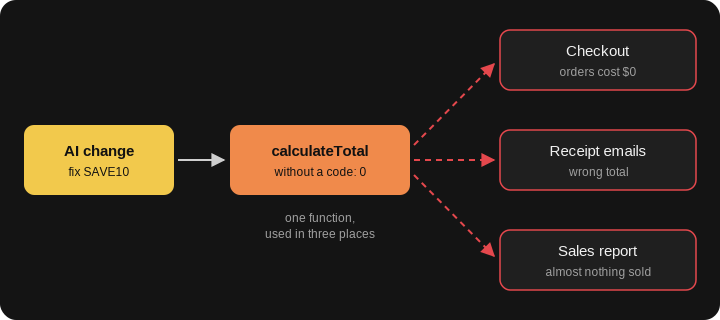
You tested the thing that you asked for. You didn’t test the three things that you didn’t think about. Nothing crashed. No error appeared. The app continued to run, silently wrong, for a whole weekend.
This is the most common way that apps built with AI break. There is no big crash. Instead, something that used to work changes without a sound.
Regressions: when working things stop working
Sometimes something used to work, and then it stopped working after a change. This kind of bug is a regression. The app went backwards.
Regressions happen in every project. But when you build with AI, they become more likely:
- The AI changes many files at once. A small request can change code that other features need.
- The AI doesn’t remember what was working. Each chat starts from nothing. It doesn’t know that checkout without a code was fine yesterday.
- You can’t click through everything after every change. You make ten changes a day. Nobody tests sign-up, login, checkout, password reset and every settings page by hand after each one.
You need something that remembers what must stay true and checks it for you every time. Tests do that.
What an automated test is
An automated test is a small program. It uses your app’s code and checks that the result is what you expect. You write it once. Then a tool runs it in seconds, as often as you like.
Think of a checklist that ticks itself. “Price without a code: correct. Price with SAVE10: correct. Other users’ invoices: hidden.” Every time you run the tests, the tool checks each item again.
Here is a real test. It uses Vitest, a popular test tool for JavaScript projects:
// cart.test.js ... imports test and expect from Vitest, and calculateTotal
const items = [{ priceInCents: 2000, quantity: 2 }];
test("no discount code: full price", () => {
  expect(calculateTotal(items, null)).toBe(4000);
});
test("SAVE10 takes 10% off", () => {
  expect(calculateTotal(items, "SAVE10")).toBe(3600);
});
In plain English:
- Line 1: the file’s name, and a note that the import lines are not shown here. Import lines load code from other files. The real file starts with two tools from Vitest (
testandexpect) and thecalculateTotalfunction from your app. - Line 2: a pretend cart with two items at $20.00 each. Prices are in cents, so 2000 means $20.00. Computers can make very small rounding errors with decimals. So apps often store money in whole cents.
- Lines 3–5: a test named “no discount code: full price”. It calls
calculateTotalwith no code. It expects the answer to be 4000 cents. - Lines 6–8: a second test. With
SAVE10, the answer must be 3600.
To install Vitest, run npm install -D vitest in your project’s terminal. -D saves it as a dev dependency: a package that you need while you build and test, but that your live app does not need. To run the tests, type npx vitest run. npx runs a command that comes from a package, here Vitest. Vitest prints each test with a pass or fail mark. If a result is wrong, it shows what it expected and what it got.
Imagine that you had this file on Friday. The AI’s fix would have made the first test fail. In seconds, Vitest would have told you that it expected 4000 and got 0. You would have known before any customer paid nothing.
Three kinds of tests
Tests are different in how much of your app they use at the same time.
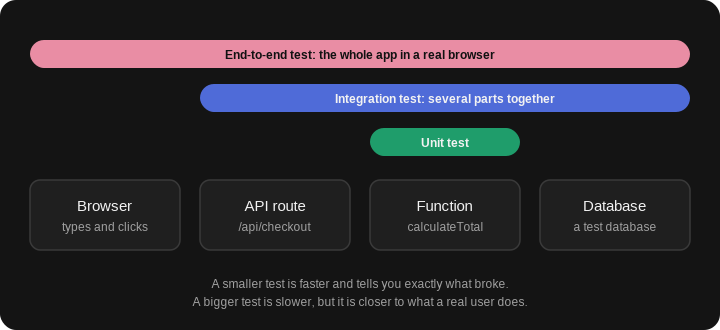
Unit tests: one piece on its own
The test above is a unit test. It checks one small piece of code (a “unit”) with no database, no server and no browser.
- Fast: hundreds run in a second or two.
- Precise: when one fails, you know exactly which function broke.
- Limited: every piece can work alone while the connections between the pieces are broken.
Best for: calculations, rules and anything with many cases, like prices, discounts, dates and permissions.
Integration tests: several pieces together
An integration test checks that several parts work together, for example an API route and the database. Remember the bug from Change one number in the URL, see everyone’s invoices? Any user could read any invoice. The test below finds that bug. It uses Supertest, a package that sends requests to your server from inside a test, with no browser.
// ... imports: request (Supertest), app, and the helpers loginAs and createInvoice
test("users can't read other people's invoices", async () => {
  const invoice = await createInvoice({ owner: "a@example.com" });
  const userB = await loginAs("b@example.com");
  const res = await request(app).get(`/api/invoices/${invoice.id}`).set("Cookie", userB);
  expect(res.status).toBe(404);
});
In plain English:
- Line 1: a note that the import lines are not shown.
requestcomes from Supertest, andappis your server.loginAsandcreateInvoiceare small helper functions. You (or your AI) write them once for your tests. - Line 2: start a test named “users can’t read other people’s invoices”. The steps of the test are in an arrow function. It is
async, because the steps wait for the database and the server withawait. - Line 3: create an invoice that belongs to user A, in the test database.
- Line 4: log in as user B.
loginAsgives back user B’s session cookie. - Line 5: as user B, ask for user A’s invoice. The address is in backticks, so
${invoice.id}puts the invoice’s ID into it, for example/api/invoices/42..set("Cookie", userB)sends user B’s session cookie with the request. - Line 6: the test expects “404 Not Found”. If the ownership check ever disappears, this test fails.
- Line 7: the end of the test.
Integration tests need a database. So they must use a test database, never production. That is the rule from Why you should never test on your real users. Many test setups empty the test database before each run. Then every run starts in the same way.
- Slower than unit tests, because they use a real database.
- Find more problems: wrong database queries, missing checks, routes that don’t connect.
End-to-end tests: a robot user in a real browser
An end-to-end test (often shortened to E2E) opens a real browser. It uses your app the way a person does: it types, clicks and reads the screen. A popular tool for this is Playwright:
import { expect, test } from "@playwright/test";
test("a new user can sign up", async ({ page }) => {
  await page.goto("http://localhost:3000/signup");
  await page.getByLabel("Email").fill(`user-${Date.now()}@example.com`);
  await page.getByLabel("Password").fill("a-long-test-password");
  await page.getByRole("button", { name: "Sign up" }).click();
  await expect(page.getByText("Welcome")).toBeVisible();
});
In plain English:
- Line 1: load the
testandexpecttools from Playwright. - Line 2: start a test named “a new user can sign up”. Playwright gives the test an object, and
{ page }takes itspageproperty.pageis a browser tab that Playwright controls. - Line 3: open the sign-up page of the app that runs on your laptop.
- Lines 4–5: find the field labeled “Email” and type an address. Then type the password.
Date.now()gives the current time as a number, and${...}puts it into the email. So every run signs up a new user. If not, the second run would fail with “email already taken”. - Line 6: find the button called “Sign up” and click it.
- Line 7: check that the word “Welcome” appears on the screen. Line 8 ends the test.
To set up Playwright, run npm init playwright@latest. It asks a few questions and adds Playwright to your project. To run the tests, type npx playwright test. By default, Playwright runs each test in three browsers:
- Chromium: the free, open-source browser that Google Chrome is built on.
- Firefox.
- WebKit: the engine inside Safari. An engine is the part of a browser that shows the page.
E2E tests have strong and weak points:
- Most realistic: it tests the frontend, the backend and the database together.
- Slowest: seconds per test, not milliseconds.
- Most fragile: E2E tests can be flaky. A flaky test passes sometimes and fails sometimes, even when nobody changed the code. For example, it fails when a page loads more slowly than usual.
- Dangerous when flaky: a flaky test teaches people to ignore red results. That is worse than no test.
A comparison
| Unit | Integration | End-to-end | |
|---|---|---|---|
| What it uses | One function | Several parts, often with a database | The whole app in a real browser |
| Speed | Milliseconds | Tenths of a second to seconds | Seconds or more |
| When it fails, you know | Exactly which function | Which feature | Something on this path is broken |
| How many to have | Many | Some | A few, for critical paths |
Which tests are worth writing first
You don’t need hundreds of tests. You need the right ten.
Start with your critical paths: the few things in your app that cost money, lose data or leak data when they break. For most apps, these are:
- Sign-up and login. If they break, nobody can use anything.
- Payments. Checkout, prices, discounts, subscriptions.
- Saving the user’s main data. Whatever your app is for: notes, bookings, invoices.
- Authorization. “User B can’t see or change user A’s data.” You can’t see these bugs during normal use. So tests are the best way to keep them fixed.
- Any calculation with money, dates or limits.
A simple question helps: If this broke tonight, would I need to fix it before breakfast? If the answer is yes, write a test for it. The color of a button doesn’t need a test.
One more rule: every time you find a bug, first write a test that fails because of it. Then fix the bug. That test stops the same bug from coming back. Bugs that come back are some of the most frustrating regressions, and this rule ends them.
Ask for tests before the change, not after
Here is a workflow for building with AI:
- Before you change anything, ask the AI: “Write tests for how checkout works right now. Don’t change any app code.”
- Run the tests. They should all pass. If one fails, the test is wrong or you found an existing bug. Decide which.
- Commit. Now you have a save point with tests that describe working behavior.
- Ask for the change that you wanted.
- Run the tests again. If an old test fails, the change broke something that used to work. You found your regression on your laptop.
Why does this order work? At step 1, the AI describes the app as it is, while it still works. Tests written after a change often describe the app as the AI changed it, with the bugs.
How it goes wrong
The AI “fixes” the test instead of the code. A test fails, and the AI changes the expected value from 4000 to 0, so the test passes. Now the test protects the bug. Tell your AI: “Don’t change existing tests unless I agree the behavior should change.”
Tests that test nothing. Look for these:
expect(true).toBe(true)- tests with no
expectat all - tests marked
test.skip, which Vitest doesn’t run
They make the results look green, but they check nothing.
Fake parts everywhere. Sometimes a test replaces a real part, like the database or a payment service, with a fake stand-in. This fake part is called a mock. It gives back answers that the test chose in advance. Mocks are useful, because tests do not have to call a real payment service. But if a test replaces the thing that it must check with a mock, the test can only pass.
Tests that touch production. A test that signs up users or deletes rows must never use the real database or live payment keys.
Many tests, but not on the critical path. Maybe you have fifty tests for small text helpers and none for checkout. That gives a good feeling but little protection.
Tests that nobody runs. Tests help only if they run after every change. People forget to run them. The next lesson fixes that.
Go deeper: Stop broken code before it ever goes live (Level 3) shows how to run your tests automatically on every push.
Test your own app
You need an app of your own for this part. No app yet? Start with Your first app in an afternoon, with an AI doing the typing.
Test one function first. In a class wall, a good choice is the function that checks a new message before it is posted. Does your app have no such check? Ask your AI: “Add a function that checks a new message before it is posted. Block a message that is empty or longer than 200 characters.”
In an AI app builder (no terminal):
- Ask its AI: “Add one Vitest test file for the function that checks a new message. Test an empty message, a normal message and a message with 201 characters. Then run the tests and show me which pass and which fail.”
- Read each test. Check the expected values yourself. Not every app builder can run tests. If yours can’t, the steps for a terminal below show how to run them on your laptop.
- Break the function on purpose. Ask: “Change the limit in the message check from 200 to 2000 characters. Don’t change the tests. Run the tests again.” At least one test must fail. If none fail, the tests don’t check what you think.
- Go back to the version before the break, in your tool’s version history. Run the tests again, and check that they all pass.
With a terminal (for example, in an AI code editor):
- Open a terminal in your project’s folder. Install Vitest:
npm install -D vitest. - Ask your AI: “Write two or three Vitest unit tests for the function that checks a new message, including one unusual case.” Read each test. Check the expected values yourself.
- Run
npx vitest run. All tests should pass. - Break the function on purpose. For example, change the limit from 200 to 2000. Run the tests again. At least one test must fail.
- Undo the break. Run the tests, and check that they are green again. Commit.
If your app calculates something, like a price or a total, test that function next.
Takeaways
Key terms
- Automated test: a small program that checks that your code gives the expected result
- Regression: something that worked before and broke after a change
- Unit test: checks one piece of code on its own; fast and precise
- Integration test: checks several parts together, such as a route and a database
- End-to-end (E2E) test: a robot user clicks through your app in a real browser
- Flaky test: a test that sometimes passes and sometimes fails with no code change
- Mock: a fake part that replaces a real part inside tests
- Critical path: a feature that costs money, loses data or leaks data when it breaks
Red flags
- The AI edited a test’s expected value to make it pass
- Tests with no
expect, or markedtest.skip - A test file that imports your production database settings
- No tests for sign-up, payments or “users can’t see each other’s data”
- Tests that never failed, not even once on purpose
Ask your AI
- “Before you change anything, write tests for how this feature works now. Don’t change app code.”
- “List the critical paths in my app: anything that handles money, saves user data or checks who can see what. Which ones have no tests?”
- “Write a failing test that reproduces this bug. Then fix the bug, and show me the test passing.”
- “Don’t edit existing tests to make them pass. If a test fails, tell me which behavior changed.”
Going deeper (optional, for readers who want more detail)
Watch mode. If you run vitest without run, it stays open. It runs the tests again every time you save a file. Vitest’s docs say that it changes to a single run automatically in two cases:
- in CI (automatic checks on a server, covered in the next lesson)
- in a terminal that isn’t interactive
vitest run always does a single run, which is what you want in scripts. A common package.json setup is "test": "vitest run".
Test-driven development (TDD). Some developers always write the test first and watch it fail. Then they write the code that makes it pass. The rule in this lesson, “write a failing test for each bug”, is a small part of that idea.
The test pyramid and the testing trophy. Mike Cohn’s 2009 book Succeeding with Agile made the test pyramid popular, and Martin Fowler describes it. It says to have many unit tests, fewer integration tests and very few end-to-end tests. Kent C. Dodds’ testing trophy gives integration tests the largest part. It also adds “static” checks (like type checking and linting) at the base. Dodds argues that tests that are more like real use give more confidence. Both ideas agree on the basics: E2E tests are expensive, so keep them for the paths that are important.
Coverage. Test tools can report code coverage: the percentage of your code lines that ran during tests. It shows what you never tested, which is useful. But a line that ran isn’t always a line that a test checked. A test with no expect can still give high coverage.
Keep tests independent. Each test should set up the data that it needs. It should not need another test to run first. Tests that share data often pass alone and fail together, or the other way round. To prevent this, use unique values (like the Date.now() email above) or reset the test database between tests.
Playwright and your app’s address. Playwright’s settings file can start your development server before the tests run. It can also point tests at a different address, such as a preview deployment. If your previews are protected by a login, your platform’s docs explain how automated tools can get through it.
References (13)
- Getting Started, Command Line Interface and Test API reference: Vitest documentation. Installing with
npm install -D vitest, importingtestandexpect, watch mode versusvitest run(and the automatic single run in CI), andtest.skipnot running a test. - Mocking: Vitest documentation. A mock is a fake version of a service that a test uses in place of the real one.
- npm install and npx: npm Docs.
-Dsaves a package todevDependencies, andnpxruns a command from a package. - Browsers: Playwright documentation. Playwright uses open-source Chromium builds for Chrome and Edge, and WebKit for the closest experience to Safari.
- Installation: Playwright documentation.
npm init playwright@latest,npx playwright test, and tests running in Chromium, Firefox and WebKit by default. - Web server: Playwright documentation. Starting your development server before the tests and setting a
baseURLto test another address. - Supertest README: Supertest. Sending HTTP requests to your app inside a test, without a browser.
- Test Pyramid: Martin Fowler (2012). Many more unit tests than end-to-end tests, and Mike Cohn’s “test automation pyramid” from Succeeding with Agile (2009).
- On the Diverse And Fantastical Shapes of Testing: Martin Fowler (2021). The pyramid compared with shapes like the trophy that favor integration tests.
- The Testing Trophy and Testing Classifications: Kent C. Dodds (2021). The trophy with static checks at the base, and “the more your tests resemble the way your software is used, the more confidence they can give you”.