Level 4 · Reliability & scale
How does a rate limiter count to 100?
- Fixed window
- Window boundary bursts
- Sliding window log
- Sliding window counter
- Token bucket
- Leaky bucket
- Shared counters in Redis
- Atomic operations
- RateLimit headers
How does a rate limiter count to 100?
Before you start This lesson uses a few words from earlier lessons:
- Rate limit: counting each client’s requests in a period of time, and refusing the extra ones with 429 Too Many Requests. (Bots signed up 10,000 times overnight. Now what?)
- Redis: a fast in-memory store that every copy of your app can share. (Fast, but showing yesterday’s data)
- TTL: how many seconds a Redis key lives before Redis deletes it. (Fast, but showing yesterday’s data)
- Race condition: a bug where the result depends on which of two things happens first. (A customer got charged twice. How?)
200 requests in two seconds
Other developers pay to use your search API (a service that programs call over the internet). Each search calls a paid AI model, so it costs you money. You set a rule: 100 requests per minute per API key (the secret code that identifies each customer). The AI added a rate limiting package. In your test, the 101st request got a 429. Done.
A week later, your bill is higher than you expected. In the logs, you find a script from one customer. It sent 100 requests at 10:00:59 and 100 more at 10:01:00. That is 200 requests in two seconds, and your limiter allowed every one.
So you add a quick fix: a limit per second too. Now a different customer complains. Their mobile app sends 15 requests at once when it opens, and the limiter blocks half of them.
The limiter had no bug. The problem is that “100 per minute” is not one rule.
Which minute? When does it start? Can a client save unused requests for later? Where do you keep the counter when you have five servers? Each rate limiting algorithm (a fixed recipe for counting) answers these questions differently. This lesson shows the five common algorithms and the cost of each.
The mental model: what does “recently” mean?
Every rate limiter answers one question on every request: “Has this client made too many requests recently?”
The algorithms differ in what “recently” means and how much they remember:
| Algorithm | What it remembers per client | “Recently” means |
|---|---|---|
| Fixed window | One counter | Since the current minute started |
| Sliding window log | Every request’s time | Exactly the last 60 seconds |
| Sliding window counter | Two counters | An estimate of the last 60 seconds |
| Token bucket | Tokens left + last update time | Whatever you saved up, refilled at a steady speed |
| Leaky bucket | A queue (or a level) + last update time | Requests leave at a steady speed |
Think of a school library that allows 3 books per student per week. “Per week” can mean different things:
- “Monday to Sunday” (a fixed window)
- “the last 7 days from today” (a sliding window)
- “you get a new book every 2 days, and you can save up to 3” (a token bucket)
All three sound like “3 per week”, but on a Sunday night they give very different results.
1. Fixed window
Divide time into fixed blocks, like 10:00:00–10:00:59, then 10:01:00–10:01:59. Keep one counter per client per block. When the block ends, a new counter starts at zero.
async function allowFixedWindow(clientId, limit = 100, windowSec = 60) {
  const windowNo = Math.floor(Date.now() / 1000 / windowSec); // which minute is it?
  const key = `rl:${clientId}:${windowNo}`;
  const [count] = await redis.multi().incr(key).expire(key, windowSec).exec();
  return count <= limit; // false → reply 429
}
In plain English:
- Line 2: Calculate the number of the current window. Every request in the same minute gets the same number.
- Line 3: Make a Redis key for this client and this window, like
rl:key_42:29512345. - Line 4: In one step, add 1 to the counter of that key (
INCR) and give it a TTL (EXPIRE). The TTL makes Redis delete old windows.INCRreturns the new count. - Line 5: Allow the request if the count is still within the limit.
Good: very little memory (one number per client), one fast Redis call, and easy to understand.
The edge problem: the counter resets at the boundary between windows. So a client can use its whole limit at the end of one window, and again at the start of the next.
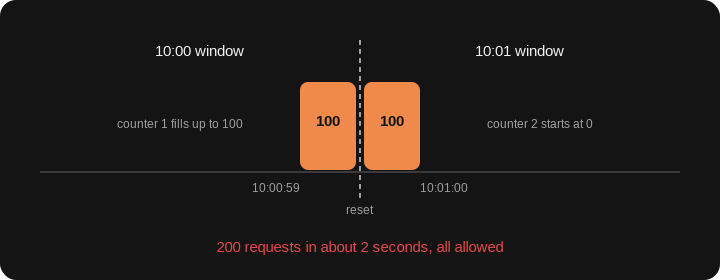
So a “100 per minute” fixed window really allows up to 200 in a short moment. For login protection, that can be acceptable. For an expensive API, it can double your worst-case cost.
express-rate-limit is the package from the earlier rate limiting lesson. It starts each client’s window at their first request, not at the start of the clock minute. But it is still a fixed window, with the same edge problem.
2. Sliding window log
Remember the time of every request. On each new request, forget the times older than 60 seconds and count the rest. This is an exact answer to “how many in the last 60 seconds?”.
Redis has a good tool for this: a sorted set, a list of items kept in order by a number called a score. Here, the score is the time:
const now = Date.now();
const key = `rl:log:${clientId}`;
await redis.zRemRangeByScore(key, 0, now - 60_000); // forget requests older than 60 s
const recent = await redis.zCard(key); // how many are left?
if (recent >= 100) return false; // over the limit → 429
await redis.zAdd(key, { score: now, value: `${now}:${crypto.randomUUID()}` });
await redis.expire(key, 60);
return true;
In plain English:
- Line 3: Delete every saved request that is older than 60 seconds.
- Lines 4–5: Count the requests that are left. If there are 100 or more, refuse.
- Lines 6–7: If not, save this request with the current time, and give the whole key a TTL. The random ID makes sure that two requests in the same millisecond don’t overwrite each other.
Good: the count is exact. There is no burst at the boundary.
Bad: memory. With a limit of 5,000 per hour, a busy client needs up to 5,000 entries. The engineers at Cloudflare rejected this method for that reason.
There is also a hidden bug. These are separate Redis commands, so two servers can both count 99 and both allow a request. The fix comes later.
3. Sliding window counter
This method is a compromise. Keep two fixed-window counters: the previous window and the current one. Then estimate the requests in the last 60 seconds, as if the previous window’s requests were spread evenly.
Cloudflare described this method in a 2017 engineering blog post, with this example:
- The limit is 50 per minute.
- The current minute started 15 seconds ago, and the client made 18 requests in it.
- In the previous minute, the client made 42 requests.
The last 60 seconds are the 15 seconds of this minute, plus the last 45 seconds (75%) of the previous minute. So the estimate is:
estimate = 42 × 0.75 + 18 = 49.5 → under 50, allowedYou store the two counters with INCR, as in the fixed window. The only new work is this one line of arithmetic.
Good: two numbers per client, and no big burst at the boundary.
Bad: it is an estimate. If the previous minute’s requests were close together, the estimate is a little wrong. Cloudflare tested it on 400 million requests from 270,000 sources. It reported that only 0.003% of requests were wrongly allowed or wrongly limited. For most apps, that is accurate enough.
4. Token bucket
Think of a bucket that holds up to 20 tokens. Tokens drip in at a steady speed, for example 100 per minute (one every 0.6 seconds). Each request takes one token. If there is no token, the request gets a 429 reply.
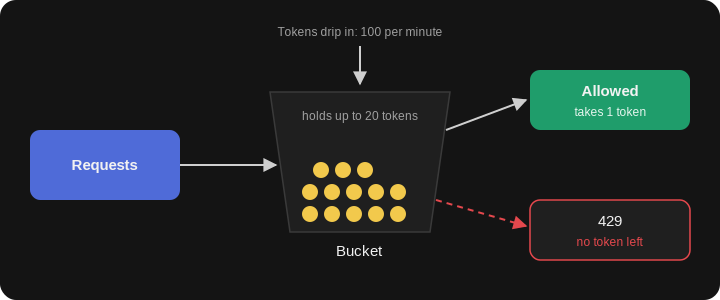
This gives you two separate settings:
- The refill rate controls the average: 100 per minute over time.
- The bucket size controls the burst: up to 20 at once, if the client was quiet before.
That is exactly what the mobile app in the story needed: 15 requests at once, then quiet.
You don’t need a timer that adds tokens. Store the tokens left and the time of the last update, and calculate the new tokens on every request:
function takeToken(bucket, now, size = 20, perSec = 100 / 60) {
  const secondsPassed = (now - bucket.updatedAt) / 1000;
  bucket.tokens = Math.min(size, bucket.tokens + secondsPassed * perSec); // refill
  bucket.updatedAt = now;
  if (bucket.tokens < 1) return false; // empty → 429
  bucket.tokens -= 1;
  return true;
}
In plain English:
- Lines 2–3: Calculate how many tokens dripped in since the last request, and add them. Never go above the bucket size.
- Line 4: Remember the time of this update.
- Lines 5–7: If there is less than one whole token, refuse. If not, take one token and allow the request.
Good: small memory, controlled bursts and a smooth average. It is widely used. In 2017, Stripe wrote that it uses the token bucket algorithm for its API rate limits, with the buckets kept in Redis.
Bad: you must choose two settings, not one. And the limiter always allows a burst up to the bucket size, so choose it with your costs in mind.
5. Leaky bucket
The name describes a bucket with a small hole at the bottom. Requests pour in at any speed. They leak out at a steady speed. If the bucket overflows, the limiter refuses the extra requests.
People use the term in two ways:
- As a queue: requests really wait in line (a queue), and your server handles them at a fixed speed, like 10 per second. The output is perfectly smooth. Requests are delayed, not refused, until the queue is full.
- As a meter: no request waits. You only track a “water level” that goes down over time. You refuse requests that would make it overflow. In this form, it works the same as a token bucket seen from the other side.
The queue version is good when the thing behind the limiter needs a steady flow, like a partner’s API that allows 10 requests per second. It is bad for requests from users, because a wait in a queue looks like a frozen app.
NGINX is a popular web server (a program that receives requests and passes them to your app). It uses a leaky bucket for its limit_req feature. Its burst setting is the queue size. The nodelay setting serves queued requests at once and does not space them out. By default, NGINX refuses extra requests with status 503, not 429. The limit_req_status setting changes that.
Comparing them
| Memory per client | Bursts | Accuracy | Good for | |
|---|---|---|---|---|
| Fixed window | 1 number | Up to 2× the limit at boundaries | Low at boundaries | Simple limits, login protection |
| Sliding window log | 1 entry per request | None | Exact | Low limits where exactness matters |
| Sliding window counter | 2 numbers | Small | Very close | Large public APIs |
| Token bucket | 2 numbers | Up to the bucket size, on purpose | Exact for its rules | APIs with bursty real clients |
| Leaky bucket (queue) | A queue | Smoothed out by waiting | Exact | Calling a partner with a strict rate |
How it goes wrong at scale
Counters that don’t share
If each server keeps its own counter in memory, a limit of 100 across 5 servers becomes about 500. On serverless platforms, the number of copies also changes with traffic. So every algorithm above needs its numbers in shared storage that all copies use. Redis is the usual choice. It is fast and has counters, TTLs and sorted sets built in.
Check, then write: the race
Shared storage brings a new problem. Look at this pattern:
const count = Number(await redis.get(key)); // read
if (count >= 100) return false; // decide
await redis.set(key, count + 1); // write
Between the read and the write, another server can do the same read. Both servers see 99, both allow the request, and both write 100. Under heavy traffic, this happens often, and more requests get through than the limit allows.
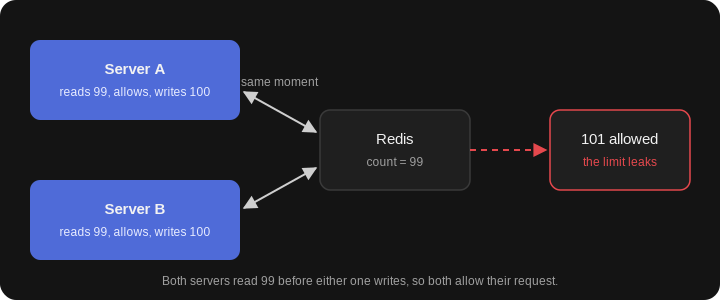
The fix: make the check and the update one atomic step. An atomic step is a single step, and nothing else can run in the middle of it.
- For counters, use
INCR. It adds 1 and returns the new value in one step. So two servers always get different answers (100 and 101). - Some algorithms have several steps, like the sliding window log or the token bucket. Put that logic in a small Lua script (Lua is a small programming language) that runs inside Redis. The Redis docs promise that a script runs atomically: nothing else happens while it runs. Many rate limiting packages that support Redis do this for you.
Redis is slow or down
Now every request makes a trip over the network to Redis. So keep Redis close to your servers. Also decide in advance what happens if Redis doesn’t answer:
- Fail open means that you allow the request. The app stays up, but there is no limit for a while.
- Fail closed means that you refuse the request. The limit holds, but every user is blocked.
Many apps fail open for normal endpoints (the addresses that your API answers on). They fail closed for endpoints where each call costs real money. Make this a decision, not an accident, and log it.
What good looks like
- Choose the algorithm from the behavior you want.
- Clients that send bursts but behave well: token bucket.
- A hard limit with no tricks at the boundary: sliding window counter.
- A steady flow to a service that breaks easily: leaky bucket queue.
- Simple login protection: a fixed window is fine.
- Store counters in shared storage and update them atomically.
- Tell clients the rules. Send
Retry-Afterwith every 429. You can also send the newerRateLimitandRateLimit-Policyheaders, which show how much of the limit is left. - Expect these headers to change. They come from a draft at the IETF, the group that writes internet standards. In November 2026, it is still an Internet-Draft (a work in progress), not a finished standard.
express-rate-limitcan send them with itsstandardHeadersoption (thedraft-7ordraft-8setting). - Limit by cost, not only by count. A search that calls an AI model can take 10 tokens from the bucket, and a simple lookup only 1.
Go deeper: Your app went viral. Will it survive? (Level 4) covers many servers behind a load balancer, where shared counters matter most.
Test your own app
You need an app of your own for this part. No app yet? Start with Your first app in an afternoon, with an AI doing the typing. Built it in an AI app builder? Ask its AI to do each step below for you, or to add the missing part first (for example, a login).
Only test your own apps, on your laptop or a private test copy.
- Find the algorithm. Ask your AI: “Which rate limiting algorithm does my app use? Where are the counters?” If the answer is “fixed window in memory”, write it down.
- Test the boundary. Send your full limit in a burst. Wait for the window to reset, then send the full limit again at once. With a fixed window, both bursts succeed. Is that acceptable for this endpoint?
- Test with several copies. Run two copies of your server on your laptop, at
localhost:3000andlocalhost:3001. Send half your requests to each copy. Does the limit still hold? If each copy allows the full limit, the counters aren’t shared. - Test a burst. Open the browser console (the place in developer tools where you can run JavaScript). Send 20 requests at the same moment. Ask your AI for a
Promise.allloop, which starts them all together. Does a normal burst get through? Does a much bigger one get stopped?
Takeaways
Key terms
- Fixed window: one counter per time block; resets at the boundary
- Sliding window log: remembers the time of every request; exact, but uses a lot of memory
- Sliding window counter: estimates the last minute from two counters
- Token bucket: tokens refill at a steady rate; the bucket size allows controlled bursts
- Leaky bucket: requests leave at a steady rate; as a queue, it delays requests and does not refuse them
- Atomic operation: a step that nothing else can run in the middle of
Red flags in AI-written code
- A fixed window that protects an expensive endpoint, and nobody knows about the 2× boundary burst
- Counters in a variable or the default memory store, in an app with several servers or serverless functions
- A read of the count, then a write of the count, as two separate Redis commands
- No decision about what happens when Redis is down
- 429 replies with no
Retry-After - A per-second limit so strict that one normal page load goes over it
Ask your AI
- “Which rate limiting algorithm does each limiter in my app use? What is the worst-case number of requests one client can get through in 2 seconds?”
- “Are my rate limit counters shared across all servers and updated atomically? Show me the exact Redis commands.”
- “Switch my AI endpoint’s limiter to a token bucket: 100 per minute, a burst of 20, stored in Redis. Send Retry-After on 429.”
Going deeper (optional, for readers who want more detail)
Rate limiting as a cost meter. The IETF draft lets a server count quota in units other than requests, for example content bytes or concurrent requests. It does this with a qu parameter on RateLimit-Policy. Even if you don’t send the headers, the idea is useful: count what costs you money.
Limits on requests in progress. Stripe’s 2017 post describes a second limiter. It limits how many requests a client has in progress at the same time, not per second. It protects you from a few very slow, expensive requests, which a per-second limit can’t see.
Remember who is blocked. Cloudflare’s 2017 post describes how each server caches the decision “this client is blocked” once the client reaches a limit. Then a blocked client doesn’t cost a lookup in shared storage on every request.
Redis key patterns. The Redis INCR docs show two rate limiter patterns. The first uses one key per client per second, with INCR and EXPIRE sent together in a MULTI/EXEC block. The second uses a single key per client. For the second pattern, the docs point out a race condition and fix it with a Lua script.
References (8)
- How we built rate limiting capable of scaling to millions of domains: Cloudflare blog, 2017. The sliding window counter formula, the 42 × 0.75 + 18 example, the 0.003% result on 400 million requests, and why the sliding window log was rejected.
- RateLimit header fields for HTTP: IETF Datatracker. The
RateLimitandRateLimit-Policyfields and the draft’s status as a working group Internet-Draft, not an RFC. - Scaling your API with rate limiters: Stripe blog, 2017. Token buckets stored in Redis, and concurrent request limiters.
- Configuration - express-rate-limit: express-rate-limit docs. Each client’s window starts at their first request, and the
standardHeadersoption (draft-7ordraft-8) sends the draftRateLimitandRateLimit-Policyheaders. - Limiting Access to Proxied HTTP Resources: NGINX docs.
limit_reqas a leaky bucket,burst,nodelay, the default 503 andlimit_req_status. - Leaky bucket: Wikipedia. The meter and queue versions, and the meter’s equivalence to a token bucket.
- INCR: Redis docs. Atomic counters and the rate limiter patterns, including the race condition.
- Scripting with Lua: Redis docs. Scripts run atomically, with all other server activity blocked while they run.