Level 4 · Reliability & scale
Fast in the US, painfully slow in India
Fast in the US, painfully slow in India
Before you start This lesson uses a few words from earlier lessons:
- Request and response: the browser asks a server for something, and the server answers. (Every website is a conversation. Here’s how it goes)
- Handshake: the start of a secure HTTPS connection. Both sides agree on how to talk before any page is sent. (What the padlock icon really protects, and what it doesn’t)
- CDN: servers in many countries that keep copies of your files close to visitors. (From your laptop to a real website in one push)
- Cache-Control: the header that tells browsers and CDNs if they can keep a copy of a response, and for how long. (Fast, but showing yesterday’s data)
“It takes four seconds to open”
You live in New York. You built a recipe app with AI. It is a Next.js app on Vercel, with a Postgres database on Supabase. On your laptop, every page appears almost at once.
You share it on a forum, and hundreds of people sign up. Many of them are in India. Within a day, the messages arrive:
“The home page takes about four seconds. Every click feels sticky.”
You check your logs, the records that your server writes about each request. Every request finishes in about 40 milliseconds (ms), or thousandths of a second. There are no errors. From New York, the app is still fast.
Nothing is broken. Your server is not slow. It is far away. Every message between a phone in Bengaluru and a server near Washington, D.C. crosses half the planet. A single page needs many of those messages, one after another.
This lesson explains where those four seconds come from. It also shows three tools that get most of them back. They are CDNs, the right region (the area where your code and data run), and fewer trips.
The mental model: distance costs time, on every trip
Two different words describe how “fast” a connection is:
- Latency is the time a message takes to travel from one place to another. The time to get there and get the answer back is the round-trip time, or RTT.
- Bandwidth is how much data the connection can carry per second. Internet plans advertise this number, for example “100 megabits per second”.
Think of delivery vans that drive between two cities. Bandwidth is the size of the vans. Latency is the time that the drive takes. Bigger vans help when you have a lot to move. But they never make the drive shorter.
Where this comparison stops working: a van can drive faster on an empty road. Internet signals cannot. They already travel through glass fiber cables at close to the speed of light, and nothing makes them faster. There are only two ways to save time: a shorter distance or fewer trips.
The speed-of-light limit
Light in a vacuum travels about 300,000 km per second. Inside a glass fiber, it slows to about two-thirds of that: roughly 200,000 km per second. From that number, you get a useful estimate:
Every 1,000 km of cable adds about 10 ms to a round trip.
Washington, D.C. to Mumbai is about 12,850 km in a straight line. A round trip through a perfectly straight cable would take about 130 ms (25,700 km at 200,000 km per second). Real cables do not go straight. They follow roads, railways and sea routes that avoid fishing grounds and earthquake zones. Also, each router (a device that passes data toward its destination) on the way adds a little delay.
Microsoft publishes the measured round-trip times between its own data centers. These are approximate typical values from its 2026 data:
| Between | Typical round trip |
|---|---|
| Two data centers in the same area (East US and East US 2) | about 8 ms |
| East US and West US | about 67 ms |
| East US and Western Europe | about 83 ms |
| Central India and South India | about 20 ms |
| East US and Central India | about 200 ms |
These are fast, private networks. A phone on mobile data or home Wi-Fi adds more time. So for a user in India and a server in the eastern US, 200 ms per round trip is optimistic.
So a faster internet plan in India changes almost nothing. Bandwidth was never the problem.
One page, many round trips
200 ms does not sound like much. But a page needs many round trips. Many of them must happen in order, and each one waits for the one before.
Here is a first visit to your app over HTTPS:
- Open a connection (called TCP): 1 round trip.
- The HTTPS handshake: 1 more round trip with modern TLS 1.3 (the current version of the HTTPS security rules). The older TLS 1.2 needs 2.
- Ask for the page: 1 round trip. The HTML arrives.
- The HTML names CSS and JavaScript files. The browser did not know about them until now, so it asks for them: another round trip.
- The JavaScript runs and asks your API (the server routes that send data to the page) for the recipes: another round trip.
- Your API answers. The page then asks for the images in the recipes: another round trip.
That is at least six trips in a row. At 200 ms each, that is 1.2 seconds of waiting. This time does not include downloading anything or running any code. In New York, the same six trips take maybe 20 ms each, so about 0.1 seconds. It is the same app and the same server, but it is ten times slower.
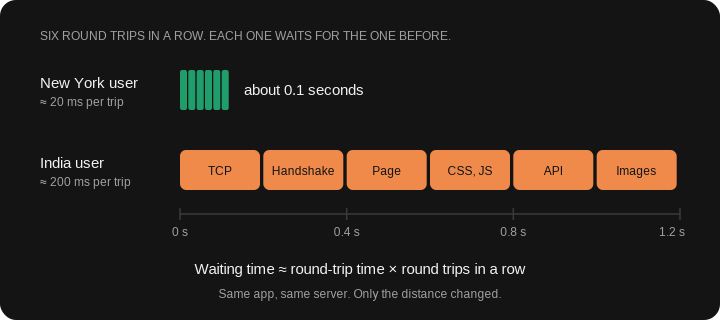
A chain of requests where each one waits for the one before is a waterfall. Your browser’s developer tools (the built-in panel that shows each request) draw it as bars. Each bar starts where the bar above it ends. Remember this formula:
Waiting time ≈ round-trip time × number of round trips in a row
How it goes wrong
Problem 1: Everything comes from one faraway place
If one server in one city sends everything, every file costs round trips to that city. A user in India waits 200 ms per trip for a logo that never changes.
Hosting platforms like Vercel and Netlify automatically put the files from your build on their CDN. But AI-written apps often load files from other places. One example is images that come straight from a storage bucket (an online folder for files) in one region. Another example is a font from another website. Those files skip the CDN.
Problem 2: The function and the database are far apart
You read that distance is the problem. So you create a new Supabase project in Mumbai, close to your users, and you move your data there.
The app gets slower.
Here is why. Your Vercel functions (the server code that Vercel runs for each request) still run in Vercel’s default region: iad1, Washington, D.C. Vercel chose that default because most databases that apps connect to are on the US East Coast. Now each question from your function to the database crosses the ocean and back.
Look at a typical route (the code that answers one URL) that the AI can write:
export async function GET(request) {
  const user = await getUser(request);                        // 1 trip
  const recipes = await db.recipe.findMany({ where: { authorId: user.id } }); // 2
  const saved = await db.save.count({ where: { userId: user.id } });         // 3
  const tags = await db.tag.findMany();                       // 4
  return Response.json({ user, recipes, saved, tags });
}
In plain English:
- Lines 2–5: four database queries (questions to the database). Each
awaitmeans “stop here until the answer comes back”. So each one is a full round trip to the database. - Line 6: send everything back to the browser.
If the function and the database are in the same region, each query takes about a millisecond for the round trip. Four queries cost a few milliseconds. If the function is in Washington and the database is in Mumbai, each query costs about 200 ms. The same four lines now take 800 ms. This happens on every request, for every user, wherever they are.
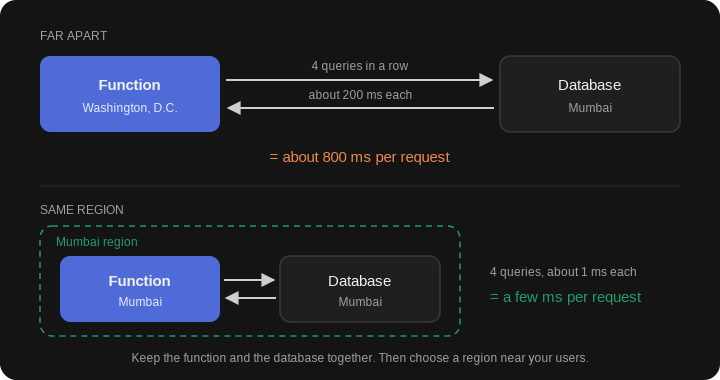
This is a common slowdown in AI-built apps. The AI created the database in one region. The hosting platform used its default region for the code. Nobody compared the two.
Problem 3: Many small trips in a row
Even in the right place, too many trips in a row add up. Here are two common shapes:
- In the browser: the page fetches
/api/userand waits. Then it fetches/api/recipesand waits. Then it fetches/api/saved. That is three round trips from India, one after another. - On the server: a loop runs one database query per item. A list of 50 recipes becomes 50 trips to the database.
Go deeper: One page, 500 database queries (Level 4) covers the “one query per item” problem and how to fix it.
What good looks like
Step 1: Serve every file from a CDN
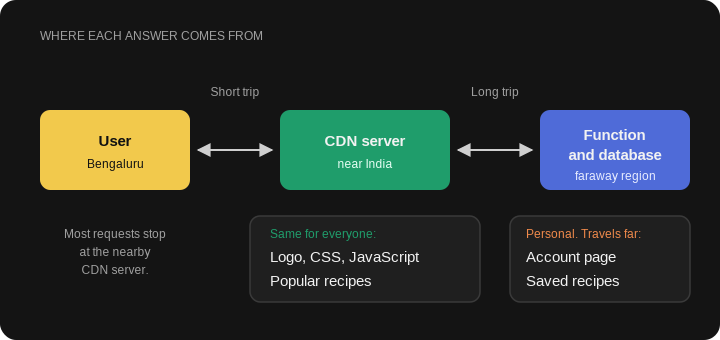
A CDN’s server locations are called points of presence (PoPs). Vercel, for example, has more than 100. When a user in Bengaluru asks for your logo, a server in or near India answers. It answers in a small part of the 200 ms. Your build’s files are already on the CDN. Check the other files:
- Images that users upload: serve them through a CDN, not straight from the storage bucket’s own address.
- Fonts and scripts from other websites: host them yourself where you can, so they come from your own CDN.
Step 2: Let the CDN keep public API answers too
A CDN can also keep copies of answers from your functions. But it does this only when you tell it to. Use it only for data that is the same for everyone. On Vercel, you do this with a Cache-Control header that includes s-maxage:
export async function GET() {
  const recipes = await getPopularRecipes();
  return Response.json(recipes, {
    headers: { "Cache-Control": "public, s-maxage=60, stale-while-revalidate=300" },
  });
}
In plain English:
- Line 2: get the list of popular recipes. It is the same for every visitor.
- Line 4: tell the CDN that it can keep this answer for 60 seconds (
s-maxage=60). After that, it can continue to give out the old copy for up to 300 more seconds. During that time, it gets a fresh copy in the background (stale-while-revalidate=300).
Now users in India get the popular recipes from a nearby CDN server. Your function runs about once a minute per location, not once per visitor.
Do not use this for personal data. A CDN gives the same copy to everyone.
Go deeper: Your cache expired and the database collapsed (Level 4) explains
stale-while-revalidateand how long to keep copies.
Step 3: Keep the function and the database together, then choose where
Big providers put their data centers into groups called regions. Examples are “US East”, “Mumbai” and “Frankfurt”. When you create a database or set up your functions, you choose a region.
Follow these two rules, in this order:
- Put the function and the database in the same region, or as close as possible. Vercel’s own documentation says this.
- Then put that region near most of your users.
| Your users | A good choice |
|---|---|
| Mostly in India | Function and database both in Mumbai (Vercel bom1, Supabase or AWS ap-south-1) |
| Mostly in Europe | Both in Frankfurt, London or Paris |
| All over the world | Both in one central region, often US East, with a CDN in front of everything public |
On Vercel, you set the function region in your project settings or in vercel.json:
{
  "regions": ["bom1"]
}
This tells Vercel to run your functions in Mumbai. The free Hobby plan allows one region. Most apps need only one.
Moving a database later is harder than moving code. For example, Supabase cannot change a project’s region in place. You must create a new project and move your data. So choose the database region on purpose, on the first day. If the AI creates the database, ask it which region it used.
Your users can be split between India and the US. Then one region cannot be close to all of them. With a CDN in front, files and public pages are still fast for everyone. Only personal API calls travel to your one region. For most apps, this is a good balance.
Step 4: Fewer trips in a row
Look for trips that do not need to wait for each other. In the route from Problem 2, the recipes, the saved count and the tags do not depend on each other. Start them all at once:
const [recipes, saved, tags] = await Promise.all([
  db.recipe.findMany({ where: { authorId: user.id } }),
  db.save.count({ where: { userId: user.id } }),
  db.tag.findMany(),
]);
In plain English:
- Lines 2–4: start all three queries at the same time. Each one returns a Promise: JavaScript’s placeholder for an answer that arrives later.
- Line 1:
Promise.allwaits until all three answers are back. Then it gives them to you in the same order.
Three waits become one. If the database is 50 ms away, you save about 100 ms on every request.
The same idea works in the browser. Do not make three API calls in a row. Make one route that returns everything the page needs.
Go deeper: One slow request froze the whole server (Level 4) explains
awaitand Promises in more detail.
Test your own app
You need an app of your own for this part. No app yet? Start with Your first app in an afternoon, with an AI doing the typing. Built it in an AI app builder? Ask its AI to do each step below for you, or to add the missing part first (for example, a login).
- Find your two regions. In Vercel, open your project’s Settings → Functions and find the function region. In your database dashboard (in Supabase, the project settings), find the database region. If they are different, that is your first fix.
- See where a request ran. On Vercel, open developer tools and click the Network tab. Reload, then click a request to one of your API routes. The
x-vercel-idresponse header lists the Vercel regions that the request passed through. This list includes the region where the function ran. - Read the waterfall. In the same Network tab, look at the Waterfall column. Bars that start only when another bar ends are trips in a row. Count how many trips your page needs before the main content appears.
- Pretend to be far away. In Chrome’s developer tools settings, under Throttling, add a custom network profile with a latency of 200 ms. Select it in the Network tab and reload. It is only an imitation. But it shows which pages suffer most from many trips.
- Check what the CDN keeps. On Vercel, the
x-vercel-cacheresponse header saysHITwhen the CDN answered from its copy. It saysMISSwhen your function ran. Reload a public route two times and check the header.
Takeaways
Key terms
- Latency: how long a message takes to travel. Distance and the speed of light limit it.
- Round-trip time (RTT): the time to get there and back. About 10 ms per 1,000 km of cable, plus extra delay on the way.
- Bandwidth: how much data per second a connection can carry. It does not shorten the trip.
- Waterfall: requests that each wait for the one before. Their round trips add up.
- Region: a group of data centers in one area. You choose one for your functions and one for your database.
- Point of presence (PoP): one of a CDN’s server locations, close to users.
Red flags
- The function region and the database region are different, or nobody knows what they are
- A route with many
awaited database queries in a row that do not depend on each other - Images or fonts that load from a single faraway server, not from a CDN
- A page that makes API call after API call, each waiting for the last
- Personal data with a
publicors-maxagecache header
Ask your AI
- “Which region do my functions run in, and which region is my database in? Show me where each is configured.”
- “In this route, which database queries are independent of each other? Rewrite it so they run at the same time.”
- “List every request this page makes before the main content appears, in order. Which ones wait for an earlier one, and can any be combined?”
Going deeper (optional, for readers who want more detail)
Fewer handshake trips. TLS 1.3 needs one round trip for its handshake. TLS 1.2 needs two. A browser can reconnect to a server that it visited recently. Then TLS 1.3 can send the first request with no handshake round trip at all. This feature is called 0-RTT.
HTTP/3 goes further: it combines the connection setup and the TLS handshake. None of these make a round trip shorter. They only reduce how many round trips you need.
Connections that stay open. Browsers keep connections open and use them again for the next requests to the same server. So the browser pays for the setup trips once, not once per file.
Your server should do the same with its database. A new database connection costs several round trips of its own. Your app went viral. Will it survive? covers connection pooling: a set of open database connections that your code uses again and again.
Where the CDN meets the region. On Vercel, the nearest point of presence receives the request. It sends the request over Vercel’s private network to the region where your function runs. The connection to the nearby server is fast. But the trip to the function region still happens for anything that the CDN cannot answer from its cache (its stored copies).
The median is not everything. Microsoft’s numbers are medians, also called “P50”: half of the measured trips were faster, and half were slower. Real users also see the slow half. When you measure your own app, look at the slower requests too. People often call these P95 or P99. P95 is the time that 95% of requests stay under, and P99 is the time that 99% stay under.
Read replicas. Some apps keep the main database in one region and add read-only copies in other regions. These copies are called read replicas. Reads come from the nearby copy. Writes still travel to the main database, and the copies can be slightly behind. This helps apps with many reads and users on several continents. But it adds cost, and it adds the “slightly old data” problem from caching.
Functions near the user, database far away. Some platforms can run code in many cities at once, near each user. That is good for work that does not touch your database, such as redirects or a cookie check. But a database query brings back Problem 2. Each query travels from the user’s city to the database’s region.
References (8)
- Azure network round-trip latency statistics: Microsoft Learn. Measured median round-trip times between data center regions (East US to Central India about 200 ms, and the other values in the table).
- It’s Time to Learn About Latency: TeleGeography. Light in fiber at roughly 203,000 km per second, about 10 ms of round trip per 1,000 km, and why real cable routes are longer.
- Introducing 0-RTT: Cloudflare. Round trips for a new HTTPS connection: one for TCP, one for the TLS 1.3 handshake (two for TLS 1.2), and 0-RTT for returning visitors.
- Global network and regions: Vercel. Points of presence, region codes such as
iad1andbom1, functions defaulting toiad1, and running functions in the same region as the database. - Choosing deployment regions: Vercel. Why
iad1is the default and how distance between a function and its data source affects response times. - Cache-Control headers: Vercel. Caching function responses on the CDN with
s-maxageandstale-while-revalidate. - Change project region: Supabase. A project’s region can’t be changed in place; you create a new project and migrate.
- Response headers: Vercel. The
x-vercel-idheader (regions a request passed through and where the function ran) and thex-vercel-cachevaluesHITandMISS.