Level 4 · Reliability & scale
How one server handles thousands of users at once
- Processes vs threads
- Concurrency vs parallelism
- CPU cores
- Shared memory
- Thread pool
- Worker threads
- Cluster
- Instances
How one server handles thousands of users at once
Before you start This lesson uses a few words from earlier lessons:
- Process: a running program, with its own space in memory. (Your app restarted and all the likes vanished)
- Event loop: the loop in Node.js that runs your JavaScript on one main thread. It picks up each task when the task is ready. (One slow request froze the whole server)
- Race condition: a bug where the result depends on which of two requests finishes first. (A customer got charged twice. How?)
- Serverless function: backend code that a platform starts only when a request arrives. (From your laptop to a real website in one push)
2,000 users, 2 cores
A newsletter writes about your app. By lunchtime, 2,000 people have it open. About every 10 seconds, each of them clicks something, and your server answers. You open your hosting dashboard. It shows the server (the computer) that your app runs on: 2 CPU cores and 1 GB of memory.
A CPU core is one part of the CPU that can follow one list of instructions at a time. A CPU with 2 cores can really do 2 things at the very same moment, and no more.
So how do 2 cores serve 2,000 people? Nobody waits 1,000 turns for a page. Each click comes back in a fraction of a second.
Then something stranger happens. Your “only 1 left in stock” item sells twice. Your login limit of 5 tries lets someone try 15 times. Nothing crashed, and every test that you ran alone worked.
Both problems have the same answer. A server splits its work into processes and threads, which run on cores. The answer is in how it does this, and which memory they share.
Mental model: kitchens and cooks
The Level 1 lessons compared a computer to a kitchen. Now make that kitchen into a restaurant.
- A process is a whole kitchen. It has its own worktop (memory) and its own ingredients (data). Cooks in one kitchen can’t touch the worktop of another kitchen. The operating system (the main program of the computer) builds the walls between them.
- A thread is one cook inside a kitchen: one line of work inside a process. The main thread from the event loop lesson is one of these. One process can have several threads, and they all share the same memory, like cooks at one worktop.
- A core is a stove. Cooks can cook only at a stove. With 2 stoves, at most 2 cooks really cook at any moment, however many cooks you have.
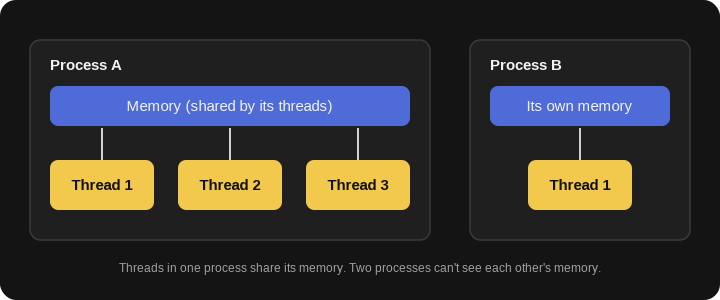
| Processes | Threads (in one process) | |
|---|---|---|
| Memory | Each has its own | Shared by all threads |
| Talking to each other | Slow: must send messages | Fast: read the same variables |
| If one crashes | The others keep running | Often the whole process dies |
| Cost to start | Higher | Lower |
Where the comparison stops working: a real cook can’t change stoves hundreds of times a second. The operating system can. It pauses one thread, saves its place, and lets another thread run on that core. The name for this is a context switch. It’s fast, but not free.
Concurrency and parallelism
These two words sound the same, but they mean different things:
- Concurrency: many tasks are in progress at the same time. They take turns. One cook can have 30 orders in progress: one in the oven, one with sauce that cools, one that the cook chops right now.
- Parallelism: several tasks run at the same moment, on different cores. Two cooks at two stoves.
You need parallelism only when the work itself keeps the CPU busy.
Why 2 cores are enough: most requests wait
Here’s the key fact for web servers. A typical request spends most of its time waiting: for the database, a payment API, an AI model or a file. The name for data that comes in or goes out is I/O (input/output).
Say each request takes 200 ms in total: 2 ms of real CPU work, and 198 ms of waiting for the database. While it waits, it doesn’t need a core at all.
Here is a useful formula from the documentation of AWS (Amazon’s cloud):
requests in progress = requests per second × seconds per requestYour 2,000 users send about 200 requests per second, and each one takes 0.2 seconds. So about 40 requests are in progress at any moment. But each one uses the CPU for only 2 ms. In total, that’s 200 × 2 ms = 0.4 seconds of CPU work every second. One core is busy about 40% of the time. The rest of the time, those 40 requests wait, and waiting costs little.
So the real question for a server is: how do you keep track of 40 (or 4,000) waiting requests without wasting memory? There are two main answers.
Two ways to serve many users
Answer 1: one thread per request
Many servers give each request its own thread. When the thread waits for the database, the operating system pauses it and runs another thread. The code stays simple, because you can’t see the waiting.
For example, Apache Tomcat is a popular server for Java apps. It uses a pool of request threads, and by default it allows at most 200 at once. Request 201 must wait for a free thread.
The cost: each thread needs its own memory for its work. Also, the operating system spends time on switching between threads. The Node.js documentation describes this trade-off: with fewer threads, more of the server’s time and memory goes to clients, and less goes to managing threads.
Answer 2: Node.js, one main thread plus helpers
Node.js uses the other answer. One slow request froze the whole server showed that your JavaScript runs on one main thread, the “waiter” of that lesson. When a request starts to wait, the main thread goes to the next one. One thread can keep thousands of waiting requests in progress. A waiting request is only a small note in memory, not a whole thread.
That lesson also showed two kinds of helpers:
- The worker pool, also called the thread pool. It has 4 threads by default, run by libuv. They do file reads,
dns.lookup(), compression and some crypto. - Worker threads, for your own CPU-heavy JavaScript.
This lesson adds a third helper:
- Multiple processes. Node’s
clustermodule starts several copies of your app as separate processes. They share one port (the number that network connections use to reach your app). Each copy has its own main thread and its own memory, so together they use every core. If one crashes, the others continue to serve.
So, which tool for which problem:
| You have… | Use | Why |
|---|---|---|
| Many slow database or API calls | Nothing extra: async code on the main thread | Waiting costs little; one thread can handle many waits |
| CPU-heavy JavaScript (image resizing, big reports) | Worker threads, or a background job | Keeps the main thread free for other requests |
| More cores than one main thread can use | More processes: cluster, or more instances on your platform |
One main thread uses at most one core |
Go deeper: Sign-up takes 10 seconds because of one email (Level 3) shows how to move slow work completely out of the request.
How hosting platforms do it: instances
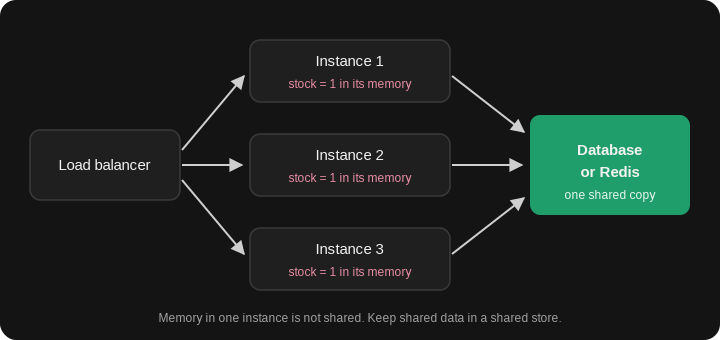
In production (the live app that real users use), your hosting platform usually runs several copies of your app for you. Each copy is an instance: a separate process, often on a separate computer. A load balancer in front of them sends each incoming request to one of the instances. For example, Render lets you set a number of instances, and it spreads traffic evenly between them.
Serverless platforms do something similar, automatically:
- On standard AWS Lambda functions, each environment that runs your function handles one request at a time. (Lambda Managed Instances, a newer option, can handle several at once.) Ten requests at once means ten separate environments, each with its own memory.
- On Vercel with Fluid compute, several requests can share one instance at the same time, like on a normal Node.js server. Fluid compute is on by default for new projects since April 2025.
Go deeper: Your app went viral. Will it survive? (Level 4) covers instances and load balancers in more detail.
How it goes wrong
Bug 1: Shared memory and the “await gap”
When threads share memory, two of them can change the same variable at once. count = count + 1 is really three steps: read, add 1, write back. Two threads can both read 5. Then both write 6, and one update is lost.
Node.js runs your JavaScript on one thread, so two lines never run at the very same instant. But that doesn’t make it safe, because of await:
let stock = 1; // lives in this process's memory

app.post("/api/buy", async (req, res) => {
  if (stock <= 0) return res.status(409).json({ error: "Sold out" });
  await chargeCard(req.user.id, 4900); // waits about 1 second
  stock = stock - 1;
  res.json({ ok: true });
});
Here’s what happens when two people press Buy at the same moment:
- Request A checks
stock. It’s 1, so A continues and starts to wait for the card payment. - While A waits, the main thread is free. Request B runs and checks
stock. It’s still 1. - Both payments succeed. Both subtract 1. You sold two items, but you had one.
stockis now -1.
Your code can check something, await, then act on what it checked. Each time it does this, another request can run in the gap. It’s the race condition from A customer got charged twice. How?, but in memory and not in the database.
Bug 2: Memory that isn’t shared, but you think it is
Now the opposite problem. The code above has a second bug: stock lives in the memory of one process. Run 3 instances, and there are 3 different stock variables. Each one thinks that it has 1 item to sell.
The same is true for other things that an AI often puts in a variable:
- Login attempt counters in a
Map(a JavaScript lookup table): each instance counts separately, so a limit of 5 becomes up to 15. - Sessions in memory: a user logs in on instance 1. Their next request goes to instance 2, and they’re logged out. The Node.js cluster docs warn about this: don’t depend on in-memory data for things like sessions and login.
- In-memory caches (saved copies of data): when you clear the copy in one instance, the others still show old data.
You can’t see this bug on your laptop, where there’s always one process. It appears on the day a second instance starts.
What good looks like
1. Make each instance stateless. A stateless server keeps nothing important in its own memory between requests. Put anything that must be shared in a shared store. That can be your database, or Redis: a fast data store that keeps data in memory and that all your instances share. Then it doesn’t matter which instance answers, or how many there are. Ask: “If this request went to a different instance, would it still work?”
2. Let the database check and change in one step. Don’t check, await, then change. Write a single update that succeeds only if the condition is still true:
UPDATE products
SET stock = stock - 1
WHERE id = $1 AND stock > 0
RETURNING stock;
If no row comes back, the item was already sold out. The database runs this as one atomic step: no other request can change stock between the check and the subtraction. Charge the card after the update succeeds. If the payment fails, put the stock back. Then you never charge for an item that you can’t deliver.
Go deeper: Two transactions, one wrong answer (Level 4) explains what the database guarantees when two transactions run at once.
3. Use every core, the simple way. On your own server, run one Node.js process per core. os.availableParallelism() tells you how many that is. On a hosting platform, increase the number of instances. Both ways give you more main threads, and the stateless rule above keeps them correct.
4. Move CPU-heavy work off the main thread. Use a pool of worker threads. If the user doesn’t need the answer right away, use a background job.
Go deeper: Two tasks waiting for each other forever (Level 4) shows how locks protect shared data, and how they can get stuck.
Test your own app
You need an app of your own for this part. No app yet? Start with Your first app in an afternoon, with an AI doing the typing. Built it in an AI app builder? Ask its AI to do each step below for you, or to add the missing part first (for example, a login).
1. Count your cores. In a terminal (the text window where you type commands), run:
node -e "console.log(require('os').availableParallelism())"This prints how many tasks your laptop can run in parallel. Your hosting plan can give you fewer.
2. Send two requests at the same moment. Choose a route that checks something and then changes it: buying, using a coupon, claiming a username.
- Open your app and log in.
- Press F12 to open the browser’s developer tools, and go to the Console tab.
- Run this code:
const send = () => fetch("/api/buy", { method: "POST" }).then((r) => r.status);
console.log(await Promise.all([send(), send(), send()]));
This sends three requests at once. Say a test item had stock 1. If you see more than one 200 (the status code for success), you have the await-gap race.
3. Check your instance count. In your hosting dashboard, find how many instances your app runs. Also check if autoscaling (adding instances automatically when traffic grows) can add more. If there can ever be more than one, every in-memory counter, Map or cache is a bug. It appears as soon as traffic grows.
Takeaways
Key terms
- CPU core: a part of the CPU that runs one list of instructions at a time
- Process: a running program with its own memory, separate from other processes
- Thread: one line of work inside a process. Threads in a process share its memory.
- Concurrency: many tasks in progress at once, taking turns
- Parallelism: several tasks running at the same moment on different cores
- Thread pool / worker threads: Node’s helper threads for built-in tasks / for your own CPU-heavy JavaScript
- Instance: one running copy of your app. Platforms run several behind a load balancer.
- Stateless: keeping nothing important in the memory of one instance
Red flags
- A variable outside any function that holds counts, stock, sessions or rate limits
- Code that checks a value, then
awaits, then changes the value - “It’s safe because Node.js is single-threaded”
- An app that works with one instance but that you never tested with two
Ask your AI
- “List every piece of state my server keeps in memory. Which ones break if I run 3 instances?”
- “Find every place where my code checks a value, awaits something, then updates that value. Rewrite each as one atomic database update.”
- “Is any CPU-heavy work running on the main thread? Should it move to a worker thread or a background job?”
Going deeper (optional, for readers who want more detail)
Worker threads can share memory, on purpose. Usually, workers talk by sending messages, and this copies the data. The Node.js docs explain that worker threads can share memory, but cluster processes can’t. Workers do this when they transfer ArrayBuffers or share a SharedArrayBuffer. When memory is really shared, the race conditions of thread-per-request servers come back. Then you need Atomics operations to update it safely.
How cluster spreads connections. By default, on every platform except Windows, the primary process accepts new connections. It gives them to the workers in turn. The name for this is round-robin. If a worker crashes, the others continue to serve, and the primary can start a new worker.
Changing the thread pool size. Set UV_THREADPOOL_SIZE before Node.js starts, for example in your start command or in your platform’s environment variables (settings that a process reads when it starts). The Node.js docs warn about setting it from inside your code with process.env. That isn’t guaranteed to work, because Node.js makes the pool before your code runs.
Requests per second and requests in progress. The formula in this lesson works for any server, not only Lambda. Here’s AWS’s example: a function takes 200 ms on average and gets 5,000 requests per second. Its concurrency (requests in progress) is 1,000. On Lambda, that means 1,000 environments at once. The default account limit is 1,000 concurrent executions per region (an area of the world where AWS has data centers).
Async also has costs. A thread-per-request server spends memory on threads. An event-loop server spends memory on waiting requests and their data. Neither one can grow forever. Memory limits both, and so do the database’s connection limit and the slowest service that you call.
References (8)
- Don’t Block the Event Loop (or the Worker Pool): Node.js. The event loop plus worker pool model, which tasks use the pool, and the cost of many threads.
- Command-line API: UV_THREADPOOL_SIZE: Node.js. Default pool size of 4, the list of thread pool APIs, and the warning about slow pool tasks.
- Worker threads: Node.js. Workers for CPU-intensive work, not I/O, shared memory, and using a pool of workers.
- Cluster: Node.js. Multiple processes sharing a port, round-robin distribution, and the warning about in-memory sessions.
- Understanding Lambda function scaling: AWS. One request per execution environment, the concurrency formula, and the default limit of 1,000.
- Fluid compute: Vercel. Multiple invocations sharing one instance; on by default for new projects since April 23, 2025.
- Scaling your Render services: Render. Running multiple instances and load-balancing traffic across them.
- Apache Tomcat HTTP Connector: Apache. Default
maxThreadsof 200 request threads.