Level 4 · Reliability & scale
How chat apps update without you refreshing
How chat apps update without you refreshing
Before you start This lesson uses a few words from earlier lessons:
- Request and response: the browser asks a server for something, and the server answers. (Every website is a conversation. Here’s how it goes)
- Serverless function: backend code that the hosting platform starts when a request arrives. Each one has a maximum duration. (Sign-up takes 10 seconds because of one email)
- Background job: slow work done outside the user’s request, with a status like
processingordone. (Sign-up takes 10 seconds because of one email)- Authorization: a check that the logged-in user is allowed to see or change this data. (Change one number in the URL, see everyone’s invoices)
The message that only appears after a refresh
You build a group chat for your study group with AI. It works. The database saves the messages, and the page shows them.
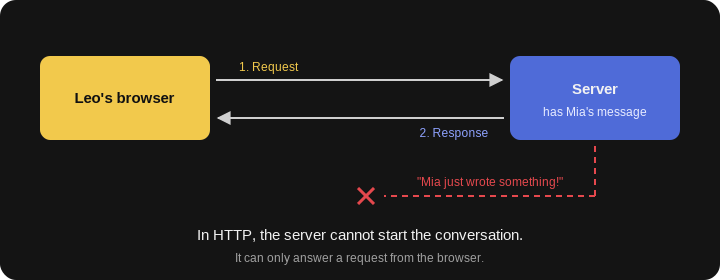
Then you try it with a friend. Mia types “Who has the notes?” and presses Enter. On Leo’s screen, nothing happens. He waits. Still nothing. He refreshes the page, and the message is there.
Real chat apps do not work like that. A message appears on your friend’s screen within a second, and nobody refreshes. How?
The problem is the way the web talks. In HTTP, the browser always speaks first. It sends a request, and the server answers. The server cannot start a conversation. It has no way to call Leo’s browser and say “Mia just wrote something”.
This lesson shows four ways around that rule and what each one costs. It also explains why “add WebSockets” is harder on serverless platforms than the AI makes it sound.
The mental model: four ways to hear about something new
Imagine that you wait for a parcel.
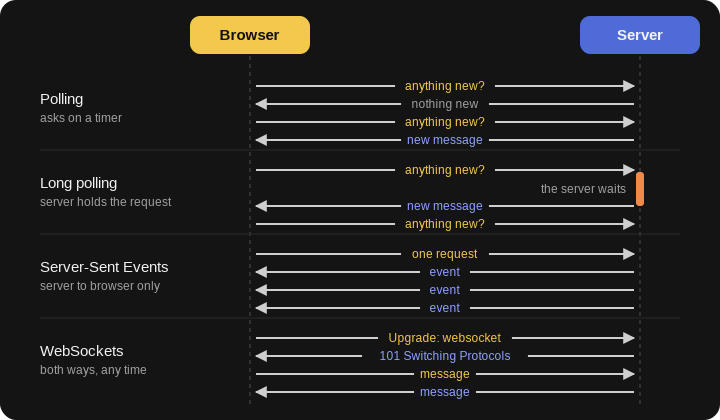
- Polling: you walk to the front door every 5 minutes to check. On most trips, there is nothing there.
- Long polling: you go to the door and wait there until the parcel comes, or until you get tired. Then you go back to the door and wait again.
- Server-Sent Events (SSE): you turn on the radio. The station talks when it has news. You can listen, but you cannot talk back through the radio.
- WebSockets: you are on a phone call. Either side can talk at any time.
Where this comparison stops working: it costs you nothing to wait by a door or stay on a call. On a server, every open connection uses memory and sometimes money. With thousands of users, that cost adds up.
Here is what each one looks like on the web.
| How it works | Direction | Delay | |
|---|---|---|---|
| Polling | The browser asks “anything new?” every few seconds | Browser asks | Up to one interval |
| Long polling | The browser asks. The server holds the request open until something happens. Then the browser asks again | Browser asks | Short |
| Server-Sent Events | One response that never ends: the server keeps writing events into it | Server → browser | Very short |
| WebSockets | The connection switches from HTTP to a two-way channel | Both ways | Very short |
Polling
Polling is the simplest. Here is what the AI often writes:
setInterval(async () => {
  const res = await fetch(`/api/rooms/study/messages?after=${lastId}`);
  const newMessages = await res.json();
  if (newMessages.length > 0) showMessages(newMessages);
}, 3000);
In plain English:
- Line 1 and line 5: run this code every 3,000 milliseconds (3 seconds).
- Line 2: ask the server for messages newer than the last one that the page has.
- Lines 3–4: if any messages came back, show them.
Polling works everywhere. It needs nothing special on the server, and it is easy to understand. But look at the numbers. If 1,000 people leave the chat open, that is about 333 requests every second. That is about 28.8 million requests a day. Almost every answer is “nothing new”.
On a serverless platform, each request starts a function and runs a database query, and you pay for both. And a message can still take up to 3 seconds to appear.
Polling is a good choice for slow, short-lived things. One example is a check if a background job is finished. Another example is a dashboard that refreshes once a minute.
Long polling
Long polling is a smarter version. The browser asks “anything new?”. If there is nothing yet, the server does not answer straight away. It holds the request open for a while. When a message arrives, the server answers. The browser shows the message and immediately asks again.
Messages arrive fast, and there are far fewer empty answers. But each waiting browser keeps a request open on your server. On a serverless platform, you can pay for a function while it sits and waits. Today, apps use long polling mostly as a fallback (a backup method). Socket.IO, a popular realtime library (ready-made code that you add to your app), starts with long polling by default.
Server-Sent Events
With Server-Sent Events (SSE), the browser makes one normal request. The server answers with a special content type (the label that says what kind of data a response holds): text/event-stream. Then the server never finishes the response. When there is news, it writes another event into it:
data: {"author":"Mia","text":"Who has the notes?"}

data: {"author":"Sam","text":"Page 42"}
Each event is a line that starts with data:, followed by an empty line. The browser has a built-in tool to read this stream, called EventSource:
const events = new EventSource("/api/rooms/study/stream");
events.onmessage = (event) => {
  showMessages([JSON.parse(event.data)]);
};
In plain English:
- Line 1: open the stream.
- Lines 2–4: each time an event arrives, turn its text into data and show it.
If the connection drops, EventSource reconnects automatically. SSE is one-way. To send a message, the browser still makes a normal POST request. That is fine for many features. For example, an AI chat app often uses SSE to show an answer word by word. AI APIs, such as Anthropic’s, stream their responses as server-sent events.
WebSockets
A WebSocket starts as a normal HTTP request with the header Upgrade: websocket. If the server agrees, it answers with status 101 Switching Protocols. After that, the connection is no longer HTTP. It is an open, two-way channel, and either side can send a message at any time.
const socket = new WebSocket("wss://example.com/chat");
socket.onopen = () => {
  socket.send(JSON.stringify({ room: "study", text: "Who has the notes?" }));
};
socket.onmessage = (event) => showMessages([JSON.parse(event.data)]);
In plain English:
- Line 1: open a WebSocket.
wss://means a WebSocket over an encrypted connection, likehttps://. - Lines 2–4: when the connection is open, send a message.
- Line 5: when the server sends something, show it.
WebSockets are the right tool for things that go both ways, often and fast. Examples are chat with “Leo is typing…”, multiplayer games, and live cursors in a shared document.
How it goes wrong
Problem 1: Polling that never rests
The AI sets polling to every second “so it feels instant”. Each poll returns all messages, not only new ones. And it continues to poll in tabs that nobody looks at.
Each of those things multiplies your costs. These fixes keep polling cheap:
- Ask only for what is new (
?after=lastId), so most answers are tiny. - Poll as slowly as the feature allows: every few seconds for a job status, once a minute for a dashboard.
- Pause when the tab is hidden. The browser tells you with the
visibilitychangeevent anddocument.hidden. - Stop polling when the job is
doneorfailed.
Problem 2: The WebSocket server that only works on your laptop
You ask the AI for realtime chat. It writes a small WebSocket server, node server.js. The server keeps every connection in a list in memory. It sends each new message to everyone in the list. On your laptop, it is perfect.
Then you deploy to a serverless platform, and it fails. A traditional server runs all the time, so it can hold connections for hours. Serverless functions were built to answer one request and stop.
Vercel now supports WebSockets in its functions. This support became generally available in October 2026. But its documentation lists the limits that you would expect:
- Connections end when the function reaches its maximum duration. This is 5 minutes by default at the time of writing. Every client needs code to reconnect.
- Each connection is pinned to one instance: one running copy of your function on one machine. Busy apps run many instances at once.
- Instances do not share memory. Mia is connected to instance A, and Leo is connected to instance B. The list of connections in A’s memory does not include Leo. So Mia’s message never reaches him.
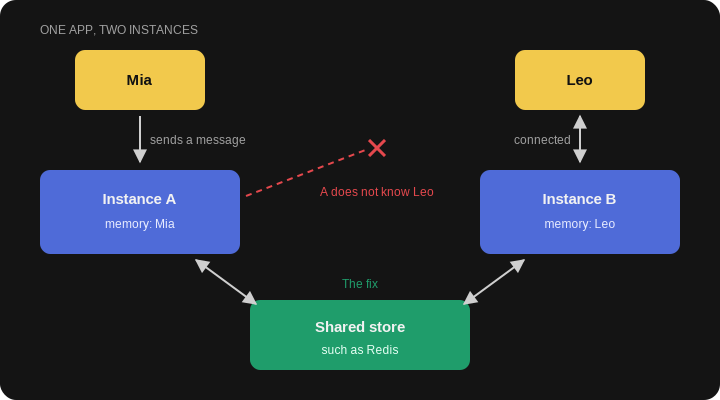
Vercel’s advice is to keep rooms, the list of who is online, and messages in a shared store such as Redis. (Redis is the fast shared data store from Fast, but showing yesterday’s data.) Then every instance can pass messages to the others. Other platforms have their own rules and limits for long connections. Check your platform’s docs before you choose.
Go deeper: Your app went viral. Will it survive? (Level 4) explains why “keep it in memory” breaks as soon as you have more than one server.
Problem 3: Forgetting that connections drop
Connections drop all the time. A phone moves from Wi-Fi to mobile data. A laptop sleeps. You deploy a new version. The function reaches its time limit.
Messages that were sent while Leo was disconnected are not waiting for him somewhere. If your app only listens to the live connection, he silently misses them. Nobody notices until someone says “I never saw your message”.
Problem 4: Anyone can listen to any room
The AI adds a WebSocket that lets the browser say “subscribe me to room 42”. Subscribe means “send me every new message in this room”. The code never checks if the user is a member of room 42. Anyone who changes the number can read someone else’s private chat as it happens.
This is the same bug as a changed ID in a web address, but over a different kind of connection. Realtime connections need the same authorization checks as every other route.
What good looks like
Pick the simplest tool that fits
| What you need | A good choice |
|---|---|
| A job’s status, updates every few seconds are fine | Polling, stopped when the job is done |
| One-way updates: AI answers, notifications, live scores | Server-Sent Events |
| Frequent messages both ways: chat, games, live cursors | WebSockets, usually through a managed service |
Most apps need fewer WebSockets than the AI suggests.
Let a managed service hold the connections
A realtime system must hold thousands of open connections and pass messages between servers. It must also reconnect users and track who is online. That is a whole product. Companies sell it as a managed realtime service. Examples include Supabase Realtime, Pusher and Ably. Vercel’s own guide also lists others, such as Liveblocks, PubNub and Firebase Realtime Database.
Supabase Realtime, for example, offers three features:
- Broadcast: send messages between connected users.
- Presence: track who is online.
- Postgres Changes: get a message when rows in your database change.
The usual shape is this: your server saves the message, then asks the service to deliver it.
app.post("/api/rooms/:id/messages", requireLogin, async (req, res) => {
  // ...check that req.user is a member of this room
  const message = await db.message.create({
    data: { roomId: req.params.id, userId: req.user.id, text: req.body.text },
  });
  await realtime.publish(`room:${req.params.id}`, message);
  res.json(message);
});
In plain English:
- Line 2: authorization first. Only members can post.
- Lines 3–5: save the message in the database.
- Line 6: tell the realtime service to send the message to everyone who listens to this room.
realtime.publishis a placeholder name. Each service has its own name for it. - Line 7: reply to the sender.
The service holds the connections, so your functions stay short and simple.
Rules that keep realtime correct
- The database is the truth. The live connection is a doorbell. Save first, then announce. Never keep messages only in the realtime channel.
- On every connect and reconnect, catch up. Load the messages after the last one that the user saw. Then continue to listen.
- Reconnect with longer and longer pauses. Wait 1 second, then 2, then 4, up to a limit like 30 seconds. Then thousands of users do not all reconnect at the same moment after an outage (a time when the service is down).
- Check permissions when a user subscribes, not only when they post. Managed services have their own way to do this. Use it.
Test your own app
You need an app of your own for this part. No app yet? Start with Your first app in an afternoon, with an AI doing the typing. Built it in an AI app builder? Ask its AI to do each step below for you, or to add the missing part first (for example, a login).
- Two windows. Open your app in a normal window and in a private window. Log in as a different user in each. Send a message in one window. How long does it take to appear in the other?
- Find out what the AI built. Open developer tools, then the Network tab. If the same request repeats every few seconds, it is polling. Count how many requests it makes per minute. If you see a connection under the WS filter, it is a WebSocket. Click it to see the messages.
- Break the connection. In one window, turn off your Wi-Fi for 30 seconds. Send a message from the other window. Turn the Wi-Fi back on. Does the missed message appear without a refresh?
- Leave it running. Open the app in a background tab for 10 minutes. Check your hosting platform’s logs or usage page. How many requests did one idle tab make?
- Listen where you should not. From the second window, try to join another user’s room. Did it work? Then ask your AI: “Show me where a user’s permission to join a room is checked for realtime subscriptions.”
Takeaways
Key terms
- Polling: the browser asks “anything new?” on a timer
- Long polling: the server holds each request open until there is news
- Server-Sent Events (SSE): one long response that the server keeps writing events into. Server to browser only
- WebSocket: a connection that switches from HTTP to a two-way channel
- Instance: one running copy of your function or server. Instances do not share memory
- Managed realtime service: a company that holds the open connections and delivers messages for you
Red flags in AI-written code
setIntervalpolling every second that returns everything, not only what is new- Polling that never stops, even in hidden tabs or after the job is done
- A WebSocket server that keeps connections in a list in memory, deployed to serverless or to more than one server
- No reconnect code, or a reconnect that does not load missed messages
- Messages that are only sent live and never saved to the database
- A subscription to a room or channel without any permission check
Ask your AI
- “How does my app get new data without a refresh: polling, SSE or WebSockets? Where does it run, and what happens on my hosting platform when there are many instances?”
- “What happens to messages sent while a user’s connection is down? Show me the code that catches up after a reconnect.”
- “Could this feature use Server-Sent Events or polling instead of WebSockets? Compare the cost and complexity.”
- “Where is a user’s permission to subscribe to a room checked?”
Going deeper (optional, for readers who want more detail)
The SSE connection limit. Over older HTTP/1.1 connections, browsers allow only 6 open connections per website, across all tabs. Each SSE stream uses one. So a user with 7 open tabs can block their own app. Many hosting platforms support HTTP/2. Over HTTP/2, the two sides agree on the limit, and it is usually much higher. Many servers allow 100 or more.
Catching up with SSE. Each SSE event can carry an id: line. When EventSource reconnects, the browser sends the last ID that it saw in a Last-Event-ID header. So the server knows where to continue. The retry: line tells the browser how long to wait before it reconnects.
Keeping connections alive. Some network equipment closes connections that stay silent for too long. The WebSocket protocol (its set of rules) has small ping and pong messages for this. One side sends a ping, and the other side answers with a pong. Then both sides know that the connection is still alive. SSE servers often send a comment line (a line that starts with :) from time to time for the same reason.
Fan-out. When a room has 10,000 listeners, one message means 10,000 sends. This is called fan-out. Vercel’s guide says that a relay you build yourself must make one send per connection. It recommends a managed provider when the fan-out gets large. This is a big part of what people pay managed services for.
Paying for open connections. On Vercel, you pay for CPU time (the time the processor works) for a WebSocket only while your code processes messages. But you pay for the function instance’s memory for as long as the connection stays open. An idle connection is not free. Check how your platform bills long connections before you build on them.
Socket.IO is not plain WebSockets. Socket.IO adds its own protocol on top: rooms, automatic reconnects, and the long-polling fallback. A Socket.IO client can only talk to a Socket.IO server. Vercel’s docs show Socket.IO set up to use only the WebSocket transport.
Collaborative editing is harder still. Live cursors are easy, but two people can type in the same paragraph at the same time. Whose change wins? That is a different problem. Two people typed in the same document at once. Who wins? covers it.
References (9)
- RFC 6455: The WebSocket Protocol: IETF. The opening handshake with
Upgrade: websocketand101 Switching Protocols, two-way messages, and ping and pong frames. - Streaming messages: Anthropic. An AI API that streams its responses as server-sent events.
- Using server-sent events: MDN. The
text/event-streamformat,data:andretry:lines, automatic reconnection, and the 6-connection limit without HTTP/2. - Server-sent events: WHATWG HTML Standard. The
id:field and theLast-Event-IDheader sent whenEventSourcereconnects. - WebSockets: Vercel. Connections pinned to one instance, closing at the maximum duration, reconnect logic, shared state in Redis, and Socket.IO’s long-polling default.
- WebSocket support is now generally available: Vercel. WebSockets in Vercel Functions became generally available in October 2026.
- Do Vercel Functions support WebSocket connections?: Vercel. The 300-second default maximum duration and how open connections are billed.
- Publish and subscribe to realtime data on Vercel: Vercel. Fan-out, when a managed provider fits, and the list of providers including Ably, Pusher, Supabase Realtime, Liveblocks and PubNub.
- Realtime: Supabase. Broadcast, Presence and Postgres Changes.