Level 5 · Systems & architecture
When everything calls everything, everything breaks
- Events
- Direct calls vs events
- Message brokers
- Publish/subscribe
- Queues
- Eventual consistency
- At-least-once delivery
- Idempotent consumers
When everything calls everything, everything breaks
Before you start This lesson uses a few words from earlier lessons:
- Service: a separate program that your app talks to over the network. (One slow service took your whole app down)
- Cascading failure: a failure in one part that spreads to parts that did not depend on it. (One slow service took your whole app down)
- Queue, worker and “at least once”: a stored list of jobs and the code that does them. Each job arrives at least once, maybe more. (Sign-up takes 10 seconds because of one email)
- Unique constraint: a database rule that refuses a second row with the same value. (A customer got charged twice. How?)
The checkout that broke because of a chart
Your shop has grown. Different parts now run as separate services, and different people build some of them. The services are orders, email, warehouse, loyalty points and analytics.
When a customer places an order, the order service calls each of the other services, one after another. It sends the receipt, reserves the stock, adds the points and records the sale for the analytics charts. Then it tells the customer “Thank you!”.
On a busy Friday, someone deploys (puts live) a bug in the analytics service. Each call now takes 20 seconds. Nobody can buy anything. The checkout broke because of a chart.
The next week, marketing wants a text message for every order. You add a fifth call to the order service, and a bug in it breaks checkout a second time. Also, the warehouse calls the order service back, and the loyalty service calls the user service, which calls email. A drawing of the calls looks like this:
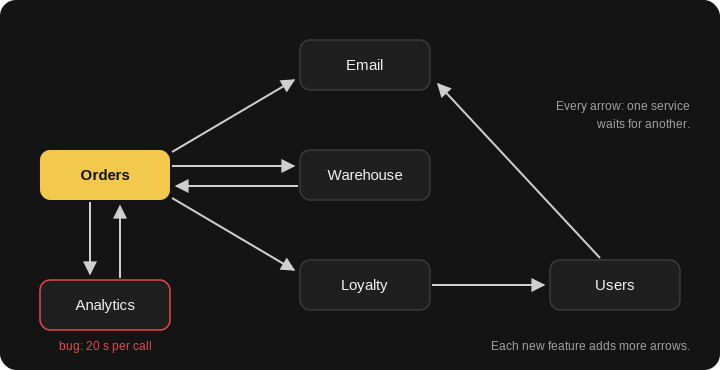
Every arrow is a place where one service waits for another. Every arrow is a way for a problem to spread. When everything calls everything, everything breaks together.
This lesson shows a different way for services to talk. It also shows what this way fixes and what it costs.
The mental model: phone calls vs a noticeboard
One part of a system can tell another part something in two basic ways.
A direct call is like a phone call. You call the email service, wait for it to answer, and wait until it says “done”. You must know who to call. They must be available right now. If they are slow, you are slow. This is the request and response that you used everywhere until now.
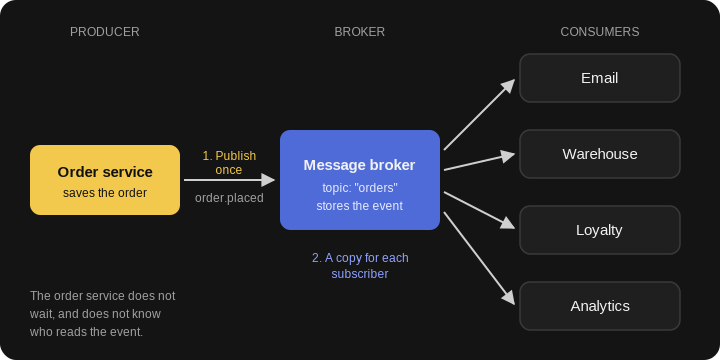
An event is like a notice on a noticeboard. You write one short fact, “Order 1042 was placed”, pin it up, and go back to work. Anyone who cares reads the board and reacts when they are ready. The email team sends a receipt, the warehouse packs a box, and the loyalty team adds points. You don’t know who reads the notice. You don’t wait for them.
Where the comparison stops working: a real noticeboard does not know who read which notice. The software version does. It keeps each notice for each reader until that reader confirms “handled”. If the reader does not confirm, it delivers the notice again. That is why readers sometimes see the same notice twice, as you will see below.
The words you’ll need
- An event is a message that reports something that already happened:
order.placed,user.signed_up,payment.failed. Event names use the past tense. Events are facts, not requests. - A command is different: it asks one specific receiver to do one thing, such as “send receipt to customer 17”.
- The service that sends an event is the producer (or publisher). The services that react are consumers (or subscribers).
- The noticeboard is a message broker: a separate system that receives messages, stores them, and delivers them to consumers.
- The broker groups events by name into topics, such as “orders”. Consumers choose which topics they want.
- When a consumer finishes with a message, it sends an acknowledgement (“ack”). The ack means “handled, you can stop delivering this to me”.
Publish/subscribe (often shortened to pub/sub) is the noticeboard pattern. A producer publishes an event once, and the broker delivers a copy to every subscriber. Compare that with the job queue you already know: each job goes to exactly one worker. Many brokers support both.
| Kind | How it works | Examples |
|---|---|---|
| Queue | Each message goes to one of the workers, then the broker removes it | Amazon SQS, RabbitMQ |
| Pub/sub | Each subscriber gets its own copy of every event | RabbitMQ, Azure Service Bus |
| Event log (streaming) | The broker keeps events in order for a set time. Each consumer reads at its own speed and can read old events again. | Apache Kafka, Azure Event Hubs |
Before and after
Here is the order route with direct calls:
app.post("/api/orders", requireLogin, async (req, res) => {
  const order = await saveOrder(req.user.id, req.body);
  await emailService.sendReceipt(order);   // down? checkout fails
  await warehouseService.reserve(order);
  await loyaltyService.addPoints(order);
  await analyticsService.track(order);     // slow? checkout is slow
  res.status(201).json(order);
});(saveOrder, requireLogin and the ...Service objects are placeholders for your own code.) Checkout is only as fast as the slowest service. It is only as reliable as the least reliable service. Also, every new reaction to an order means a change to this route.
Here it is with an event (broker is a placeholder for the broker library you use):
const order = await saveOrder(req.user.id, req.body);
await broker.publish("order.placed", {
  eventId: crypto.randomUUID(), orderId: order.id, userId: req.user.id, points: order.points,
});
res.status(201).json(order);
In plain English: save the order, publish one event that describes it, and reply. The event has a unique eventId, which you will need soon. The order service no longer knows who reacts. The text message feature becomes a new consumer, and checkout does not change. If analytics is slow or down, its events wait in the broker until it recovers. No customer at checkout notices.
Go deeper: There is a gap between
saveOrderandpublish. If the server crashes between them, the event is lost. The order was saved, but the email never went out (Level 5) shows how to close this gap.
The price: eventual consistency
With direct calls, the points are already added when checkout says “Thank you!”. With events, they are not. The loyalty service adds them when it gets to the event. This usually takes milliseconds or seconds, but it takes longer if the service is busy or down.
So for a short time, different parts of your system disagree. The order exists, but the points page shows the old balance. This is called eventual consistency. If no new changes happen, every part will eventually show the same data, but not at every moment.
You cannot fix this like a bug. It is the cost of letting services work independently. You design for it:
- Show honest messages: “Your points can take a minute to appear.”
- Don’t build a page that writes to one service, then reads from another service right away and expects to see the change.
- Some rules must always hold at the moment of the action, such as “never sell more than we have in stock”. Don’t use an event for those rules. Check them directly, or in the same database transaction (a group of writes that all succeed or all fail).
For every interaction, ask the question from background jobs: does the caller need the answer before it can continue?
| Interaction | Needs the answer now? | Use |
|---|---|---|
| Check stock before confirming | Yes | Direct call or database check |
| Charge the card | Yes: success or failure decides the next screen | Direct call |
| Send the receipt email | No | Event |
| Add loyalty points | No | Event |
| Update analytics charts | No | Event |
How it goes wrong
Bug 1: Double points
Brokers deliver events at least once. Say the loyalty consumer adds the points, then crashes before it sends the acknowledgement. The broker never got “handled”, so it delivers the event again. The customer gets double points.
This is not rare. Amazon’s docs say that SQS standard queues may deliver more than one copy of a message. RabbitMQ’s docs tell you to design consumers that handle duplicates. You will see duplicates in production.
Bug 2: Events out of order
A customer places an order and cancels it a second later. This makes two events: order.placed, then order.cancelled. If two workers handle them at the same time, a worker can handle the cancel first. The loyalty service removes points that it never added. Then it adds points for a cancelled order.
Most brokers don’t promise order across all messages. For example, Kafka keeps events in order only within one partition (one slice of a topic). Events with the same key, such as the same order ID, always go to the same partition.
Bug 3: One bad event, retried forever
A producer sends an event with a missing field. The consumer crashes on it, and the broker delivers it again. The consumer crashes again, and this repeats forever. This is called a poison message. Depending on the broker, it wastes the consumer’s time or blocks the events behind it.
Bug 4: Nobody knows what happens after “order placed”
A customer says: “I never got my receipt.” With direct calls, you read the order route from top to bottom. With events, the order service does not know who listens. Five consumers in three codebases react to order.placed, and one of them failed without an error message an hour ago.
Martin Fowler warns about this problem in event-based systems: “Often the only way to figure out this flow is from monitoring a live system.”
What good looks like
Make every consumer idempotent
An idempotent consumer can receive the same event twice and still do the work only once. The usual method: record which events you handled, in the same transaction as the work.
await db.$transaction(async (tx) => {
  const isNew = await tx.$executeRaw`
    INSERT INTO processed_events (event_id, consumer) VALUES (${event.eventId}, 'loyalty')
    ON CONFLICT DO NOTHING`;
  if (isNew === 0) return; // seen this event before: do nothing
  await tx.user.update({ where: { id: event.userId }, data: { points: { increment: event.points } } });
});
In plain English:
- Lines 2–4: try to record “the loyalty consumer handled this event ID”. The
processed_eventstable has a unique constraint on the event ID and consumer name. If that row already exists,ON CONFLICT DO NOTHINGtells the PostgreSQL database to skip the insert without an error.$executeRawreturns how many rows it inserted: 1 or 0. - Line 5: if it inserted nothing, this is a repeat. Stop.
- Line 6: if not, add the points. Both writes are in one transaction, so a crash leaves neither or both.
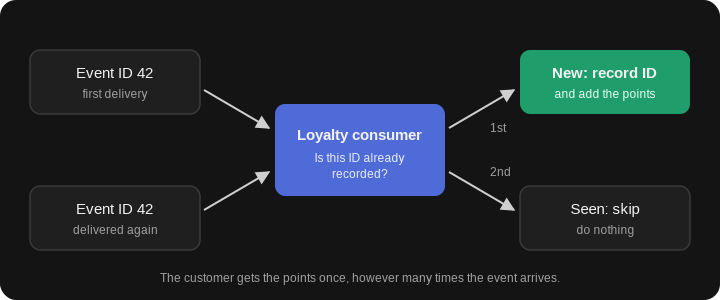
Send the acknowledgement only after this transaction commits (is saved for good). If you send the ack first and then crash, the event is lost.
Go deeper: The payment timed out. Did it go through? (Level 3) and A customer got charged twice. How? (Level 4) cover the same “safe to repeat” idea for payments and for requests that arrive at the same time.
Handle order on purpose
- Don’t assume events arrive in order. Consumers can check the current state before they act. For example, the loyalty service can ignore a
cancelledevent for an order with no points. It can also record that event, so it ignores a lateplacedevent too. - When order matters for one thing, such as one order, use the broker’s ordering feature for that key. In Kafka, give every event about the same order the same key.
Send failing events aside
Configure a dead-letter queue: a separate place where the broker puts an event after a set number of failed attempts. Healthy events continue to flow. Set an alert on the dead-letter queue and look at what is there. Fix the bug, then send the events back.
Make the flow visible
Add a correlation ID to every event: an ID that follows one customer action through every service. Put it in every log line (the app’s record of what it did). Then you can search for one ID and see the whole story. Also keep a simple list of every event, who publishes it, and who consumes it.
When not to use events
Event-driven architecture solves the problems of many services and many teams. Each service can deploy and grow on its own, and you can add new reactions without a change to old code. The price is everything in this lesson:
- a broker to run and pay for
- duplicates and ordering in every consumer
- eventual consistency in the user interface
- debugging across services
Microsoft’s architecture guide says this style may not fit:
- simple request-response workflows
- operations that need strong consistency across services
- teams without experience in distributed systems (systems made of many programs on a network)
If you have one codebase and one database, you probably don’t need a message broker. A function call, plus a background job queue for slow work, gives you most of the benefit. Use events when your app starts to look like the first diagram in this lesson.
Test your own app
You need an app of your own for this part. No app yet? Start with Your first app in an afternoon, with an AI doing the typing. Built it in an AI app builder? Ask its AI to do each step below for you, or to add the missing part first (for example, a login).
Do these tests in staging (a test copy of your app).
- Send an event twice. Publish the same event, with the same
eventId, two times. Check that the work happened once: one email, one set of points. - Stop a consumer. Turn off one consumer, place five orders, and turn it back on. Checkout should work the whole time. The consumer should catch up on all five orders.
- Send a broken event. Publish an event with a missing field. After a few attempts, it should go to the dead-letter queue, and you should get an alert.
- Follow one action. Place one order and search your logs for its correlation ID. Can you see every service that reacted?
Takeaways
Key terms
- Event: a message that reports something that already happened, in the past tense
- Command: a message that asks one specific receiver to do something
- Producer / consumer: the service that sends events / a service that reacts to them
- Message broker: a system that stores messages and delivers them to consumers
- Publish/subscribe (pub/sub): publish once, and every subscriber gets a copy
- Acknowledgement (ack): a consumer tells the broker “handled”
- Eventual consistency: different parts of a system catch up a short time after a change
- Idempotent consumer: a consumer that does the work only once, however many times an event arrives
- Dead-letter queue: where events go after too many failed attempts
- Correlation ID: an ID that follows one action through every service and log line
Red flags in AI-written code
- A route that waits for several “nice to have” services, one after another, before it replies
- A consumer with no check for “already handled this event”
- An acknowledgement sent before the work is saved
- Code that assumes events arrive in the order they were sent
- No dead-letter queue, or one that nobody watches
- Events with no ID and no correlation ID
- A message broker added to a small app with one database “for scale”
Ask your AI
- “List every place where one of my services calls another and waits. Which of these need the answer right away, and which could be events?”
- “Make this consumer idempotent. Show what happens if the same event arrives twice, or if the consumer crashes after doing the work but before acknowledging.”
- “Does my app really need a message broker? Explain the costs for an app of my size, and what a simpler option would be.”
Going deeper (optional, for readers who want more detail)
A change to an event breaks other teams. Say you rename points to loyaltyPoints in the event. The loyalty service deploys separately and still reads points. So it adds zero points to every order. Treat the shape of an event like a public API (a contract that other programs rely on). Add new fields, but don’t rename or remove old ones while any consumer still reads them. For a breaking change, publish a new version, such as order.placed.v2. Keep the old version until every consumer has moved.
Pub/sub vs event streaming. Microsoft’s guide separates two models. In pub/sub, the broker delivers each event to the current subscribers, and new subscribers don’t see past events. In event streaming, such as Kafka, the broker writes events to a log and keeps them for a set time. Kafka’s docs say that events are not deleted after consumers read them. A new consumer can start from the beginning. After you fix a bug, you can replay (read again) old events.
Fat events vs thin events. An event can carry all the data that consumers need, or only IDs. Full events save consumers from calls back to the producer, but they are bigger and harder to change. ID-only events keep one source of truth. But then every consumer must call the producer for details, and the services depend on each other again.
Choreography vs orchestration. In this lesson, each service reacts to events on its own. This is called choreography. Some long processes have steps that can fail, like “reserve stock, charge, ship, and undo earlier steps if a later one fails”. For these, some teams use orchestration instead: one coordinator tells each service what to do next. The undo-on-failure pattern is called a saga.
“Exactly once”. Some messaging systems offer exactly-once delivery. Microsoft’s Publisher-Subscriber guide notes that it adds coordination work and delay. It also depends on the messaging system. And it cannot stop your own consumer from a crash after it sent an email but before it recorded that fact. Idempotent consumers are still the safe default.
Where events come from. Your code can publish events. You can also read events from the database’s own change log, or make events the main way you store data. See Your search results are an hour out of date. Why? and What if your database remembered everything that ever happened?.
References (6)
- Event-driven architecture style: Microsoft Azure Architecture Center. Producers, consumers and event channels, pub/sub vs event streaming, eventual consistency, ordering, error handling, correlation IDs, schema changes, and when this style isn’t a good fit.
- Publisher-Subscriber pattern: Microsoft Azure Architecture Center. How pub/sub decouples senders from receivers, technologies such as RabbitMQ, Kafka and Azure Service Bus, ordering not being guaranteed, poison messages, dead-letter queues, delivery guarantees (including the cost of exactly-once delivery) and idempotent subscribers.
- Introduction: Apache Kafka. Events, producers, consumers, topics and partitions, events not deleted after consumption, and ordering within a partition for events with the same key.
- Reliability Guide: RabbitMQ documentation. Acknowledgements giving at-least-once delivery, redelivery, and designing consumers to be idempotent.
- Amazon SQS standard queues: AWS documentation. At-least-once delivery, more than one copy of a message, and messages occasionally arriving out of order.
- What do you mean by “Event-Driven”?: Martin Fowler. Events vs commands, the low coupling of event notification, and the quote about the flow being visible only by monitoring a live system.