Level 5 · Systems & architecture
One slow service took your whole app down
- Cascading failures
- Timeouts
- Circuit breaker
- Closed open and half-open states
- Fallbacks
- Graceful degradation
- Bulkheads
One slow service took your whole app down
Before you start This lesson uses a few words from earlier lessons:
- Timeout and retry: the longest you wait for an answer, and a failed request sent again, with longer waits each time. (The payment timed out. Did it go through?)
- Thread: one line of work inside a running program. Some servers use one thread per request. (How one server handles thousands of users at once)
- Connection pool: the limited set of open database connections that your app shares. (Your app went viral. Will it survive?)
- Cache: a saved copy of an answer, kept somewhere faster to reach. (Fast, but showing yesterday’s data)
The box nobody needed
You run an online shop. Each product page has a small box at the bottom: “Customers also bought”. The list comes from a recommendations API (a service that your code calls for data), run by another company. In this lesson, a service means a separate program that your app talks to over the network. Examples are that API, a payment provider and an email sender. A service that your app needs is called a dependency.
One evening, the recommendations service does not crash. It gets slow. Answers that took 0.1 seconds now take 30.
Five minutes later, your product pages hang. Then checkout stops working. Then login. Your error tracker fills with timeouts from pages that never call the recommendations service. A box that nobody needed took the whole shop down.
This lesson explains how one slow dependency spreads its problem to everything else. It also shows the three tools that stop it: timeouts, circuit breakers and bulkheads.
The mental model: waiting is not free
Every request in progress holds on to something that your app has only a limited amount of:
- Some servers use one thread per request. There, each request holds a thread. A server with 200 threads can serve 200 requests at once, and request 201 waits.
- In Node.js, waiting does not block the main thread. But every waiting request still holds memory and an open connection.
- Your code can hold a database connection or a transaction while it waits for the other service. Then it holds one of the few connections in your connection pool.
- On a serverless platform, it keeps a function running, and you can pay for the wait.
Now do some arithmetic. Your product page gets 50 visits per second.
- Normal day: each request lasts 0.1 seconds. So about 50 × 0.1 = 5 requests are in progress at any moment.
- Slow evening: each request lasts 30 seconds. So about 50 × 30 = 1,500 requests are in progress at once.
Your traffic (the number of incoming requests) did not change. Each request lives 300 times longer, so 300 times more of them exist at the same moment. A server with 200 threads runs out after about 4 seconds (200 ÷ 50). Checkout also needs a thread or a database connection, so it waits in the same line as everyone else. Users press refresh, and retries add even more requests.
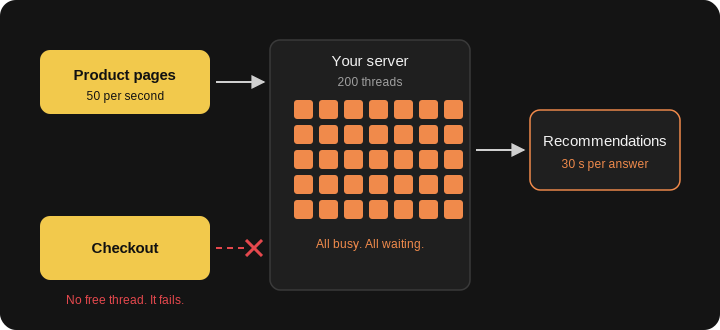
This is a cascading failure: a failure in one part of a system spreads to parts that did not depend on it.
Here is the surprising part:
A slow service is often more dangerous than a dead one.
When a service is completely down, your calls usually fail within milliseconds. Your resources are then free again at once. A slow service keeps them busy.
How it goes wrong
Bug 1: No timeout
const res = await fetch(`https://recs.example.com/for/${productId}`);This is the code from the story. Without a timeout, fetch in Node.js can wait for minutes. Each product page waits as long as the recommendations service takes. It holds its resources the whole time.
Bug 2: A timeout, but nothing else
Say that you add a 2-second timeout. Now about 50 × 2 = 100 requests are in progress, not 1,500. That is much better. But every product page is 2 seconds slower while the service is sick.
And you continue to send 50 requests per second to a service that already has problems. This can keep it down longer. With 3 retries per failure, you send up to four times that number.
The timeout limits the damage of each call. It does not stop calls that will almost certainly fail.
Bug 3: One failure takes the whole page with it
const product = await getProduct(id);
const recs = await getRecommendations(id); // throws when the service fails
res.json({ product, recs });
When the recommendations call throws an error (stops with an error), the whole route fails. The product, its price and the Buy button all disappear because of a box at the bottom. The important part of the page depends on the least important part.
What good looks like
Fix 1: Timeouts first
Give every call to another service a timeout that fits the job. You saw this in the timeouts lesson:
const getRecs = (productId) =>
  fetch(`https://recs.example.com/for/${productId}`, { signal: AbortSignal.timeout(2000) })
    .then((r) => { if (!r.ok) throw new Error(`recs ${r.status}`); return r.json(); });
In plain English: ask for the recommendations, and stop after 2 seconds. Treat any error status as a failure. A timeout is the first defense. Every other tool in this lesson needs calls to fail in a known amount of time.
Fix 2: A circuit breaker
Your home has a box of circuit breakers for the electrical wiring. Sometimes too much current flows through one circuit. Then its breaker trips and cuts the power to that circuit, before the wires get too hot. The rest of the house keeps its lights on.
A software circuit breaker does the same for calls to a service. It sits between your code and the service, and it counts recent failures. When there are too many, it trips. For a while, it stops all calls to the service and fails them immediately.
Where the comparison stops working: a home breaker stays off until a person switches it back on. A software breaker tests the service on its own. It closes again when the service has recovered.
A circuit breaker has three states:
| State | What happens to calls | It changes when… |
|---|---|---|
| Closed (normal) | Calls go through to the service. The breaker counts failures, including timeouts. | Failures pass a threshold, such as “more than half of recent calls failed”. Then it moves to open. |
| Open (tripped) | Calls fail immediately. The breaker does not contact the service at all. | A wait time passes, such as 30 seconds. Then it moves to half-open. |
| Half-open (testing) | A small number of trial calls go through. | If the trials succeed, it moves to closed. If one fails, it goes back to open, and the wait starts again. |
The names come from electrical circuits, and they confuse almost everyone at first. Closed means working, because the current can flow. Open means stopped.
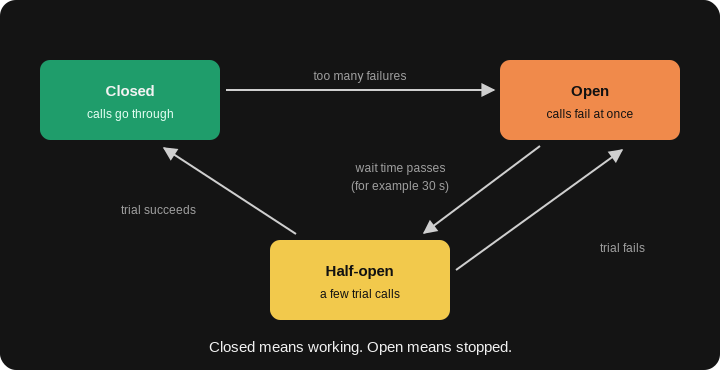
The half-open state is important. A service that recovers can often handle a little traffic, but not all of it at once. A few test calls go through first. This stops your app from causing the service to fail again.
Replay the slow evening with a breaker. After a few seconds of timeouts, the breaker opens. The recommendations call now fails instantly, so threads and connections are free again. Checkout and login continue to work. The struggling service gets no traffic from your app. Every 30 seconds, a trial call checks if the service is back.
For Node.js, one circuit breaker library (ready-made code that you add to your app) is opossum. You wrap the function from Fix 1 in a breaker:
const recsBreaker = new CircuitBreaker(getRecs, {
  timeout: 2000,                // a call slower than 2 s counts as a failure
  errorThresholdPercentage: 50, // open when over half of recent calls fail
  resetTimeout: 30000,          // after 30 s open, let a trial call through
  volumeThreshold: 10,          // but only judge once there are 10 recent calls
});
In plain English:
timeout: the library’s own timer. A call that takes longer counts as a failure. This timer stops the wait in opossum, but it does not cancel the request itself. That is whygetRecskeeps its ownAbortSignal.timeout.errorThresholdPercentage: the threshold. The library looks at the calls in a recent time window (the last 10 seconds by default). It opens when more than half of them failed.resetTimeout: how long the breaker stays open before it moves to half-open.volumeThreshold: the default is 0. So a single failed call out of one can open the breaker. A minimum number of calls stops one unlucky request from tripping it.
Choosing the numbers
No threshold is correct for every app. You must decide:
- Too sensitive (trips after one or two failures): the breaker opens during normal small problems, and users lose a feature for no reason.
- Too relaxed (needs hundreds of failures): the waiting requests build up before the breaker reacts.
- Wait time too short: the breaker keeps switching between open and half-open. It adds load to a service that has not recovered.
- Wait time too long: the feature stays off long after the service is healthy again.
Also decide which errors count. A timeout or a 503 means that the service has a problem. A 404 for a product with no recommendations is a normal answer, not a sign of a problem. For errors that must not trip the breaker, the library has an errorFilter option.
Fix 3: A fallback for every breaker
When the breaker is open, your code must still show something. The answer that you use instead is called a fallback. The choice of fallback is a product decision, not a technical one:
| Fallback | Example |
|---|---|
| A cached answer | Yesterday’s recommendations for this product. Older, but good enough. |
| A default answer | The shop’s bestsellers instead of personal recommendations |
| Hide the feature | No “Customers also bought” box today |
| Save it for later | Put the request in a queue and finish it when the service is back |
| An honest error | “Payments are temporarily unavailable. Please try again in a few minutes.” |
Graceful degradation means that the important parts of your app continue to work while the less important parts are switched off or simplified.
Some things have no safe substitute. Never fake a success for a payment, an order or a password check. For those, the right fallback is a fast, clear error. That is still much better than a 30-second spinner.
With opossum, you register the fallback on the breaker:
recsBreaker.fallback(() => cachedBestsellers); // used on failure, timeout, or when open
recsBreaker.on("open", () => logger.warn("Recommendations breaker OPEN"));

app.get("/api/products/:id/recs", async (req, res) => {
  res.json(await recsBreaker.fire(req.params.id));
});
In plain English:
- Line 1: if a call fails or times out, or if the breaker is open, return the cached bestsellers.
- Line 2: write a log line when the breaker opens, so that you can send an alert. Nobody fixes a breaker that hides an outage silently.
- Lines 4–6: the route calls the service only through the breaker, with
fire.
Also look at the route. Recommendations now have their own API route, and the page loads it separately. If that route fails, only the box is empty. The product, price and Buy button come from a different request. That fixes Bug 3.
Fix 4: Bulkheads
Ships are divided into sealed sections by walls called bulkheads. If the hull is damaged, water fills one section, and the ship stays afloat.
In software, a bulkhead gives each dependency its own limited share of resources. Then one slow dependency cannot use up everything. For example, at most 20 calls to the recommendations service can be in progress at once. Call number 21 does not wait. It fails immediately and gets the fallback.
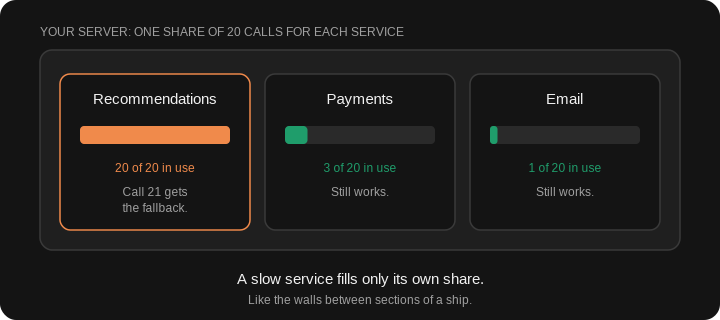
The opossum library has this built in, as the capacity option. Add capacity: 20 to the options above. There are other ways to build bulkheads. One is a separate connection pool for each service. Another is to run an important feature as its own service with its own servers.
A circuit breaker and a bulkhead work together. While the breaker is still closed, the bulkhead limits how much damage a slow service can do. The breaker decides when to stop calling altogether.
Test your own app
You need an app of your own for this part. No app yet? Start with Your first app in an afternoon, with an AI doing the typing. Built it in an AI app builder? Ask its AI to do each step below for you, or to add the missing part first (for example, a login).
Do this in staging (a copy of your app for tests). Never do it against real users or a real outside service.
- List your dependencies. Ask your AI: “List every outside service my app calls, which routes call it, and the timeout each call uses.”
- Build a fake slow service. Ask your AI for a tiny test server with one route that waits 30 seconds before it answers. In staging, point one dependency’s URL at it.
- Load the slow page and an unrelated page at the same time. Open the page that uses the slow dependency in several tabs. Then open checkout or login. Does checkout still answer quickly? It should.
- Watch the breaker. Check your logs for the “breaker open” line. Does the page show the fallback within a few seconds?
- Switch the fake service back to fast. Within your
resetTimeout, the breaker should move to half-open, and then to closed. The real feature should come back without a deploy (a new release of your app).
Takeaways
Key terms
- Dependency: a service that your app needs to do its work
- Cascading failure: a failure in one part that spreads to parts that did not depend on it
- Circuit breaker: a wrapper that stops calls to a failing service for a while and fails fast instead
- Closed / open / half-open: normal / tripped, calls fail immediately / testing with a few trial calls
- Threshold: how many failures, or what share of recent calls, trips the breaker
- Fallback: the answer that you use when the real call fails or the breaker is open
- Graceful degradation: the important parts continue to work while less important parts are switched off or simplified
- Bulkhead: a separate, limited share of resources for each dependency
Red flags in AI-written code
- A call to an outside service with no timeout
- A retry loop around a call, with no circuit breaker and no limit
- A “nice to have” call (recommendations, analytics, avatars) awaited inside the main route, so its failure fails the whole page
- A circuit breaker with no fallback, or no log or alert when it opens
- A database transaction kept open while the code waits for an outside service
404or400errors counted as failures that trip the breaker
Which step broke?
- Pages are slow but working → the dependency is slow, and your timeouts are too long
- Unrelated pages fail too → a cascading failure: no bulkhead, and waiting requests use shared resources
- The feature stays off after the service recovered → the breaker’s wait time is too long, or half-open trials keep failing
- The breaker opens on normal days → the threshold is too sensitive, or normal errors count as failures
Ask your AI
- “For each outside service my app calls, what happens to my app if that service takes 30 seconds to answer? Which unrelated pages would slow down?”
- “Wrap calls to [service] in a circuit breaker with opossum. Set a timeout, a sensible threshold, a fallback, and a log line when it opens.”
- “Which features in my app could show a cached or default answer when a service is down, and which must show an error instead?”
Going deeper (optional, for readers who want more detail)
Where retries fit. A retry says “this was probably a short problem, try again”. A breaker says “this service is in real trouble, stop trying”. Microsoft’s guide suggests that you make calls through the breaker. It also suggests that you stop retries when the breaker reports that it is open. A retry against an open breaker only wastes time.
The arithmetic has a name. “Requests in progress = arrival rate × time each one takes” is known as Little’s Law. It explains why a latency problem (requests take too long) becomes a capacity problem (you run out of resources). If requests take 300 times longer, you need 300 times the capacity for the same traffic.
Each copy of your app has its own breaker. The opossum library keeps the breaker’s state in memory. If your app runs as many instances, each one learns separately that the service is sick. That is usually fine. On serverless platforms, short-lived instances can start with a fresh, closed breaker, so each one needs a few failures before it trips. Some teams keep breaker state in a shared store, or let the infrastructure handle it.
Breakers outside your code. Microsoft’s pattern guide notes that service meshes often offer circuit breaking without changes to application code. A service mesh is infrastructure that sits next to each service and handles the network calls between services.
Smarter thresholds. Thresholds can treat error types differently. For example, a breaker can need more timeouts than “connection refused” errors before it trips. A service can reply with 429 or 503 and say how long to wait. Then the breaker can open at once for that long.
Fallbacks can fail too. A fallback that calls another slow service only moves the problem. Good fallbacks are fast and local: a value in memory, a cache, or a fixed default.
Load shedding. A bulkhead protects you from a slow dependency. The same idea can protect your own server from too many users. When the server is overloaded, it quickly refuses some requests with a 503. Otherwise it would accept all of them and answer none in time.
References (6)
- Circuit Breaker: Martin Fowler. The original explanation of the pattern: tripping after a failure threshold, the half-open trial call, monitoring breaker state, and fallbacks such as showing stale data or queuing work for later.
- Circuit Breaker pattern: Microsoft Azure Architecture Center. Blocked requests holding memory, threads and database connections, the closed, open and half-open states, limited trial requests in half-open, cached or default responses, combining breakers with retries, and service meshes.
- Bulkhead pattern: Microsoft Azure Architecture Center. The ship-hull comparison, and a separate connection pool per service so one failing service can’t exhaust the others.
- opossum documentation: nodeshift. The options
timeout,errorThresholdPercentage,resetTimeout,volumeThreshold,capacityanderrorFilter, their defaults, the 10-second rolling window,fire,fallback, and theopen,halfOpenandcloseevents. - opossum source code (circuit.js): nodeshift on GitHub. The fallback runs on failures, timeouts, open-breaker rejections and capacity rejections, and opossum’s timeout only aborts the request itself if you pass an
abortController. - Dispatcher: undici documentation (the library behind
fetchin Node.js). Default waits of 300 seconds, which is whyfetchwithout a timeout can wait for minutes.