Level 2 · Builder
Can strangers read your whole database? Check in 5 minutes
Can strangers read your whole database? Check in 5 minutes
Before you start Words from earlier lessons:
- Trust boundary: the line between the user’s browser and your server, which you control. (A player scored 999,999 points by editing the page. How?)
- API route and request body: a server address that your pages send requests to, and the data that the browser sends. (The hidden conversation behind every button you tap)
- Authorization: the decision about what a logged-in user is allowed to do. (Change one number in the URL, see everyone’s invoices)
- Table and row: a database keeps data in tables. Each row is one record, like one journal entry. (Your app forgot everyone’s messages overnight. Why?)
Two emails on Monday
You built a mood journal app with AI. Each day, users pick a mood from 1 to 5 and write a short note, up to 500 characters. Entries are private. The form is careful. The mood picker only offers 1 to 5, and the note box stops you at 500 characters.
On Monday, you get two emails.
The first email says: “Your stats page shows an average mood of 3,000. Also, someone’s entry is a whole book.”
The second email is worse: “I wasn’t even logged in. I opened your page’s code, copied a key, and downloaded every entry from every user. You should fix that.”
Nobody guessed a password. In both cases, your app trusted something that it should have checked.
This lesson is about where checks must be, so that a user’s browser cannot skip them.
The form is only a suggestion
Think of the forms at a doctor’s reception. The boxes on the paper guide you: “Date of birth”, “Phone number”. They help you fill in the form correctly. But the receptionist still reads the form before anything happens. If you write “banana” as your date of birth, the receptionist catches it.
Your app has the same two layers:
- Checks in the browser are the boxes on the paper. They help honest users.
- Checks on the server are the receptionist. They protect your data.
A check that data is correct before you use it is called validation. Validation in the browser is called client-side validation. (“Client” is another word for the browser side.) Validation on your server is called server-side validation.
Where this comparison stops working: a patient cannot take the receptionist’s job. But in your app, if there is no server check, nobody does the receptionist’s job. The data goes straight into your database.
Why browser checks cannot protect anything
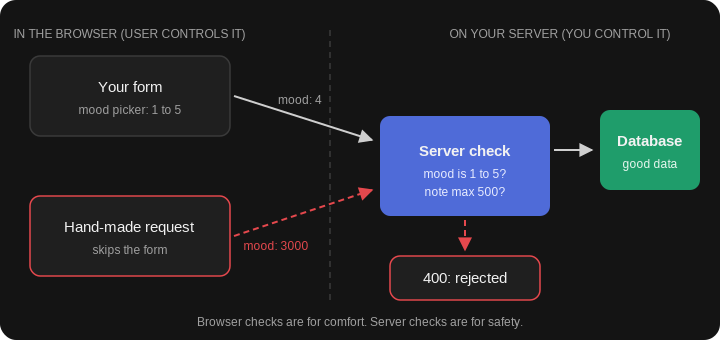
You already know that users control their own browser. With developer tools, anyone can do these things:
- Remove the 500-character limit from the note box.
- Change the mood picker to allow 3,000.
- Skip your page completely and send their own request to your API route.
The third one is the most important. Your server gets a request. It cannot tell if the request came from your form or from someone who typed it in the browser’s console. Any request can be hand-made.
So the rule is:
Browser checks are for comfort. Server checks are for safety.
Keep the browser checks. They show helpful messages immediately. But the server must check every important rule again.
How it goes wrong
Mistake 1: The rules are only in the form
You ask your AI: “Make a form to save a journal entry. Mood must be 1 to 5. The note can be at most 500 characters.”
The AI writes a careful form. Then it writes this API route:
app.post("/api/entries", requireLogin, async (req, res) => {
  const entry = await db.entry.create({
    data: { ...req.body, userId: req.user.id },
  });
  res.status(201).json(entry);
});
In plain English:
- Line 1: a logged-in user sends a new entry.
- Lines 2–4: the code saves a new row with everything in the request body. That is what
...req.bodymeans: “copy every field”. It adds the user’s ID from the session. - Line 5: the server replies with the saved entry.
The rules that you asked for (1 to 5, at most 500 characters) are not in this code. They are only in the form. Your first email came from someone who sent "mood": 3000 and a note with millions of characters. The server saved both.
Also look at ...req.body. It saves every field that the browser sends, including fields that you never planned for. That is the mass assignment bug from the previous lesson.
Broken values cause more than strange stats. A note with millions of characters fills your database. It also makes every page that shows it slow. A mood of "hello" instead of a number can crash code that expects a number.
Mistake 2: The database is open to the browser
Many AI app builders use Supabase. Supabase is a service that gives you a PostgreSQL database (a popular kind of database) and ready-made login. Supabase has a feature that beginners love. Your frontend (the part of your app that runs in the browser) can talk to the database directly. There is no API route of your own between them:
const supabase = createClient(SUPABASE_URL, SUPABASE_PUBLIC_KEY);

const { data } = await supabase.from("entries").select("*");
In plain English:
- Line 1: the code connects to your Supabase project with its address and its public key.
- Line 3: the code asks for all rows from the
entriestable.
This code runs in the browser, so the address and the public key are in your frontend. Anyone can read them with developer tools.
That is expected. Supabase made this key to be public. Older projects call it the anon key. Newer projects call it the publishable key. Supabase’s documentation says that the key is safe in a web page, but only if Row Level Security protects your tables.
Here is the mistake that AI-built apps make:
- The table has no Row Level Security (explained below). It was created without it, or someone turned it off because “the query wasn’t working”. (A query is a request to the database.)
- So the table has no rules about who can see which rows.
- Anyone can copy the address and the public key from your page. Then they can ask for every row from their own code, without a login.
That was your second email. Your app’s page only shows each user their own entries. But the page is not the lock. The stranger never used your page. They asked the database directly, and the database said yes.
Supabase’s own security checker calls this an error-level problem. Anyone with the project address can read, edit and delete a table in the public part of the database if RLS is off.
What good looks like
Fix 1: Check every request on the server with a schema
You can write each check by hand: “is mood a number? is it at least 1?”. But the code gets long fast, and it is easy to forget a check.
Instead, describe one time what valid data looks like. A description of the shape that your data must have is called a schema. A schema validator is a code package that compares incoming data with that description. It tells you if the data matches. A popular one for JavaScript and TypeScript (JavaScript with types) is Zod.
First, the schema:
const EntrySchema = z.object({
  mood: z.number().int().min(1).max(5),
  text: z.string().min(1).max(500),
});
In plain English: mood must be a whole number from 1 to 5. text must be text, from 1 to 500 characters. (z comes from the Zod package.)
Then the API route uses it:
app.post("/api/entries", requireLogin, async (req, res) => {
  const result = EntrySchema.safeParse(req.body);
  if (!result.success) return res.status(400).json({ error: "Invalid entry" });
  const { mood, text } = result.data;
  await db.entry.create({ data: { userId: req.user.id, mood, text } });
  res.status(201).json({ ok: true });
});
In plain English:
- Line 2: the code compares the request body with the schema.
safeParsedoes not crash when the data is wrong. It returns a result that says if the data passed. - Line 3: if the check failed, the server replies 400 (“your request is wrong”) and saves nothing.
- Lines 4–5: if the check passed, the code takes only
moodandtextfrom the checked result. It takes the user’s ID from the session. Then it saves those values.
Two good things happen here. First, the server now rejects a mood of 3,000 or a note as long as a book. Second, by default, Zod removes fields that it does not know. Someone can send "userId": 99 or "isAdmin": true. Those fields are not in result.data, so they never get to your database.
Allow what you expect, and reject everything else. Describe exactly what good data looks like. Do not try to list every bad thing that a user can send. You will always miss one.
You can use the same schema in your form too. Then honest users see the same rules in the browser.
Fix 2: Put the rules inside the database with Row Level Security
When your frontend talks to the database directly, no API route of yours is in the middle to check anything. So the rules must be in the database itself.
Row Level Security (RLS) is a PostgreSQL feature that does this. When RLS is on for a table, the database checks every request, row by row, against rules that you write. Each rule is called a policy. If no policy allows a row, that request cannot see the row.
Think of a building with a key card system. Before, the front door was locked, but every office door inside was open. RLS gives every office its own lock, and it checks your card at each one.
Here is what the journal app needs. It is written in SQL, the language that the database understands:
alter table entries enable row level security;

create policy "Users can read their own entries" on entries
  for select to authenticated using ( (select auth.uid()) = user_id );

create policy "Users can add their own entries" on entries
  for insert to authenticated with check ( (select auth.uid()) = user_id );
In plain English:
- Line 1: this turns on RLS for the
entriestable. From now on, nothing is allowed unless a policy allows it. - Lines 3–4: this is a policy for reading (
select). It applies to logged-in users (authenticated). A row is visible only if itsuser_idmatches the ID of the logged-in user.auth.uid()is a Supabase function that returns that ID. The ID comes from the user’s login, not from anything they typed. - Lines 6–7: this is a policy for adding rows (
insert). A user can only add a row with their own ID inuser_id.with checkmeans “check the new row before you save it”.
Now the stranger with the public key asks for every row. They are not logged in, so no policy matches. The database returns nothing. A logged-in user asks for every row and gets only their own rows. The database checks this every time.
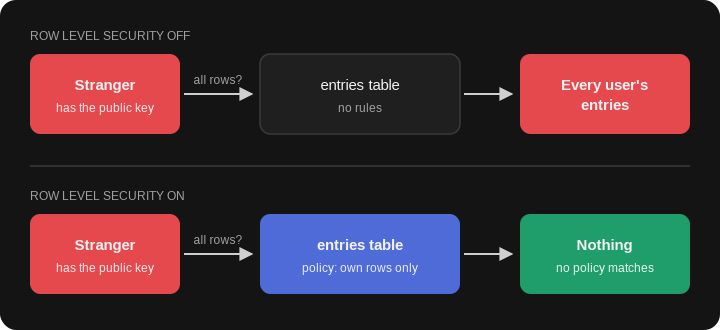
If users also edit or delete entries, add policies for update and delete too. With RLS on, the database blocks any action that has no policy. That is the safe way for it to fail.
This is the same idea as the ownership check from the previous lesson, but inside the database. Here is the difference. An ownership check in an API route only protects that route. RLS protects the table, from any direction that a request comes from.
What about validation when there is no API route? The database can check values too. PostgreSQL lets you add rules to columns, like “mood must be between 1 and 5”. Ask your AI to add these rules. The “Going deeper” section shows an example.
Fix 3: Keep the secret key on the server
Supabase also gives you a second key: the secret key. Older projects call it the service_role key. It is made for trusted server code, and it skips every RLS policy.
When a query fails because of RLS, the AI can suggest a dangerous “fix”: use the secret key. With the older service_role key, the query works again, so the problem looks solved. Supabase’s newer secret keys refuse requests that come from a browser. But with both kinds of key, if the key is in browser code, anyone who copies it has full control of your database.
Do not put the secret key in browser code. When a query fails because of RLS, the fix is a better policy, not a stronger key.
Go deeper: Your API key leaked, and strangers are spending your money (Level 2) shows how secret keys leak into frontend code.
Test your own app in 10 minutes
You need an app of your own for this part. No app yet? Start with Your first app in an afternoon, with an AI doing the typing. Built it in an AI app builder? Ask its AI to do each step below for you, or to add the missing part first (for example, a login).
Test 1: Skip your own form (in Chrome).
- Open your app and log in.
- Open developer tools (F12 on Windows, Cmd+Option+I on Mac). Click the Network tab.
- Submit a form normally. A new line appears in the Network tab.
- Right-click that line and choose Copy → Copy as fetch. This copies the request as code.
- Click the Console tab and paste the code. Do not press Enter yet.
- Find the data in the
bodyline. Change a value to something that your form never allows. For example, use a huge number, an empty name or a very long note. - Press Enter, then reload the page.
If the server saved the bad value, your server does not validate. Ask your AI to add a schema check on the server for that route.
Test 2: Check your Supabase tables.
- In your Supabase dashboard, open the Security Advisor.
- Look for any finding about a table with RLS disabled, or a table that is publicly accessible.
Any table in that list is open to anyone with your public key. Fix it before someone else finds it.
Test 3: Two accounts. Use the two-account test from the previous lesson. Log in as User A in one window and as User B in a private window. On every page, check that User B cannot see or change User A’s data.
Takeaways
Key terms
- Validation: a check that data is correct before you use it.
- Client-side validation: checks in the browser. They help users, but anyone can skip them.
- Server-side validation: checks on your server. These checks protect your data.
- Schema validator: a package, like Zod, that checks data against a description of its shape.
- Row Level Security (RLS): database rules that decide which rows each user can read or change.
- Policy: one RLS rule, like “users can read their own entries”.
Red flags in AI-written code
- Rules like “1 to 5” or “max 500 characters” are in the form, but not in the API route.
- The API route saves
...req.bodyor the whole request body without a check. - A Supabase table has RLS turned off. Or the AI suggests that you turn it off to “fix” an error.
- A Supabase secret or
service_rolekey is in code that runs in the browser. - A policy allows everything, like
using (true), on private data.
Ask your AI
- “For every API route that saves data, show me the server-side validation. Use a schema validator like Zod and allow only the fields we expect.”
- “List every table in my Supabase project. Does each one have Row Level Security turned on, and what do its policies allow?”
- “Is the Supabase secret or service_role key used anywhere in code that runs in the browser?”
- “Could a user who is not logged in read or change any data, using only the public key in my frontend?”
Going deeper (optional, for readers who want more detail)
TypeScript types are not validation. A type like { mood: number } helps you while you write code. But TypeScript removes types before the code runs. So types cannot stop a request that contains "mood": "hello". A schema validator checks the real data while the app runs. Zod can also make a TypeScript type from a schema, so you describe the shape one time. Other schema validators include Valibot and Yup.
parse vs safeParse. Zod’s parse throws an error when data is not valid. safeParse returns { success, data } or { success, error }. That result is easier to turn into a 400 reply. If you want Zod to reject unknown fields, not remove them, use z.strictObject.
Validation in the database. PostgreSQL check constraints are rules on columns. They reject bad values from any direction:
alter table entries
  add constraint mood_range check (mood between 1 and 5),
  add constraint text_length check (char_length(text) <= 500);
using vs with check. In a PostgreSQL policy, using decides which existing rows a request can see, update or delete. with check decides which new or changed rows are allowed. If an update policy has only using, PostgreSQL uses the same rule for both. Think of a table with RLS on and no policy at all. Nobody can see or change any row. PostgreSQL’s documentation calls this “default-deny”.
Who skips RLS. In PostgreSQL, superusers (all-powerful accounts) and roles with the BYPASSRLS attribute always skip RLS. Table owners normally skip it too. You may run a query in an admin tool, connected as the table owner or an admin role. That query may skip RLS, so it does not show what your users see. Test through your app or with a real user’s login instead.
Why (select auth.uid()). Supabase’s docs put the function inside select. Then the database runs it one time per query, not one time per row. This is faster on big tables.
RLS by default. Supabase says that tables created in its dashboard have RLS on by default. Tables created with SQL follow PostgreSQL’s default: RLS is off until you turn it on. This includes SQL written by an AI or by a migration (a saved script that changes the database). Supabase’s docs describe an optional database trigger that turns on RLS for every new table.
Grants. In 2026, Supabase changed how new tables work in its projects. New tables are no longer automatically reachable through its Data API. Each new table first needs a grant (tables that already existed keep their grants). A grant decides if a role can reach the table at all. RLS decides which rows. You still need both. When a table has a grant, RLS keeps users apart.
A real case. CVE-2025-48757 is a published vulnerability record. It describes Row Level Security policies that were not strong enough in sites made by the AI app builder Lovable (through 15 April 2025). The record says that attackers who were not logged in could read or write database tables of those sites. Lovable disputes the record. It says that each customer is responsible for the protection of their own app’s data. In both cases, the lesson is the same: check your own tables.
References (10)
- Input Validation Cheat Sheet: OWASP. Validate on the server even when the browser checks the same fields, and allow what you expect instead of listing bad inputs.
- Basic usage: Zod. How
parsethrows andsafeParsereturns a success or error result. - Defining schemas: Zod. Object schemas strip unknown keys by default, and
z.strictObjectrejects them. - Row Security Policies: PostgreSQL documentation. Turning RLS on, default-deny,
usingvswith check, and which roles bypass RLS. - Row Level Security: Supabase docs. Writing policies with
auth.uid(), why it is wrapped inselect, and the event trigger that turns RLS on for new tables. - API keys: Supabase docs. The publishable key is safe in the browser only because RLS limits it; secret keys bypass RLS and must never be in the browser.
- Advisors: Supabase docs. Lint
0013_rls_disabled_in_publicis an error: anyone with the project URL can read, edit and delete a table without RLS. - CVE-2025-48757: NIST National Vulnerability Database. The Lovable Row Level Security record and the vendor’s dispute note.
- Supabase Security Retro: 2025: Supabase blog. RLS is on by default for tables created through the dashboard; event triggers can enforce it for tables made in other ways.
- Breaking Change: Tables not exposed to Data and GraphQL API automatically: Supabase changelog. New tables need an explicit grant before the Data API can reach them; RLS behavior is unchanged.